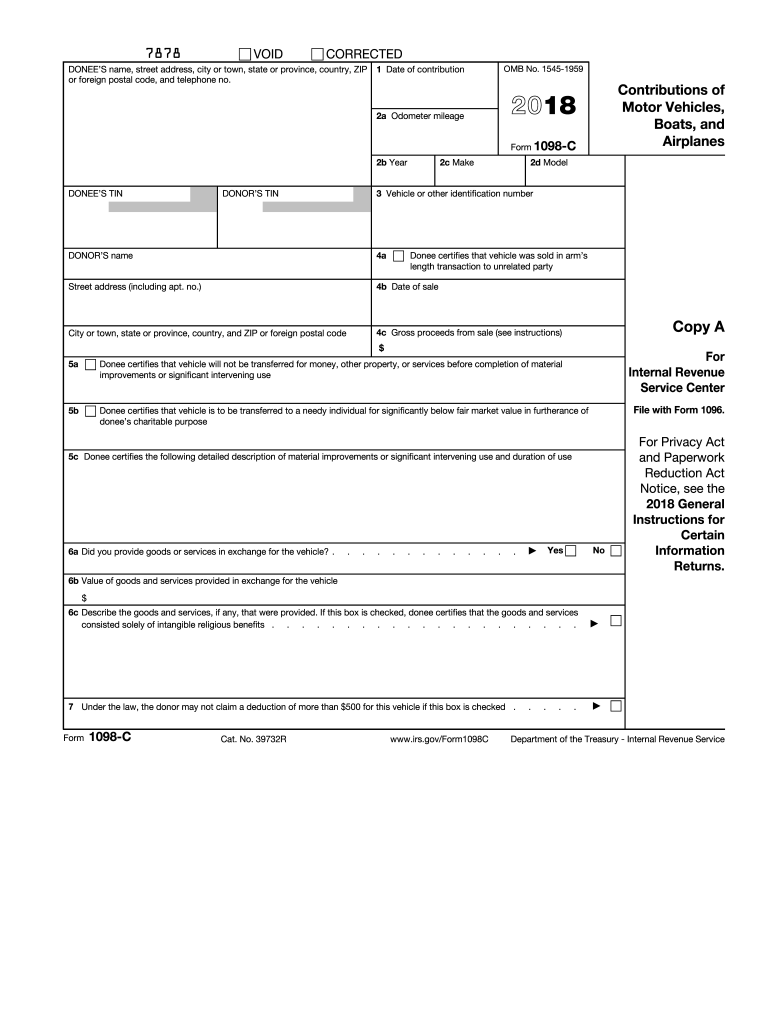
5c Donee certifies the following detailed description of material improvements or significant intervening use and duration of use 6a Did you provide goods or services in exchange for the vehicle? . . . . . . . . . . . . . Yes No 6b Value of goods and services provided in exchange for the vehicle Unless box 5a or 5b is checked, your deduction cannot exceed the amount in box 4c. $ 6c Describe the goods and services, if any, that were provided. If this box is checked, donee.
Loading

Open form follow the instructions

Easily sign the form with your finger

Send filled & signed form or save
How to fill out the IRS 1098-C online
The IRS 1098-C form is essential for reporting contributions of motor vehicles, boats, or airplanes to qualified charitable organizations. This guide provides a step-by-step approach to complete the form online, ensuring a smooth and accurate submission process.
Follow the steps to accurately complete your IRS 1098-C form online.
- Click ‘Get Form’ button to obtain the form and open it in the editor.
- Enter the donee's name, street address, city or town, state or province, country, ZIP or foreign postal code, and telephone number. This information is vital for identifying the charitable organization receiving the contribution.
- Fill in the date of contribution in Box 1. Ensure it reflects the actual date when the vehicle was donated.
- Complete Boxes 2a to 2d with the vehicle odometer mileage, year, make, and model. This information helps in accurately determining the vehicle's value.
- Enter the vehicle identification number (VIN) in Box 3. This unique identifier is crucial for tracking the specific vehicle.
- In Boxes 4a, 4b, and 4c, provide the gross proceeds from the sale of the vehicle if applicable. Check the appropriate box if the vehicle has been sold.
- Complete Boxes 5a, 5b, and 5c to certify the nature of the donation and how the vehicle will be used by the charity. Check the boxes that apply regarding the vehicle’s sale and intended use.
- In Box 6, indicate whether goods or services were provided in exchange for the vehicle. If applicable, fill in the value of those goods and services in Box 6b.
- If required, provide a description of the goods and services in Box 6c. Remember, if you received only intangible religious benefits, check the appropriate box.
- Check Box 7 if you want to limit your deduction to no more than $500. Completing this step is crucial for accurate tax reporting.
- Once you have filled out all necessary fields, review the form for accuracy and completeness.
- Save your changes, then download, print, or share the completed form as needed for your records and submission.
Complete your IRS 1098-C form online today to ensure timely and accurate reporting of your charitable contributions.
Experience a faster way to fill out and sign forms on the web. Access the most extensive library of templates available.
Related content
Jun 6, 2025 — A donee organization must file a separate Form 1098-C with the IRS for...
You received Form 1098-C because you donated a motor vehicle, boat, or airplane...
Apr 15, 2015 — organization may use Form 1098-C to provide the required information. If...
Get answers to your most pressing questions about US Legal Forms API.
Who fills out 1098-C?
The organization receiving the donation is responsible for filling out the IRS 1098-C. They provide you with the completed form, detailing the type of property donated and its fair market value. As a donor, it's your job to keep this form for your records and use it when filing taxes. For help understanding this process, consider the resources available on uslegalforms.
How do I submit my 1095-C to the IRS online?
To submit your 1095-C online, you’ll generally need to use the IRS’s e-File option or a third-party service that supports this process. The 1095-C is essential for reporting health coverage, and timely submission is critical to compliance. Check specific instructions from the IRS on how to complete the online filing process. Uslegalforms can provide guidance to help navigate these requirements.
How do I submit my 1098-C to the IRS?
To submit your 1098-C to the IRS, you must include it with your tax return. While you don’t attach it directly, keep it in your records for verification. Ensure you report the information accurately on your tax forms. If you're looking for a streamlined approach, look into the services offered by uslegalforms for seamless tax submissions.
Can 1098-C be filed electronically?
Yes, the IRS allows electronic filing of the 1098-C through recognized tax software. This method is often more efficient and can help you avoid delays in processing your tax return. Just ensure you follow the specific guidelines for electronic submission provided by the IRS. If you need further assistance, uslegalforms offers tools to help with electronic filings.
How does a 1098-C affect my taxes?
The IRS 1098-C directly affects your tax deductions by allowing you to claim deductions for charitable donations over $500. When reported accurately, it can lead to a lower taxable income, which might reduce your overall tax liability. Thus, understanding how to use the 1098-C can have a positive impact on your tax return. For detailed guidance, consider resources available on uslegalforms.
Where do I enter 1098-C in Turbotax?
In TurboTax, you can enter the IRS 1098-C information under the section titled 'Deductions and Credits.' This section allows you to input details about your charitable contributions. Make sure to have the form on hand so you can fill in the necessary fields correctly. For a guided experience, uslegalforms offers instructional content to navigate tax software effectively.
How do I report 1098-C on my taxes?
To report the IRS 1098-C when filing your taxes, use the information provided on the form to identify your deductions. Generally, you'll include this in the section for charitable deductions. Be sure to accurately record the fair market value of the donated property as indicated. If you need assistance, uslegalforms offers resources to simplify this process.
Do I need to attach 1098-C to a tax return?
You do not need to attach the IRS 1098-C to your tax return. However, you must keep it for your records as it provides vital information about your charitable contributions. It’s wise to reference the 1098-C when completing your tax forms to ensure accurate reporting. Always consult a tax professional if you're unsure.
Can a creditor still collect after issuing a 1099-C?
Yes, even after issuing an IRS 1099-C, a creditor can pursue collection for the remaining balance. The cancellation of a portion of the debt does not eliminate your responsibility for any outstanding amounts. Ensure you communicate with your creditor to clarify your obligations following the issuance of a 1099-C. Consulting with professionals can aid in understanding how to navigate these situations effectively.
What is form 1098-C used for?
Form 1098-C is used to report the value of vehicles donated to qualified charitable organizations. This form allows donors to claim tax deductions for their contributions, making it an essential document for tax filings. Accurately completing and submitting this form is crucial for taking advantage of potential tax benefits. Engage with your chosen charitable organization to ensure you receive this important documentation.
Use professional pre-built templates to fill in and sign documents online faster. Get access to thousands of forms.
If you believe that this page should be taken down, please follow our DMCA take down process here.
This form is available in several versions. Select the version you need from the drop-down list below.