Loading
Get Irs 1098 2018
This website is not affiliated with IRS
How it works
-

Open form follow the instructions
-

Easily sign the form with your finger
-

Send filled & signed form or save
How to fill out the IRS 1098 online
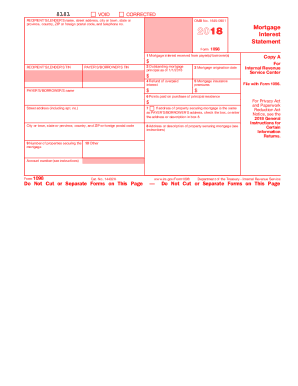
The IRS 1098 form, also known as the Mortgage Interest Statement, is essential for reporting mortgage interest paid on qualified home loans. Completing this form accurately is important to ensure compliance with tax regulations and to utilize available deductions effectively.
Follow the steps to complete the IRS 1098 form online.
- Click ‘Get Form’ button to obtain the form and open it in your preferred editor.
- Enter the recipient's or lender's name, street address, city or town, state or province, country, ZIP code, and telephone number in the appropriate fields.
- Fill in the recipient's or lender's taxpayer identification number (TIN) and the payer's or borrower's TIN.
- Complete box 1 with the total mortgage interest received from the payer(s) or borrower(s) during the tax year.
- In box 2, report the outstanding mortgage principal as of January 1 of the tax year.
- Document the mortgage origination date in box 3.
- If applicable, enter any refund of overpaid interest in box 4.
- List any mortgage insurance premiums in box 5.
- Report any points paid on the purchase of the principal residence in box 6.
- If the property address securing the mortgage is the same as the payer's or borrower's address, check the box or provide the different address in box 8.
- Include the address or description of the property securing the mortgage in box 8.
- Indicate the number of properties securing the mortgage in box 9.
- Use box 10 for any other relevant information, such as real estate taxes or insurance.
- Review all entries for accuracy, then save your changes, download the form, or print it for your records.
Fill out your IRS 1098 form online today to ensure timely and accurate reporting.
Get form
Experience a faster way to fill out and sign forms on the web. Access the most extensive library of templates available.
Related links form
To enter your 1098-T on your tax return, locate the part of the form related to education expenses and credits. You’ll need to report qualifying expenses or scholarships directly. Resources on the uslegalforms platform can guide you through this process to ensure you receive any available education tax credits.
Get This Form Now!
Use professional pre-built templates to fill in and sign documents online faster. Get access to thousands of forms.