Loading
Form preview
  • US Legal Forms
  • Form Library
  • Tax Forms
  • Executive Department Treasury IRS Forms
  • Irs 941c 2006

Get Irs 941c 2006-2026

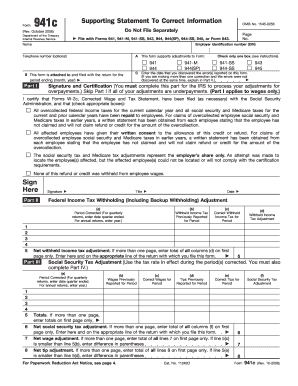
Ile this form. Part III (b) Wages Previously Reported for Period (c) Correct Wages for Period (d) Tips Previously Reported for Period (e) Correct Tips for Period Totals. If more than one page, enter totals on first page only Net social security tax adjustment. If more than one page, enter total of all columns (f) on first page only. Enter here and on the appropriate line of the return with which you file this form Net wage adjustment. If more than one page, enter total of all.

How it works

  1. Open form

    Open form follow the instructions

  2. Easily sign form

    Easily sign the form with your finger

  3. Share form

    Send filled & signed form or save

How to fill out the IRS 941c online

Filling out the IRS 941c form online can seem overwhelming, but with the right guidance, you can navigate it with ease. This form is used to correct previous reported information on federal income, social security, and Medicare taxes, ensuring accuracy in your tax filings.

Follow the steps to fill out the IRS 941c form online.

  1. Click the ‘Get Form’ button to obtain the IRS 941c form and open it for editing.
  2. Enter your employer identification number (EIN) and name at the top of the form, ensuring all details are accurate.
  3. In Part A, check the appropriate box to indicate which form you are correcting (e.g., 941, 944, etc.).
  4. Provide the specific period for which you are making the adjustments in Part B, indicating the month and year.
  5. State the date you discovered the errors in Part C, and leave it blank if multiple corrections are made at different times.
  6. Complete Part I, ensuring to sign and certify any overpayment adjustments. Select at least one applicable certification box.
  7. Fill out Part II to correct federal income tax withholding errors, providing the amounts previously reported and necessary adjustments.
  8. Continue to Part III to adjust social security tax information, entering the previously reported wages and the correct amounts.
  9. Proceed to Part IV for adjusting Medicare tax information, recording the previous and correct figures.
  10. If necessary, use Part V to explain any adjustments made in detail.
  11. Once all information is accurately completed, review the form for any errors, and then save your changes, download, print, or share it as needed.

Complete your IRS 941c form online today to ensure your tax records are accurate.

Get form

Experience a faster way to fill out and sign forms on the web. Access the most extensive library of templates available.
Get form

Related content

Form 941c (Rev. October 2006)
Form 941c provides background and certifications for prior period adjustments to income...
Learn more
941 Form – Net Tax Adjustment and Monthly Tax...
Print 941 Form from QuickBooks, or prepare manually, and mail form to designated...
Learn more
Publication 3823 (Rev. 9-2014)
Provide America's taxpayers top quality service by helping them understand and meet their...
Learn more

Related links form

NV PL125 2013 NYC Doing Business Data Form 2011 NYC Doing Business Data Form 2008 OH SOS 523A 2014

Questions & Answers

Get answers to your most pressing questions about US Legal Forms API.

Contact support

Yes, taxpayers can file Form 941x electronically through the IRS e-file system. This option streamlines the process and allows for quicker processing of your adjustments to IRS Form 941. Be sure to follow the instructions carefully to ensure that you complete the form correctly and reference the IRS 941c if necessary. For added guidance on electronic filing, the US Legal Forms platform offers resources to support you through the process.

To write an IRS penalty abatement letter, start by clearly stating your intent to request relief from penalties. Include your name, address, and Social Security number, along with the tax period and the type of penalties you seek to abate. Provide a brief explanation of the circumstances that led to the penalties, and why you believe the IRS should grant your request. Lastly, don’t forget to refer to the IRS 941c form if it is relevant to your case.

The 941 deposit rules stipulate that employers must deposit payroll taxes on either a monthly or semi-weekly basis, depending on their tax liability. If your total taxes reported are $100,000 or more, you are required to deposit the next business day. Staying compliant with these guidelines is essential when preparing your IRS 941c.

To fill out an Employee's Withholding Exemption Certificate, employees should provide their name, address, and Social Security number, along with their withholding status. They must also indicate any specific exemptions to ensure accurate payroll deductions. Using a general guide from US Legal Forms can help streamline this process for both employees and employers.

The fraction of cents on Form 941 refers to the adjustment made for amounts that do not round up to a full cent. It is important to report totals accurately to avoid discrepancies when filing your IRS 941c. Any miscalculation can lead to penalties, so always ensure your amounts are correctly rounded.

To correct a 941 deposit made to the wrong quarter, you need to file Form 941-X, Adjusted Employer's QUARTERLY Federal Tax Return or Claim for Refund. Ensure you clearly indicate the corrections and maintain your records for future reference. Using the IRS 941c can also help clarify any adjustments to your submission.

When calculating fractions of cents on Form 941, round the total wages, tips, and other compensation to the nearest penny. If the total is halfway between two cents, round up to the nearest cent. This approach helps ensure compliance and accuracy when submitting your IRS 941c. If you're unsure, consider using a reliable tool for precise calculations.

The primary difference between form 941 and form 941X is their intended use. Form 941 is used for reporting quarterly payroll taxes, while form 941X is specifically for amending previously filed form 941s. It is crucial to use the correct form to ensure accuracy in your tax reporting and compliance. If you need support in this area, consider leveraging the resources available on the US Legal Forms platform.

Form 941 C is an additional form used to correct errors on previously filed form 941. If you discover mistakes in your original filing, such as incorrect wages or tax amounts, you should file form 941 C to amend those errors. This corrective process helps maintain accurate records with the IRS, ensuring your fiscal responsibilities remain compliant. Tools like US Legal Forms can assist you in filing amendments smoothly.

The key difference between W-2 and form 941 lies in their purpose. W-2 forms report employee wages and the taxes withheld from them at the end of the year, while form 941 reports those wages and taxes on a quarterly basis. In essence, form 941 is used for ongoing reporting, whereas W-2 is for annual summaries. Understanding both forms is crucial for accurate tax reporting.

Get This Form Now!

Use professional pre-built templates to fill in and sign documents online faster. Get access to thousands of forms.
Get form
If you believe that this page should be taken down, please follow our DMCA take down processhere.
Get IRS 941c
Get form
  • Adoption
  • Bankruptcy
  • Contractors
  • Divorce
  • Home Sales
  • Employment
  • Identity Theft
  • Incorporation
  • Landlord Tenant
  • Living Trust
  • Name Change
  • Personal Planning
  • Small Business
  • Wills & Estates
  • Packages A-Z
  • Affidavits
  • Bankruptcy
  • Bill of Sale
  • Corporate - LLC
  • Divorce
  • Employment
  • Identity Theft
  • Internet Technology
  • Landlord Tenant
  • Living Wills
  • Name Change
  • Power of Attorney
  • Real Estate
  • Small Estates
  • Wills
  • All Forms
  • Forms A-Z
  • Form Library
  • Legal Hub
  • About Us
  • Help Portal
  • Legal Resources
  • Blog
  • Affiliates
  • Contact Us
  • Delete My Account
  • Site Map
  • Industries
  • Forms in Spanish
  • Localized Forms
  • State-specific Forms
  • Forms Kit
  • Real Estate Handbook
  • All Guides
  • Notarize
  • Incorporation services
  • For Consumers
  • For Small Business
  • For Attorneys
  • USLegal
  • FormsPass
  • pdfFiller
  • signNow
  • altaFlow
  • DocHub
  • Instapage
Form Packages
  • Adoption
  • Bankruptcy
  • Contractors
  • Divorce
  • Home Sales
  • Employment
  • Identity Theft
  • Incorporation
  • Landlord Tenant
  • Living Trust
  • Name Change
  • Personal Planning
  • Small Business
  • Wills & Estates
  • Packages A-Z
Form Categories
  • Affidavits
  • Bankruptcy
  • Bill of Sale
  • Corporate - LLC
  • Divorce
  • Employment
  • Identity Theft
  • Internet Technology
  • Landlord Tenant
  • Living Wills
  • Name Change
  • Power of Attorney
  • Real Estate
  • Small Estates
  • Wills
  • All Forms
  • Forms A-Z
  • Form Library
Customer Service
  • Legal Hub
  • About Us
  • Help Portal
  • Legal Resources
  • Blog
  • Affiliates
  • Contact Us
  • Delete My Account
  • Site Map
  • Industries
  • Forms in Spanish
  • Localized Forms
  • State-specific Forms
  • Forms Kit
Legal Guides
  • Real Estate Handbook
  • All Guides
Prepared for you
  • Notarize
  • Incorporation services
Our Customers
  • For Consumers
  • For Small Business
  • For Attorneys
Our Sites
  • USLegal
  • FormsPass
  • pdfFiller
  • signNow
  • altaFlow
  • DocHub
  • Instapage
Social Media
Call us now toll free:
+1 833 426 79 33
As seen in:
© Copyright 1999-2026 airSlate Legal Forms, Inc. 17 Station Street, Suite 303, Brookline, MA 02445
  • Your Privacy Choices
  • Terms of Service
  • Privacy Notice
  • Content Takedown Policy
  • Bug Bounty Program