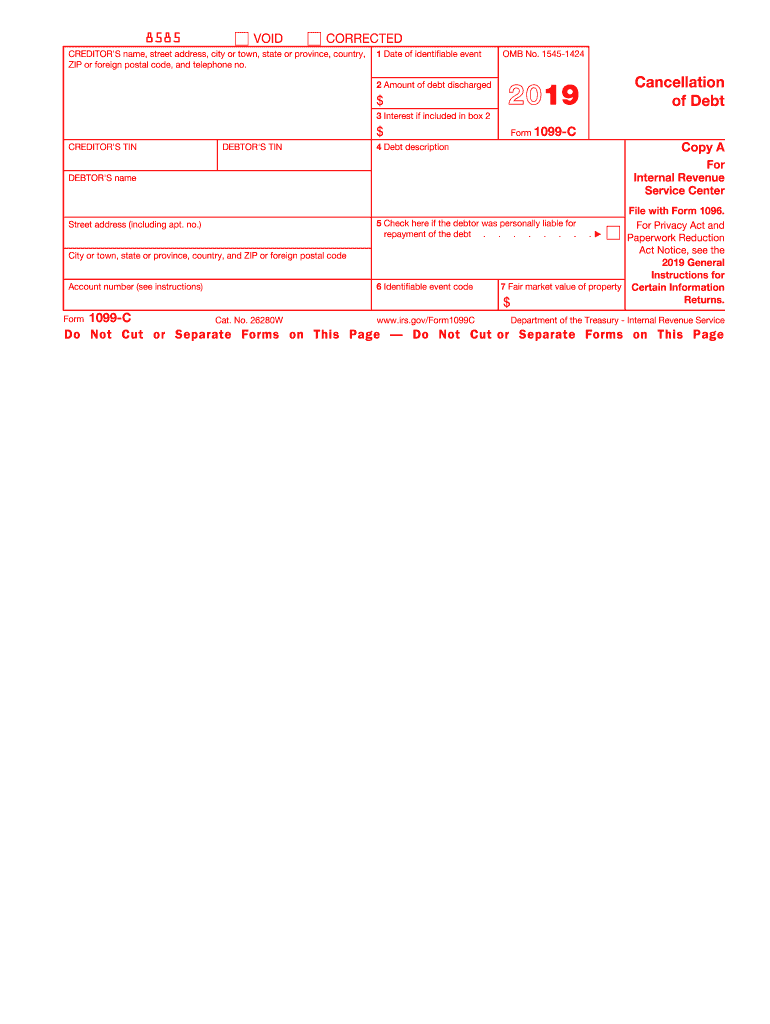
R (ITIN), adoption taxpayer identification number (ATIN), or employer identification number (EIN)). However, the creditor has reported your complete TIN to the IRS. Account number. May show an account or other unique number the creditor assigned to distinguish your account. Box 1. Shows the date the earliest identifiable event occurred or, at the creditor's discretion, the date of an actual discharge that occurred before an identifiable event. See the code in box 6. Box 2. Shows the amount of de.
Loading

Open form follow the instructions

Easily sign the form with your finger

Send filled & signed form or save
How to fill out the IRS 1099-C online
This guide provides a detailed overview of how to complete the IRS 1099-C form online. Whether you are a debtor or creditor, understanding the components of this form is essential for accurate reporting to the IRS.
Follow the steps to complete the IRS 1099-C form effectively.
- Press the ‘Get Form’ button to acquire the form and open it in your editor.
- Enter the creditor's name, street address, city or town, state or province, country, ZIP or foreign postal code, and telephone number in the designated fields.
- Input the date of the identifiable event in box 1. This should reflect the date the debt was discharged or an event that indicates a discharge.
- Fill in the amount of debt discharged in box 2. This figure must represent the actual or deemed discharged debt.
- If applicable, include any interest included in the debt in box 3.
- Provide the creditor's and debtor's taxpayer identification numbers (TIN) in the relevant boxes. For privacy, only the last four digits may be displayed.
- Describe the debt in box 4. If there is a property involved, include a description of that property as well.
- Indicate whether the debtor was personally liable for repayment of the debt in box 5 by checking the box if appropriate.
- Select the identifiable event code in box 6 that corresponds with the reason for the debt cancellation, as outlined in the instructions.
- If relevant, fill in the fair market value of the property in box 7. This may pertain to transactions involving property or foreclosure situations.
- After reviewing all entries for accuracy, save your changes and choose to download or print the form for your records. Additionally, consider sharing the form as required.
Complete your IRS 1099-C form online to ensure accurate tax reporting.
Experience a faster way to fill out and sign forms on the web. Access the most extensive library of templates available.
Related content
Feb 3, 2025 — File Form 1099-C for each debtor for whom you canceled $600 or more of a...
§ 6050P(c)(2) are required to issue a Form 1099-C reporting debt cancellation income to...
It simply reports the event to the IRS. Conversely, the 1099-C indicates that the forgiven...
Get answers to your most pressing questions about US Legal Forms API.
Do I need to amend my tax return for a 1099-C?
If you received an IRS 1099-C after filing your return, you might need to amend your tax return to include the canceled debt as income. It’s important to file this amendment as soon as possible to avoid future penalties. Consulting a tax professional is recommended for proper guidance on the amendment process.
Where do I enter 1099-C on Turbotax?
For TurboTax users, inputting your IRS 1099-C is relatively straightforward. Look for the section called 'Income' and then select '1099-C.' You will be guided through the process step-by-step, ensuring that all information is correctly reported. Remember to review your entries for accuracy before filing.
Where do I enter 1099-C on the tax act?
When using the TaxAct software, you will enter your IRS 1099-C information in the section for 'Income' or 'Other Income.' There is usually a specific area for canceled debts. Following prompts will help ensure that your entries are accurate, which is crucial for compliance.
Where do I report 1099-C on my tax return?
You report the IRS 1099-C on your tax return by including the canceled debt as 'Other Income' on your Form 1040. Use Schedule 1 to provide additional details if necessary. It’s important to accurately reflect this income to avoid problems with the IRS later.
What happens if you don't report a 1099-C?
Failing to report an IRS 1099-C can lead to significant consequences, including penalties and interest charges from the IRS. Since the IRS receives a copy of the 1099-C, they will match it against your tax return. If discrepancies arise, it could trigger an audit, leading to further complications with your tax obligations.
How do I report a 1099-C on my tax return?
To report an IRS 1099-C on your tax return, first determine if the canceled debt is taxable. If it is, you’ll include the amount on your tax return as income. Generally, you can report this on Form 1040, using Schedule 1 to list additional income. A tax professional or tax software can assist you with this process.
How badly does a 1099-C affect my taxes?
Receiving an IRS 1099-C can significantly affect your tax situation, as the cancelled debt is typically treated as taxable income. This could potentially increase your overall tax liability for the year. However, there are exceptions and exclusions that may apply, which can lessen the impact. To navigate this effectively, consider exploring options available on the uslegalforms platform or seek expert guidance.
Does a 1099-C need to be reported?
Yes, a 1099-C must be reported on your tax return to ensure that you remain compliant with IRS rules. This form reflects any cancelled debts that you have, which may be considered taxable income. Failing to report could lead to unintended tax liabilities and penalties. It's advisable to consult with a tax professional or use resources from the uslegalforms platform for assistance.
What happens if I don't report a 1099-C?
Failing to report the IRS 1099-C can lead to serious consequences, including IRS audits and penalties. The IRS receives a copy of this form from creditors, so they are aware of the debt cancellation. If you do not report it, the IRS may regard it as unreported income, potentially leading to back taxes. It's essential to address any 1099-C forms you receive to maintain your tax compliance.
How do you fill out a 1099-C?
To fill out the IRS 1099-C, begin by entering the creditor's name, address, and taxpayer identification number. Next, provide your information as the debtor, including your name and taxpayer identification number. Carefully input the amount of cancelled debt, along with the relevant date and any applicable details. For accurate guidance, consider using tools available on the uslegalforms platform to simplify the process.
Use professional pre-built templates to fill in and sign documents online faster. Get access to thousands of forms.
If you believe that this page should be taken down, please follow our DMCA take down process here.