Get Il Dor Il-941 2018
How it works
-

Open form follow the instructions
-

Easily sign the form with your finger
-

Send filled & signed form or save
How to fill out the IL DoR IL-941 online
Filing the IL DoR IL-941 form efficiently is crucial for maintaining compliance with Illinois tax regulations. This comprehensive guide will walk you through each step necessary to complete the form online, ensuring that you have all the information needed to submit your withholding income tax return accurately.
Follow the steps to complete the IL DoR IL-941 form online.
- Press the ‘Get Form’ button to access the IL-941 form and open it in your electronic editor.
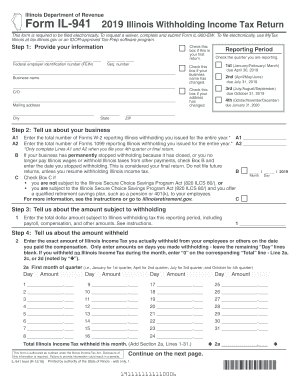
- In the first section, provide your information: Check the reporting period box if this is your first return. Indicate the quarter you are reporting. Enter your Federal Employer Identification Number (FEIN) and sequence number. If your business name has changed, check the appropriate box. Input your business name, address, city, state, and ZIP code.
- For the next section titled 'Tell us about your business': In Line A1, enter the total number of Forms W-2 you issued that report Illinois withholding for the year. In Line A2, enter the total number of Forms 1099 for the same purpose. Only complete A1 and A2 for your fourth quarter or final return. If your business has stopped withholding, check Box B and enter the date. If applicable, check Box C regarding the Illinois Secure Choice Savings Program.
- Proceed to the section 'Tell us about the amount subject to withholding': Enter the total dollar amount subject to Illinois withholding tax for the period, including payroll, compensation, and other amounts.
- In the next section, 'Tell us about the amount withheld': For each month of the quarter, enter the amount of Illinois Income Tax you withheld from employees or others on the dates you paid compensation. Total these amounts for the quarter.
- Next, fill out the 'Tell us about your payments and credits' section. Enter any credits from DCEO and the total dollar amount of withholding payments made to the Illinois Department of Revenue for this period. Sum the two amounts.
- Calculate your balance in 'Figure your balance'. If Line 2 is greater than Line 5, subtract Line 5 from Line 2 to find your remaining balance due.
- Finally, sign and date the form in the 'Sign here' section. Ensure that all required signatures and information from paid preparers are included if applicable. Review the form thoroughly before submission.
- Once all sections are completed, save your changes, and you can then download, print, or share the form as needed.
Complete the IL DoR IL-941 online to ensure timely and accurate submission of your Illinois withholding income tax return.
Get form
An IL-941 payment refers to the amount an employer is required to remit to the Illinois Department of Revenue based on employee withholdings. This payment reflects the taxes withheld during the specified period and must be accurately reported. Timely submission of IL-941 payments is essential to avoid late fees and maintain compliance.