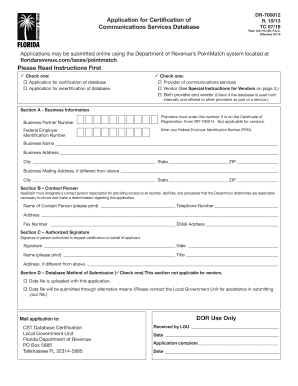
Ent of Revenue s PointMatch system located at: https://pointmatch.state.fl.us Please Read Instructions First Check one: Application for certification of database Application for recertification of database Check one: Provider of communications services Vendor (See Special Instructions for Vendors on page 3.) Both provider and vendor (Check if the database is used both internally and offered to other providers as part of a service.) Section A - Business Information.
Open form follow the instructions
Easily sign the form with your finger
Send filled & signed form or save
How to fill out the FL DR-700012 online
This guide provides a clear and supportive approach to completing the FL DR-700012, the Application for Certification of Communications Services Database. By following the steps outlined below, users can efficiently navigate the form online.
Follow the steps to complete the FL DR-700012 form online.
- Press the ‘Get Form’ button to access the FL DR-700012 application. This action opens the document in an editable format.
- Begin by selecting the appropriate option for the type of application you are submitting. Indicate whether you are applying for certification or recertification of the database by checking the relevant box.
- Next, specify your role in the application by selecting whether you are a provider of communications services, a vendor, or both. Make sure to refer to the special instructions for vendors if applicable.
- In Section A, provide the business information required. Enter your Business Partner Number and Federal Employer Identification Number (FEIN) if you are a provider. Fill out the Business Name, Business Address, and Business Mailing Address if it differs from your physical address.
- Move to Section B and designate a contact person responsible for the application. Please fill in their name, telephone number, address, fax number, and email address accurately.
- In Section C, the authorized person must sign and date the form to authenticate the application. Print their name and title as required, and provide the address if it is different from the previous sections.
- Section D asks about the database method of submission. Check one box indicating whether the data file is uploaded with this application or will be submitted through alternative means.
- Review all the completed sections for accuracy before finalizing your form. Ensure all fields are filled out to avoid rejection.
- Once you are satisfied with your application, save the changes. You can choose to download, print, or share the form as needed.
Complete your FL DR-700012 application online today for a streamlined certification process.
Experience a faster way to fill out and sign forms on the web. Access the most extensive library of templates available.
Related content
Jul 2, 2025 — This volume of the FAFSA Processing Specifications Guide provides tables...
(a) Application for certification must be made to the Department on Form DR-700012...
Parts-Pricing EFFECTIVE MARCH 15, 2013 SERVICE PARTS PRICE LIST SPPL-29 ALL PRICES AND...
Get answers to your most pressing questions about US Legal Forms API.
Do both parties need to be present to transfer a title in FL?
In Florida, both parties do not always need to be present to complete a title transfer. However, the seller must sign the FL DR-700012 form, which is essential for processing. If one party cannot attend, a notarized signature may suffice to verify the transfer. It is advisable to consult with your local tax collector's office for specific requirements regarding attendance during the title transfer.
How to fill out a Florida title transfer?
Filling out a Florida title transfer requires using the FL DR-700012 form, which simplifies the process for both parties. First, review the existing title for any discrepancies, and gather necessary documents. Carefully input the required information for both the buyer and seller, ensuring everything is accurate. After completing the form, go to your local tax collector's office to process the transfer efficiently.
How to fill out title transfer in Florida?
To fill out a title transfer in Florida, you must complete the form FL DR-700012 accurately. Start by gathering necessary documentation, such as the vehicle title and identification. Ensure you provide the correct details for both the seller and buyer, including names and addresses. Once filled out, submit the FL DR-700012 form to your local tax collector's office along with any required fees.
How do I establish a domicile in Florida?
Establishing a domicile in Florida involves several steps, starting with declaring your intent to make Florida your permanent home. You can accomplish this by filing FL DR-700012 at the county clerk's office, along with showing proof of residency, such as a lease or utility bill. Additionally, consider updating your driver's license and voter registration to reflect your new Florida address, as these steps further solidify your claim to domicile.
How do I get a declaration of domicile in Florida?
To get a declaration of domicile in Florida, you must visit your local county clerk's office or utilize a reliable online service like US Legal Forms. There, you will complete FL DR-700012, which requires basic information about your residency. After completing the form, submit it to the clerk’s office for processing, confirming your status as a Florida resident.
Where can I get a declaration of domicile in Florida?
You can obtain a declaration of domicile in Florida at your local county clerk's office. This document, also known as FL DR-700012, confirms your residency within Florida. If you prefer convenience, you may also use the US Legal Forms platform to access and complete this form online. Using this platform streamlines the process, ensuring you have everything you need to establish your legal residency.
Use professional pre-built templates to fill in and sign documents online faster. Get access to thousands of forms.
If you believe that this page should be taken down, please follow our DMCA take down process here.