Loading
Get Ar Ar1099pt 2017
How it works
-

Open form follow the instructions
-

Easily sign the form with your finger
-

Send filled & signed form or save
How to fill out the AR AR1099PT online
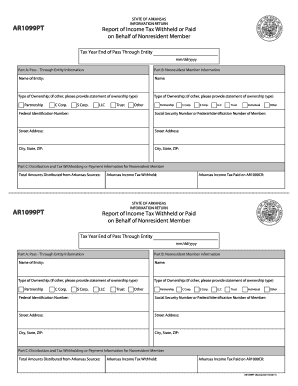
The AR AR1099PT is an essential form for pass-through entities in Arkansas, reporting income tax withheld or paid on behalf of nonresident members. This guide provides clear and step-by-step instructions to assist users in filling out this form accurately and efficiently.
Follow the steps to complete the AR AR1099PT form online.
- Click 'Get Form' button to obtain the form and open it for editing.
- In Part A, enter the pass-through entity information. This includes the legal name of the entity and its federal identification number.
- In Part B, provide information for the nonresident member. Fill in their name, type of ownership, and social security or federal identification number.
- Ensure the street address and city, state, and ZIP code of both the entity and the nonresident member are correctly filled out.
- Proceed to Part C and report the total amounts distributed from Arkansas sources, along with the Arkansas income tax withheld and any taxes paid on AR1000CR.
- Review all entered information for accuracy and completeness.
- Once satisfied with the form, save changes, download it, print copies, or share it as needed.
Complete your AR AR1099PT online now to ensure accurate reporting.
Get form
Experience a faster way to fill out and sign forms on the web. Access the most extensive library of templates available.
Related links form
When determining the amount for extra withholding, consider your total tax liabilities and any additional income you may earn over the year. You can use the IRS withholding calculator to estimate a suitable figure. It's wise to adjust this figure as needed based on your AR AR1099PT financial circumstances to avoid underpayment or surprise bills at tax time.
Get This Form Now!
Use professional pre-built templates to fill in and sign documents online faster. Get access to thousands of forms.