Loading
Get Irs 1095-c 2018
This website is not affiliated with IRS
How it works
-

Open form follow the instructions
-

Easily sign the form with your finger
-

Send filled & signed form or save
How to fill out the IRS 1095-C online
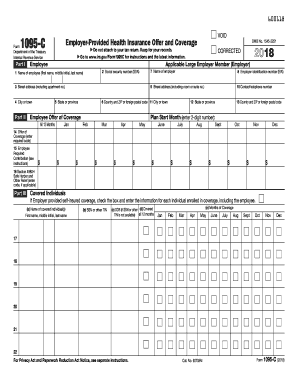
The IRS 1095-C form is essential for reporting health insurance coverage offered by applicable large employers. This guide provides step-by-step instructions for filling out the form online, ensuring clarity and support for users with varying levels of experience.
Follow the steps to complete the IRS 1095-C form online effectively.
- Click ‘Get Form’ button to obtain the form and open it in the editing tool.
- In Part I, fill in the employee's name (first name, middle initial, last name) in line 1.
- Enter the employee's social security number (SSN) in line 2. If preferred, a Taxpayer Identification Number (TIN) can be provided for other covered individuals.
- Complete line 3 with the employee's street address, including any apartment number.
- Fill in the city or town in line 4, followed by the state or province in line 5.
- In line 6, provide the country and postal code.
- For the employer, enter the name in line 7 and the employer identification number (EIN) in line 8.
- Add the employer's street address in line 9 and their contact telephone number in line 10.
- For months of coverage, use line 12 to indicate the plan start month and provide the details for coverage offered on lines 14-16.
- Part III requires information on covered individuals: name, SSN or TIN, date of birth, and months of coverage.
- Finally, review all entered information for accuracy, then save your changes, download, print, or share the completed form.
Take action today by completing your IRS 1095-C form online to ensure compliance with health coverage reporting.
Get form
Experience a faster way to fill out and sign forms on the web. Access the most extensive library of templates available.
Related links form
You do not need to report the IRS 1095-C directly on your taxes when using TurboTax. That said, having the form makes it easier to confirm your coverage status, which helps TurboTax guide you accurately. You’ll likely answer questions about your health insurance based on the information contained in the 1095-C. Make sure to have it on hand when preparing your return.
Get This Form Now!
Use professional pre-built templates to fill in and sign documents online faster. Get access to thousands of forms.