Loading
Form preview
  • US Legal Forms
  • Other Templates
  • Tax Forms
  • New York Tax Forms
  • Ny It-201-i 2019

Get Ny It-201-i 2019

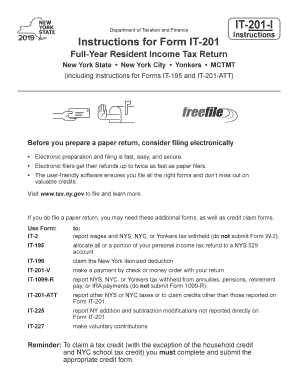
Department of Taxation and FinanceInstructions for Form IT201IT201IInstructionsFullYear Resident Income Tax Return New York StateNew York CityYonkersMCTMT (including instructions for Forms IT195 and.

How it works

  1. Open form

    Open form follow the instructions

  2. Easily sign form

    Easily sign the form with your finger

  3. Share form

    Send filled & signed form or save

How to fill out and sign NY IT-201-I online?

Get your online template and fill it in using progressive features. Enjoy smart fillable fields and interactivity.Follow the simple instructions below:

In current times, the majority of Americans prefer to handle their own taxes and, in addition, to complete forms electronically.

The US Legal Forms online service simplifies the process of e-filing the NY IT-201-I, making it straightforward and user-friendly.

Ensure that you have accurately completed and submitted the NY IT-201-I on time. Consider any relevant deadlines. Providing inaccurate information on your tax documents may lead to considerable penalties and complications with your annual tax return. Always use legitimate templates from US Legal Forms!

  1. Open the PDF template in the editor.
  2. Look at the highlighted fillable fields. This is where you need to enter your information.
  3. Select the option to choose if you see the checkboxes.
  4. Review the Text icon along with additional powerful functionalities to modify the NY IT-201-I manually.
  5. Confirm all the information before proceeding to sign.
  6. Create your personalized eSignature using a keyboard, camera, touchpad, mouse, or smartphone.
  7. Authenticate your PDF form online and indicate the specific date.
  8. Click Done to continue.
  9. Download or forward the document to the recipient.

Tips on how to fill out, edit and sign NY IT-201-I online

How to fill out and sign NY IT-201-I online?

Get your online template and fill it in using progressive features. Enjoy smart fillable fields and interactivity.Follow the simple instructions below:

In current times, the majority of Americans prefer to handle their own taxes and, in addition, to complete forms electronically.

The US Legal Forms online service simplifies the process of e-filing the NY IT-201-I, making it straightforward and user-friendly.

Ensure that you have accurately completed and submitted the NY IT-201-I on time. Consider any relevant deadlines. Providing inaccurate information on your tax documents may lead to considerable penalties and complications with your annual tax return. Always use legitimate templates from US Legal Forms!

  1. Open the PDF template in the editor.
  2. Look at the highlighted fillable fields. This is where you need to enter your information.
  3. Select the option to choose if you see the checkboxes.
  4. Review the Text icon along with additional powerful functionalities to modify the NY IT-201-I manually.
  5. Confirm all the information before proceeding to sign.
  6. Create your personalized eSignature using a keyboard, camera, touchpad, mouse, or smartphone.
  7. Authenticate your PDF form online and indicate the specific date.
  8. Click Done to continue.
  9. Download or forward the document to the recipient.

How to modify Get NY IT-201-I 2019: personalize forms online

Experience a stress-free and paperless method of adjusting Get NY IT-201-I 2019. Utilize our trusted online solution and conserve a significant amount of time.

Creating every document, including Get NY IT-201-I 2019, from the ground up takes considerable effort, so having a proven solution of pre-uploaded document templates can greatly enhance your efficiency.

However, altering them can present challenges, particularly with PDF files. Fortunately, our extensive library includes an integrated editor that enables you to effortlessly complete and modify Get NY IT-201-I 2019 without leaving our site, ensuring you don't waste valuable time handling paperwork. Here’s what you can accomplish with your document using our service:

Whether you need to finalize editable Get NY IT-201-I 2019 or any other document in our collection, you're on the right path with our online document editor. It's straightforward and secure, requiring no specific technical expertise.

Our web-based solution is designed to handle nearly everything you can think of regarding document modification and execution. Say goodbye to antiquated methods of managing your forms. Choose a more efficient approach to streamline your tasks and reduce your dependency on paper.

  1. Step 1. Find the necessary form on our site.
  2. Step 2. Click Get Form to launch it in the editor.
  3. Step 3. Utilize our sophisticated editing tools that let you insert, remove, annotate, and highlight or obscure text.
  4. Step 4. Create and include a legally-recognized signature to your document using the signing option at the top toolbar.
  5. Step 5. If the document format isn’t as you desire, use the options on the right to delete, add, and rearrange pages.
  6. Step 6. Insert fillable fields so others can be invited to complete the document (if necessary).
  7. Step 7. Distribute or send the form, print it, or choose the format in which you want to download the file.

Get form

Experience a faster way to fill out and sign forms on the web. Access the most extensive library of templates available.

Related content

Instructions for Form IT-201, Full-Year Resident...
Jul 9, 2025 — This is the official New York State Tax Department 2024 Form IT-201-I...
Learn more
Income Tax Forms – Indian Lake Public Library
New York State: IT-201, and instructions (IT-201-I); IT-201-V; IT-201-ATT; IT-2; IT-195;...
Learn more
Guia Rápido da Série TF V4.0
Alinhe as laterais da placa NY aos trilhos de guia do dispositivo no qual você a está...
Learn more

Related links form

CO DoR 104 2019 MA DoR 1 Instructions 2019 PA PA-40 Schedule W-2S 2019 MA DoR 3M 2019

Questions & Answers

Get answers to your most pressing questions about US Legal Forms API.

Contact support

To qualify for the school tax credit, ensure that you meet the residency, income, and dependent criteria required by New York City. It's essential to file your tax returns, including form NY IT-201-I, to demonstrate your eligibility and properly claim any available credits. Keeping accurate records of your expenses will also help streamline this process.

Eligibility for the NYC school tax credit generally includes parents or guardians of school-age children who live in New York City. Your eligibility may depend on income levels and filing status. Utilizing the NY IT-201-I form can clarify your qualifications and help you maximize your available credits.

To qualify for the New York City school tax credit, you typically must be a resident of the city with a dependent enrolled in school. Additionally, your income must fall within specific guidelines outlined by the city. Completing the NY IT-201-I accurately can assist in determining if you meet these requirements.

NY state may audit you to ensure compliance with tax laws or to resolve discrepancies in your submitted tax documents. Common reasons include unreported income, inconsistent information, or random selection. If you receive an audit notice, it is wise to gather your records, including forms like the NY IT-201-I, and consider consulting a tax professional.

Generally, qualifying income for the education tax credit includes wages, salaries, and other taxable income types. However, your Adjusted Gross Income (AGI) must fall below certain limits to qualify. The NY IT-201-I can guide you through determining your eligibility based on your income and expenses.

To determine if you qualify for the education tax credit, review your income and the amount you spent on education-related expenses. Eligibility often depends on meeting specific income thresholds and having qualified expenses. If you want to simplify this process, consider using the NY IT-201-I form, which can help you track your educational credits.

NYC 201 refers to the New York City Income Tax Return for residents who are subject to the city's income tax. This form helps city residents calculate their income tax liability based on their earnings. It is important for residents to file this form to avoid penalties and ensure that they contribute to city services.

The NY state tax form IT-201 is the Resident Income Tax Return for individuals who reside in New York State. It is used by residents to report their income, calculate taxes owed, and claim various tax credits. Completing this form accurately is essential to ensure you comply with state tax laws and potentially receive a refund or tax benefits.

Responding to a state tax audit involves organizing all relevant documents such as W-2s,1099s, and previous tax returns. It’s critical to prepare a detailed response to any inquiries posed by the auditor. The uslegalforms platform can help you find templates and guidelines to navigate through an audit effectively.

To calculate your New York adjusted gross income, start with your federal adjusted gross income as a base. Then, incorporate any applicable state-specific adjustments to reach your NY adjusted gross income. Utilize the NY IT-201-I form for clear instructions and calculations during this process.

Get This Form Now!

Use professional pre-built templates to fill in and sign documents online faster. Get access to thousands of forms.
If you believe that this page should be taken down, please follow our DMCA take down processhere.
Get NY IT-201-I
  • Adoption
  • Bankruptcy
  • Contractors
  • Divorce
  • Home Sales
  • Employment
  • Identity Theft
  • Incorporation
  • Landlord Tenant
  • Living Trust
  • Name Change
  • Personal Planning
  • Small Business
  • Wills & Estates
  • Packages A-Z
  • Affidavits
  • Bankruptcy
  • Bill of Sale
  • Corporate - LLC
  • Divorce
  • Employment
  • Identity Theft
  • Internet Technology
  • Landlord Tenant
  • Living Wills
  • Name Change
  • Power of Attorney
  • Real Estate
  • Small Estates
  • Wills
  • All Forms
  • Forms A-Z
  • Other Templates
  • Legal Hub
  • About Us
  • Help Portal
  • Legal Resources
  • Blog
  • Affiliates
  • Contact Us
  • Delete My Account
  • Site Map
  • Industries
  • Forms in Spanish
  • Localized Forms
  • State-specific Forms
  • Forms Kit
  • Real Estate Handbook
  • All Guides
  • Notarize
  • Incorporation services
  • For Consumers
  • For Small Business
  • For Attorneys
  • USLegal
  • FormsPass
  • pdfFiller
  • signNow
  • altaFlow
  • DocHub
  • Instapage
Form Packages
  • Adoption
  • Bankruptcy
  • Contractors
  • Divorce
  • Home Sales
  • Employment
  • Identity Theft
  • Incorporation
  • Landlord Tenant
  • Living Trust
  • Name Change
  • Personal Planning
  • Small Business
  • Wills & Estates
  • Packages A-Z
Form Categories
  • Affidavits
  • Bankruptcy
  • Bill of Sale
  • Corporate - LLC
  • Divorce
  • Employment
  • Identity Theft
  • Internet Technology
  • Landlord Tenant
  • Living Wills
  • Name Change
  • Power of Attorney
  • Real Estate
  • Small Estates
  • Wills
  • All Forms
  • Forms A-Z
  • Other Templates
Customer Service
  • Legal Hub
  • About Us
  • Help Portal
  • Legal Resources
  • Blog
  • Affiliates
  • Contact Us
  • Delete My Account
  • Site Map
  • Industries
  • Forms in Spanish
  • Localized Forms
  • State-specific Forms
  • Forms Kit
Legal Guides
  • Real Estate Handbook
  • All Guides
Prepared for you
  • Notarize
  • Incorporation services
Our Customers
  • For Consumers
  • For Small Business
  • For Attorneys
Our Sites
  • USLegal
  • FormsPass
  • pdfFiller
  • signNow
  • altaFlow
  • DocHub
  • Instapage
Social Media
Call us now toll free:
+1 833 426 79 33
As seen in:
© Copyright 1999-2026 airSlate Legal Forms, Inc. 17 Station Street, Ste. 203, Brookline, MA 02445
  • Your Privacy Choices
  • Terms of Service
  • Privacy Notice
  • Content Takedown Policy
  • Bug Bounty Program
NY IT-201-I
This form is available in several versions.
Select the version you need from the drop-down list below.
2021 NY IT-201-I
Select form
  • 2021 NY IT-201-I
  • 2020 NY IT-201-I
  • 2019 NY IT-201-I
  • 2018 NY IT-201-I
  • 2016 NY IT-201-I
  • 2014 NY IT-201-I
  • 2013 NY IT-201-I
Select form