Loading
Form preview
  • US Legal Forms
  • Other Templates
  • Tax Forms
  • New York Tax Forms
  • Ny It-257 2019

Get Ny It-257 2019

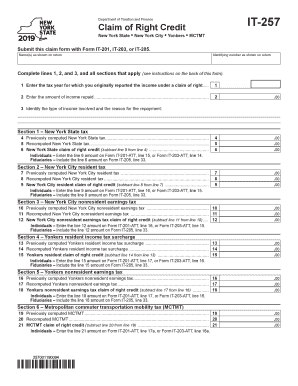
Own on return Identifying number as shown on return Complete lines 1, 2, and 3, and all sections that apply (see instructions on the back of this form). 1 Enter the tax year for which you originally reported the income under a claim of right...... 1 2 Enter the amount of income repaid............................................................................................... 2 .00 3 Identify the type of income involved and the reason for the repayment: Section 1 New York.

How it works

  1. Open form

    Open form follow the instructions

  2. Easily sign form

    Easily sign the form with your finger

  3. Share form

    Send filled & signed form or save

How to fill out the NY IT-257 online

The NY IT-257 form is essential for individuals, estates, or trusts claiming the right credit on income repaid due to an error in previous reporting. This guide will walk you through each section of the form to ensure accurate completion and submission online.

Follow the steps to accurately complete the NY IT-257 online.

  1. Click ‘Get Form’ button to obtain the form and open it for editing. This allows you to access the required document.
  2. Enter your name(s) as shown on your tax return in the designated field at the top of the form.
  3. Fill in your identifying number as it appears on your return, ensuring accuracy.
  4. Complete lines 1, 2, and 3. For line 1, enter the tax year for which you originally reported the income. For line 2, state the total amount of income repaid. On line 3, provide details about the type of income involved and the reason for the repayment.
  5. Proceed to Section 1 for New York State tax. Enter the previously computed New York State tax on line 4, then the recomputed tax on line 5. Calculate and input the claim of right credit on line 6 by subtracting line 5 from line 4.
  6. Continue to Section 2 for New York City resident tax. Repeat the steps: input the previously computed tax on line 7, recomputed tax on line 8, and calculate the claim of right credit on line 9.
  7. For Section 3 regarding New York City nonresident earnings tax, enter the necessary values on lines 10, 11, and 12, following the same subtraction method for the credit.
  8. In Section 4 for Yonkers resident income tax surcharge, fill out lines 13-15 in the same manner as previous sections.
  9. Section 5 addresses Yonkers nonresident earnings tax. Complete lines 16-18 accordingly, ensuring all math is correct.
  10. Finally, complete Section 6 for the Metropolitan commuter transportation mobility tax (MCTMT) by filling in lines 19-21 based on the information provided.
  11. Once all sections are filled, review for accuracy. You can now save changes, download, print, or share the completed form.

Complete your NY IT-257 form online today to ensure your claim is processed efficiently.

Get form

Experience a faster way to fill out and sign forms on the web. Access the most extensive library of templates available.

Related content

Instructions for Form IT-257 Claim of Right Credit...
Dec 12, 2024 — File Form IT-257 if you are an individual or estate or trust that...
Learn more
2008 NEW YORK STATE REFERENCE MANUAL FOR ...
by KR Bennett — To claim the claim of right credit, Form IT-257, Claim of Right Credit...
Learn more
Incorporating Bioavailability Considerations into...
ABOUT ITRC. Established in 1995, the Interstate Technology & Regulatory Council (ITRC) is...
Learn more

Related links form

CA GV-115 2020 NY TC309 2020 NY TC600 2020 CT JD-FM-237 2020

Questions & Answers

Get answers to your most pressing questions about US Legal Forms API.

Contact support

Filling out a withholding allowance form like the NY IT-257 can be straightforward if you follow the instructions closely. Begin with your personal information, then move on to determine your allowances based on dependents and other factors. The form includes a worksheet designed to help you calculate how many allowances you should claim based on your specific financial situation. Accurate completion will aid in aligning your withholdings with your tax liabilities.

When responding to the question about exemption from withholding, consider your financial situation. If you qualify due to low income or specific circumstances, you should indicate that you are exempt. Complete the NY IT-257 form with the details supporting your claim and ensure you meet the necessary criteria for exemption. This honest assessment can guide the correct handling of your tax responsibilities.

To fill out your tax withholding form effectively, start with your personal details and review the criteria for claiming exemptions. Use the NY IT-257 guidelines to assess your situation, including income and dependents. Ensure you provide accurate and complete information, then double-check your entries for any mistakes. This way, you can fine-tune your withholdings, potentially avoiding overpayments or tax bills later.

When writing a check for New York state income tax, start by obtaining the correct payee name and amount due, which you can find on your tax bill or payment voucher. On the check, include 'New York State Income Tax' as the payee and your Social Security number in the memo line to ensure proper credit to your account. Use the correct mailing address for the payment, and remember to send it well before the deadline to avoid penalties. This process is essential for staying compliant with your state tax obligations.

Filling out a withholding exemption form like the NY IT-257 involves a few key steps. First, gather your personal information, including your Social Security number and address. Then, follow the instructions on the form carefully, providing accurate information about your exemptions, salary, and allowances. It's crucial to review your entries to ensure everything is correct, as errors can lead to incorrect withholdings.

To determine the appropriate number of exemptions to withhold, consider your tax situation and family size. The NY IT-257 form provides a straightforward way to calculate this based on your income and dependents. Many taxpayers find it helpful to use the worksheet included with the form to estimate their withholdings accurately. Remember, claiming too many exemptions may lead to a tax bill at the end of the year.

The 10 month rule indicates that if you are a resident for at least 10 months in New York, you will be taxed as a resident for the entire year. This rule highlights the importance of tracking your residency duration. Additionally, using the NY IT-257 can help you understand any credits applicable to your situation, ensuring you maximize your tax return.

The 183 day rule is a key factor in determining your residency status in New York State for tax purposes. If you spend 183 days or more in New York during a calendar year, you may be considered a resident. The implications of this status can directly affect your tax obligations, and the NY IT-257 form can assist in clarifying your residency and the taxes owed.

A New York State residency audit can be triggered by factors such as inconsistent income reporting or claims of residency that do not match your taxable income history. High income levels and frequent travel outside the state can also raise flags. To prepare, consider using the NY IT-257 form to ensure your records are in order, thus minimizing the risk of an audit.

A claim of right can qualify as a refundable credit depending on your situation. This credit applies to taxpayers who have reported income they later had to repay. Utilizing the NY IT-257 can clarify your eligibility for claiming this credit, ensuring you receive any refunds you are owed.

Get This Form Now!

Use professional pre-built templates to fill in and sign documents online faster. Get access to thousands of forms.
If you believe that this page should be taken down, please follow our DMCA take down processhere.
Get NY IT-257
  • Adoption
  • Bankruptcy
  • Contractors
  • Divorce
  • Home Sales
  • Employment
  • Identity Theft
  • Incorporation
  • Landlord Tenant
  • Living Trust
  • Name Change
  • Personal Planning
  • Small Business
  • Wills & Estates
  • Packages A-Z
  • Affidavits
  • Bankruptcy
  • Bill of Sale
  • Corporate - LLC
  • Divorce
  • Employment
  • Identity Theft
  • Internet Technology
  • Landlord Tenant
  • Living Wills
  • Name Change
  • Power of Attorney
  • Real Estate
  • Small Estates
  • Wills
  • All Forms
  • Forms A-Z
  • Other Templates
  • Legal Hub
  • About Us
  • Help Portal
  • Legal Resources
  • Blog
  • Affiliates
  • Contact Us
  • Delete My Account
  • Site Map
  • Industries
  • Forms in Spanish
  • Localized Forms
  • State-specific Forms
  • Forms Kit
  • Real Estate Handbook
  • All Guides
  • Notarize
  • Incorporation services
  • For Consumers
  • For Small Business
  • For Attorneys
  • USLegal
  • FormsPass
  • pdfFiller
  • signNow
  • altaFlow
  • DocHub
  • Instapage
Form Packages
  • Adoption
  • Bankruptcy
  • Contractors
  • Divorce
  • Home Sales
  • Employment
  • Identity Theft
  • Incorporation
  • Landlord Tenant
  • Living Trust
  • Name Change
  • Personal Planning
  • Small Business
  • Wills & Estates
  • Packages A-Z
Form Categories
  • Affidavits
  • Bankruptcy
  • Bill of Sale
  • Corporate - LLC
  • Divorce
  • Employment
  • Identity Theft
  • Internet Technology
  • Landlord Tenant
  • Living Wills
  • Name Change
  • Power of Attorney
  • Real Estate
  • Small Estates
  • Wills
  • All Forms
  • Forms A-Z
  • Other Templates
Customer Service
  • Legal Hub
  • About Us
  • Help Portal
  • Legal Resources
  • Blog
  • Affiliates
  • Contact Us
  • Delete My Account
  • Site Map
  • Industries
  • Forms in Spanish
  • Localized Forms
  • State-specific Forms
  • Forms Kit
Legal Guides
  • Real Estate Handbook
  • All Guides
Prepared for you
  • Notarize
  • Incorporation services
Our Customers
  • For Consumers
  • For Small Business
  • For Attorneys
Our Sites
  • USLegal
  • FormsPass
  • pdfFiller
  • signNow
  • altaFlow
  • DocHub
  • Instapage
Social Media
Call us now toll free:
+1 833 426 79 33
As seen in:
© Copyright 1999-2026 airSlate Legal Forms, Inc. 17 Station Street, Ste. 203, Brookline, MA 02445
  • Your Privacy Choices
  • Terms of Service
  • Privacy Notice
  • Content Takedown Policy
  • Bug Bounty Program
NY IT-257
This form is available in several versions.
Select the version you need from the drop-down list below.
2021 NY IT-257
Select form
  • 2021 NY IT-257
  • 2020 NY IT-257
  • 2019 NY IT-257
  • 2018 NY IT-257
  • 2017 NY IT-257
  • 2006 NY IT-257
Select form