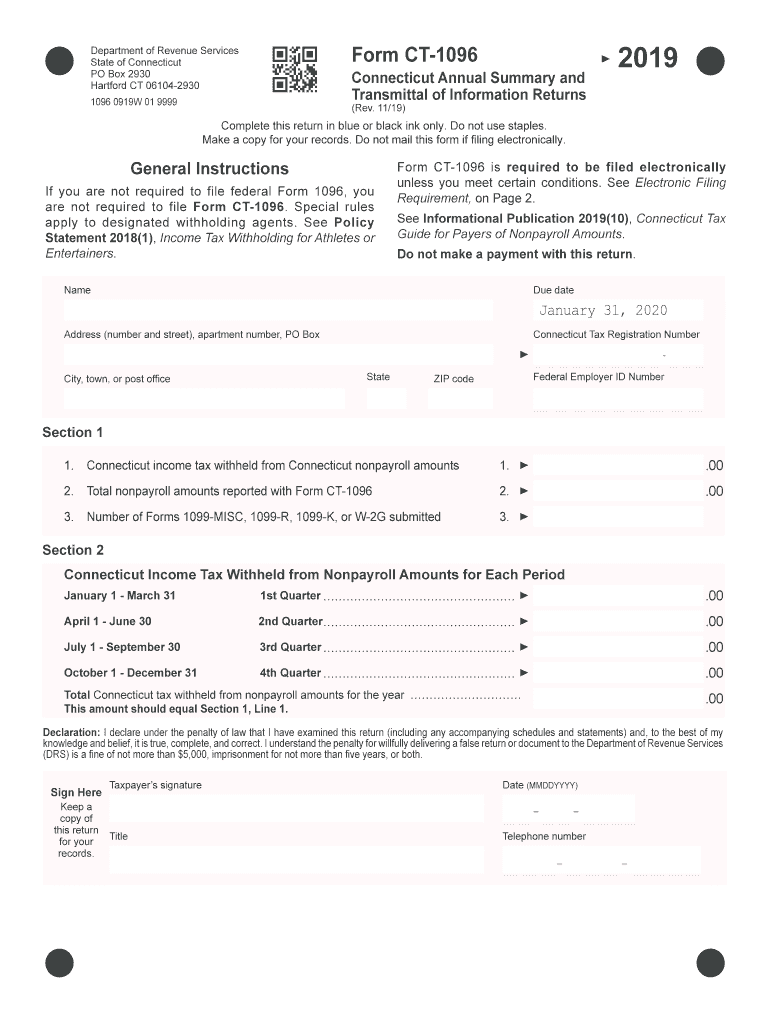
V. 11/19) Complete this return in blue or black ink only. Do not use staples. Make a copy for your records. Do not mail this form if filing electronically. General Instructions If you are not required to file federal Form 1096, you are not required to file Form CT-1096. Special rules apply to designated withholding agents. See Policy Statement 2018(1), Income Tax Withholding for Athletes or Entertainers. Form CT-1096 is required to be filed electronically unless you meet certain conditions.
Loading

Open form follow the instructions

Easily sign the form with your finger

Send filled & signed form or save
How to fill out the CT DRS CT-1096 online
The CT DRS CT-1096 form, known as the Connecticut Annual Summary and Transmittal of Information Returns, is essential for reporting nonpayroll amounts and withholding taxes in Connecticut. This guide provides clear and supportive instructions for completing the form online, ensuring compliance and accurate submission.
Follow the steps to complete your CT DRS CT-1096 online.
- Click the ‘Get Form’ button to obtain the CT DRS CT-1096 form and open it in the editor.
- Begin filling out the form by entering your personal information, including your name, address, Connecticut Tax Registration Number, Federal Employer ID Number, and the due date of January 31, 2020.
- In Section 1, input the Connecticut income tax withheld from nonpayroll amounts in Line 1, the total nonpayroll amounts reported in Line 2, and the number of Forms 1099-MISC, 1099-R, 1099-K, or W-2G submitted in Line 3.
- Proceed to Section 2 where you will report Connecticut income tax withheld from nonpayroll amounts for each quarter. Enter data for each quarter from January to December as instructed.
- Confirm that the total Connecticut tax withheld from nonpayroll amounts aligns with your entry in Section 1, Line 1.
- In the declaration section, affirm that the information is complete and accurate. Sign the form digitally, enter the date, your title, and your telephone number.
- Once you have completed the form, save your changes. You can then download, print, or share the completed document as necessary.
Take the next step to comply with Connecticut tax regulations by completing your CT DRS CT-1096 online today.
Experience a faster way to fill out and sign forms on the web. Access the most extensive library of templates available.
Related content
Jan 31, 2024 — Form CT-1096 must be filed electronically unless certain conditions are...
Following the end of the calendar year, the designated withholding agent must file with...
The Valiant® thoracic stent graft with the Captivia® delivery system is designed for the...
Get answers to your most pressing questions about US Legal Forms API.
Where do I file my CT amended return?
For filing your CT amended return, use the CT DRS CT-1096. This form provides all the details needed by the Connecticut Department of Revenue Services. Always verify the latest mailing address and guidelines on their official website to ensure smooth processing.
What happens if you don't file 1096?
Failing to file the CT DRS CT-1096 can result in penalties from the Connecticut Department of Revenue Services. Not filing on time may delay your tax processing and can lead to issues with IRS compliance. To avoid these consequences, ensure you file all necessary forms by their respective deadlines.
Where to file a CT amended return?
You can file a CT amended return using the CT DRS CT-1096 form. This form provides you with a structured way to correct any mistakes on your original tax return. Make sure to follow the guidelines on where to file it, which can usually be found on the Connecticut Department of Revenue Services website.
Do I mail 1099 and 1096 together?
It is recommended to mail the 1099 forms along with the CT DRS CT-1096 together to the proper address. This way, the Connecticut Department of Revenue Services can efficiently process your filings. Ensure you double-check the requirements for the specific forms to avoid any mistakes.
Do I have to file 1099-NEC in Connecticut?
Yes, you must file the 1099-NEC form in Connecticut if you have nonemployee compensation to report. This requirement applies to any individual or business that pays $600 or more to an independent contractor. Additionally, when filing your 1099-NEC, you may need to submit the CT DRS CT-1096 to summarize your filings.
Where do I file an amended tax return?
To file an amended tax return for Connecticut, use the CT DRS CT-1096 form. Make sure to follow the instructions carefully, as they will guide you on the necessary steps and where to send the amended return. If you're unsure, you can visit the Connecticut Department of Revenue Services website for more detailed guidance.
Where do I send my CT state tax return?
You should send your Connecticut state tax return to the address specified on the tax form. For those using the CT DRS CT-1096, the mailing address can often be found directly on the form or on the Connecticut Department of Revenue Services website. Confirming the address helps to avoid delays in processing your return.
What is the address for the Connecticut IRS return?
To send your Connecticut IRS return, use the address provided by the Connecticut Department of Revenue Services. Generally, it varies based on the form you are filing. For the CT DRS CT-1096, you can find the most accurate mailing address on the official CT DRS website, ensuring you send your return to the correct location.
How do I get a tax clearance certificate in CT?
To obtain a tax clearance certificate in Connecticut, you must request it through the Connecticut DRS. This certificate shows that you have met your tax obligations. If you need assistance, consider using platforms like uslegalforms that can streamline your paperwork and ensure you're using the correct forms, such as the CT DRS CT-1096.
How do I get my 1040 form online?
To access your 1040 form online, visit the IRS website, which provides downloadable versions of tax forms. Additionally, if you need information related to Connecticut taxes, checking the CT DRS website can guide you to the necessary forms. The CT DRS CT-1096 may also be relevant for your overall tax management.
Use professional pre-built templates to fill in and sign documents online faster. Get access to thousands of forms.
If you believe that this page should be taken down, please follow our DMCA take down process here.
This form is available in several versions. Select the version you need from the drop-down list below.