Get Ct Drs Ct-588 2019-2026
How it works
-

Open form follow the instructions
-

Easily sign the form with your finger
-

Send filled & signed form or save
How to fill out the CT DRS CT-588 online
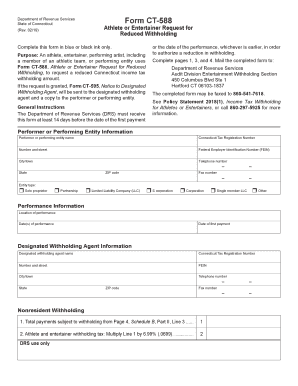
This guide provides step-by-step instructions on how to accurately complete the CT DRS CT-588 form, known as the Athlete or Entertainer Request for Reduced Withholding. Whether you are an athlete, entertainer, or performing entity, this guide is designed to assist you in navigating the online submission process with clarity and ease.
Follow the steps to complete and submit the CT DRS CT-588 online.
- To begin, locate and press the ‘Get Form’ button to access the form and open it in the online editor.
- In the Performer or Performing Entity Information section, fill in your name, Connecticut Tax Registration Number, street address, Federal Employer Identification Number (if applicable), city or town, state, ZIP code, and telephone number. Also, indicate your entity type by selecting the appropriate option.
- Provide details about your performance in the Performance Information section. This includes the location of the performance, the date(s) of the performance, and the date of the first payment.
- Next, complete the Designated Withholding Agent Information section. Fill in the designated withholding agent's name, Connecticut Tax Registration Number, street address, Federal Employer Identification Number, city or town, state, ZIP code, and telephone number.
- Proceed to the Nonresident Withholding section where you will need to complete Line 1 with the total payments subject to withholding from Schedule B, Part II, Line 3, and then calculate the athlete or entertainer withholding tax by multiplying Line 1 by 6.99%.
- Fill out Schedule A, providing a comprehensive list of income related to the Connecticut performance. Ensure you describe each income source and include the amounts received for each item.
- Continue by completing Schedule B, marking down all compensation for each participant involved. This includes personal details and financial sums as outlined in the schedule.
- Finally, confirm that all fields are filled out accurately before saving the changes you have made. You will have the option to download, print, or share the form once completed.
Start completing your CT DRS CT-588 online today to ensure a smooth submission process.
Related links form
You can download the CT 1040 form directly from the Connecticut Department of Revenue Services website. This form is essential for filing your state income taxes, and you can also find instructions and supporting documents there. Ensure that you complete all required sections accurately to avoid delays or complications. As you navigate your tax responsibilities, the CT DRS CT-588 may be a useful resource.