Loading
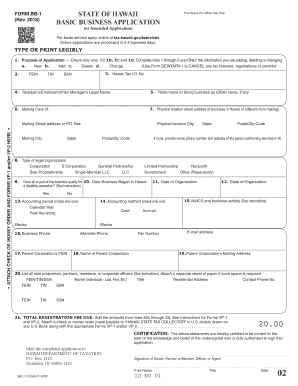
Get Hi Dot Bb-1 2018
How it works
-

Open form follow the instructions
-

Easily sign the form with your finger
-

Send filled & signed form or save
How to fill out the HI DoT BB-1 online
Filling out the HI DoT BB-1 form online is an essential step for individuals and businesses seeking to register for various tax licenses with the State of Hawaii. This guide provides detailed, step-by-step instructions to help you navigate each section of the form efficiently and accurately.
Follow the steps to complete the HI DoT BB-1 form online.
- Press the ‘Get Form’ button to acquire the HI DoT BB-1 form and open it in your digital editor.
- Identify the purpose of your application by selecting one box in Section 1. Choose 'New', 'Add', 'Delete', or 'Change' based on your requirements.
- Enter your Federal Employer Identification Number (FEIN), Tax Identification Number (TIN), or Social Security Number (SSN) in Section 2. Ensure you provide this information accurately for processing.
- Complete Section 4 by entering your legal name as it appears on your tax documents. This name must match your tax return to prevent discrepancies.
- If applicable, fill out the Trade name or operating as (DBA) section in line 5. This section is critical if your business operates under a name different from your legal name.
- In Section 6, provide your mailing address. If this is a change, do not use this form; refer to Form ITPS-COA instead.
- Enter the physical location of your business if it's different from the mailing address. Provide the complete street address in Section 7.
- Select your legal organization type in Section 8. Options include Corporation, General Partnership, Limited Liability Company (LLC), and others. This helps in correctly categorizing your filing.
- Answer the disability exemption question in Section 9. If your business qualifies, check 'Yes' and attach relevant documentation; otherwise, select 'No'.
- Complete the accounting period options in Section 13 and accounting method in Section 14. Ensure clarity on whether you will use Calendar Year or Fiscal Year for reporting your taxes.
- List your North American Industry Classification System (NAICS) code and business activity in Section 15. This identifies your primary business activity for tax purposes.
- In Section 21, calculate the total registration fee due based on the selected tax types in Section 22. Make sure this reflects accurately and attach payment as necessary.
- Finally, review all sections for accuracy. Once completed, save your changes. You have the options to download, print, or share the completed form for submission.
Get started on your application process and complete the HI DoT BB-1 form online today!
Get form
Experience a faster way to fill out and sign forms on the web. Access the most extensive library of templates available.
Related links form
To calculate Hawaii sales tax, apply the current general excise tax rate to the total sales amount. Hawaii uses a tiered system, so be sure to check the latest rates. Knowing how to calculate sales tax accurately is essential for compliance with HI DoT BB-1.
Get This Form Now!
Use professional pre-built templates to fill in and sign documents online faster. Get access to thousands of forms.