Loading
Form preview
  • US Legal Forms
  • Other Templates
  • Tax Forms
  • Hawaii Tax Forms
  • Hi Dot N-884 2018

Get Hi Dot N-884 2018

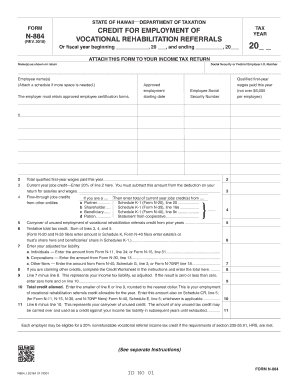
LITATION REFERRALS Or fiscal year beginning , 20 , and ending , 20 20 ATTACH THIS FORM TO YOUR INCOME TAX RETURN Name(s) as shown on return Social Security or Federal Employer I.D. Number Employee name(s) (Attach a schedule if more space is needed.) Approved employment Employee Social The employer must retain approved employee certification forms. starting date Security Number Qualified first-year wages paid this year (not over $6,000 per empl.

How it works

  1. Open form

    Open form follow the instructions

  2. Easily sign form

    Easily sign the form with your finger

  3. Share form

    Send filled & signed form or save

How to fill out the HI DoT N-884 online

The HI DoT N-884 form is a critical document for taxpayers in Hawaii seeking credits for the employment of individuals referred through vocational rehabilitation programs. This guide provides clear instructions on how to complete this form online effectively.

Follow the steps to complete the HI DoT N-884 online.

  1. Click ‘Get Form’ button to obtain the form and open it in the editor.
  2. Start by entering the tax year for which you are filing the form. Be sure to specify the beginning and ending dates of the fiscal year, if applicable.
  3. In the section labeled 'Name(s) as shown on return,' fill out the names of the individuals or entity filing the return. Include the Social Security or Federal Employer Identification Number.
  4. Enter the name(s) of the employee(s) participating in the program. If you need more space, attach a schedule with additional names.
  5. Record the qualified first-year wages paid to each approved employee. Ensure the total does not exceed $6,000 per employee.
  6. Calculate the current year jobs credit by entering 20% of the total wages from the previous step.
  7. If applicable, complete the section regarding flow-through jobs credits. Enter the relevant amounts based on your role — partner, shareholder, beneficiary, or patron.
  8. If there are carryovers of unused employment credits from previous years, complete that section accordingly.
  9. Sum all applicable credits to determine your tentative total tax credit, ensuring to refer to appropriate schedules as needed.
  10. Enter your adjusted tax liability based on your filing type, ensuring to reference the correct form lines for your situation.
  11. Complete the Credit Worksheet for any additional credits that you may be claiming, and record the total on the form.
  12. Subtract the total credits from your adjusted tax liability to determine your final tax credit allowed.
  13. Review all entries for accuracy. Once satisfied, you may save your changes, download a copy, print it for your records, or share it as necessary.

Start filling out the HI DoT N-884 online to claim your credits today.

Get form

Experience a faster way to fill out and sign forms on the web. Access the most extensive library of templates available.

Related content

Individual Income Tax – Resident and Nonresident
Jan 7, 2025 — Please see Tax Announcement 2017-03 for more details. Rev. 2024 · Rev...
Learn more
Department of Ocean and Resources Engineering
School of Ocean and Earth Science and Technology (SOEST) · University of Hawai'i at...
Learn more
Operating Instructions - Proservo NMS5/7 Series
The Proservo NMS5/7 series of intelligent tank gauges are designed for high accuracy...
Learn more

Related links form

CT DRS CT-W4 2019 NC E-585 2020 Kenya Form 25 UK HMRC R43 2019

Questions & Answers

Get answers to your most pressing questions about US Legal Forms API.

Contact support

To fill out the G-49 form in Hawaii, you should gather all your income documentation, including W-2s and 1099s, as they are required for accurate reporting. Carefully follow the instructions provided with the G-49 to ensure you complete all necessary sections. If you find you need to amend this in the future, consider utilizing the HI DoT N-884 for the process.

You should mail your completed Form N-15 to the Hawaii Department of Taxation at the appropriate address outlined on the form. Typically, this may be directed to Honolulu, but it's best to refer to your N-15 instructions for confirmation. Always ensure that your form is up to date for the current tax year. If amendments are needed later, the HI DoT N-884 is available for your use.

In Hawaii, you must file an income tax return if your gross income exceeds specific thresholds, which vary based on your filing status and age. This includes both residents and non-residents earning income from Hawaii sources. Be sure to check the state guidelines for precise requirements. Using the HI DoT N-884 will assist if you ever need to amend your return.

When mailing your Form 1040 in Hawaii, you should use the address designated for individual income tax returns specified in your form’s instructions. This generally directs you to the central processing facility in Honolulu. Regularly confirm this on the Hawaii Department of Taxation website to avoid any mailing issues. Employing the HI DoT N-884 for amendments further streamlines your filing process.

The address for sending your Hawaii state tax return typically depends on the type of form you are submitting. For most tax returns, it should be sent to the Hawaii Department of Taxation, as outlined in your form’s instructions. It's essential to check the latest information from the Hawaii DoT website. Making sure to use the HI DoT N-884 can help with filing any amendments.

When writing a check to the Hawaii state tax collector, make it payable to 'Hawaii State Tax Collector.' Include your taxpayer identification number in the memo section for reference. Ensure you check the latest payment instructions from the Department of Taxation. This makes sure your payment is matched correctly with your account, especially when dealing with the HI DoT N-884.

You should mail your completed state tax return to the Hawaii Department of Taxation at the appropriate address listed on the instructions of your form. Typically, this is the main office in Honolulu, but it can vary depending on your specific form. Always verify the mailing instructions on the official Hawaii DoT website. Using the HI DoT N-884 helps ensure your return reaches the right location.

To file an amended Hawaii tax return, you need to use Form N-884, which is the official form for submitting amendments. You'll complete this form with the necessary corrections and additional documentation if needed. Once filled out, you can mail it directly to the Hawaii Department of Taxation. Using the HI DoT N-884 ensures your amendments are properly processed for compliance.

Individuals who earn income in Hawaii but do not reside there must file a Hawaii nonresident return. If you are a nonresident and your income meets the state's filing requirements, you need to complete the HI DoT N-884 form. Make sure to check the criteria closely to determine your obligation. Uslegalforms can guide you through the necessary steps for filing.

You should send your Hawaii tax return to the designated department, which can be found on the instructions sheet of the HI DoT N-884 form. Ensure you have the correct mailing address for timely processing. Checking the Hawaii Department of Taxation website can provide you with the most current information. For further assistance, uslegalforms offers guidance on submission methods.

Get This Form Now!

Use professional pre-built templates to fill in and sign documents online faster. Get access to thousands of forms.
If you believe that this page should be taken down, please follow our DMCA take down processhere.
Get HI DoT N-884
  • Adoption
  • Bankruptcy
  • Contractors
  • Divorce
  • Home Sales
  • Employment
  • Identity Theft
  • Incorporation
  • Landlord Tenant
  • Living Trust
  • Name Change
  • Personal Planning
  • Small Business
  • Wills & Estates
  • Packages A-Z
  • Affidavits
  • Bankruptcy
  • Bill of Sale
  • Corporate - LLC
  • Divorce
  • Employment
  • Identity Theft
  • Internet Technology
  • Landlord Tenant
  • Living Wills
  • Name Change
  • Power of Attorney
  • Real Estate
  • Small Estates
  • Wills
  • All Forms
  • Forms A-Z
  • Other Templates
  • Legal Hub
  • About Us
  • Help Portal
  • Legal Resources
  • Blog
  • Affiliates
  • Contact Us
  • Delete My Account
  • Site Map
  • Industries
  • Forms in Spanish
  • Localized Forms
  • State-specific Forms
  • Forms Kit
  • Real Estate Handbook
  • All Guides
  • Notarize
  • Incorporation services
  • For Consumers
  • For Small Business
  • For Attorneys
  • USLegal
  • FormsPass
  • pdfFiller
  • signNow
  • altaFlow
  • DocHub
  • Instapage
Form Packages
  • Adoption
  • Bankruptcy
  • Contractors
  • Divorce
  • Home Sales
  • Employment
  • Identity Theft
  • Incorporation
  • Landlord Tenant
  • Living Trust
  • Name Change
  • Personal Planning
  • Small Business
  • Wills & Estates
  • Packages A-Z
Form Categories
  • Affidavits
  • Bankruptcy
  • Bill of Sale
  • Corporate - LLC
  • Divorce
  • Employment
  • Identity Theft
  • Internet Technology
  • Landlord Tenant
  • Living Wills
  • Name Change
  • Power of Attorney
  • Real Estate
  • Small Estates
  • Wills
  • All Forms
  • Forms A-Z
  • Other Templates
Customer Service
  • Legal Hub
  • About Us
  • Help Portal
  • Legal Resources
  • Blog
  • Affiliates
  • Contact Us
  • Delete My Account
  • Site Map
  • Industries
  • Forms in Spanish
  • Localized Forms
  • State-specific Forms
  • Forms Kit
Legal Guides
  • Real Estate Handbook
  • All Guides
Prepared for you
  • Notarize
  • Incorporation services
Our Customers
  • For Consumers
  • For Small Business
  • For Attorneys
Our Sites
  • USLegal
  • FormsPass
  • pdfFiller
  • signNow
  • altaFlow
  • DocHub
  • Instapage
Social Media
Call us now toll free:
+1 833 426 79 33
As seen in:
© Copyright 1999-2026 airSlate Legal Forms, Inc. 17 Station Street, Ste. 203, Brookline, MA 02445
  • Your Privacy Choices
  • Terms of Service
  • Privacy Notice
  • Content Takedown Policy
  • Bug Bounty Program
HI DoT N-884
This form is available in several versions.
Select the version you need from the drop-down list below.
2023 HI DoT N-884
Select form
  • 2023 HI DoT N-884
  • 2022 HI DoT N-884
  • 2020 HI DoT N-884
  • 2018 HI DoT N-884
  • 2017 HI DoT N-884
  • 2016 HI DoT N-884
  • 2015 HI DoT N-884
  • 2012 HI DoT N-884
Select form