Loading
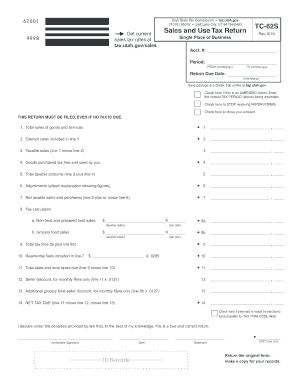
Get Ut Tc-62s 2019-2026
How it works
-

Open form follow the instructions
-

Easily sign the form with your finger
-

Send filled & signed form or save
How to fill out the UT TC-62S online
Filling out the UT TC-62S form online can be a straightforward process if you follow the right steps. This guide will help you navigate each section of the form with ease, ensuring that all necessary information is accurately provided.
Follow the steps to complete the UT TC-62S form online.
- Press the ‘Get Form’ button to access the UT TC-62S online. This will allow you to open the form and begin filling it out.
- In the first section, enter your company name and address below the designated line. Make sure to provide accurate and complete information.
- Next, input the period for the sales tax return by entering the 'FROM' and 'TO' dates in the specified mmddyyyy format.
- Enter the return due date in the same mmddyyyy format to ensure timely filing.
- If this is an amended return, check the appropriate box and clearly indicate the correct tax period you are amending above.
- Fill out line 1 by reporting total sales of goods and services made within the period. Do not include tax collected in this figure.
- On line 2, enter the total amount of exempt sales included in line 1. Keep documentation to support these exempt sales.
- Calculate taxable sales by subtracting line 2 from line 1 and enter the result on line 3.
- For line 4, report any goods purchased tax-free that were used by you, ensuring the amount is not negative.
- Add the amounts from line 3 and line 4 for line 5. This is your total taxable amounts.
- If you have any adjustments to report, include them on line 6 along with an explanation attached if necessary.
- Calculate net taxable sales and purchases by adding or subtracting any adjustments on line 7.
- On line 8a, report tax for non-food and prepared food sales by multiplying taxable sales from line 3 by the appropriate tax rate.
- For grocery food sales, report on line 8b similarly, following tax guidelines.
- Total your computed tax on line 9 by adding line 8a and line 8b.
- Calculate any applicable residential fuel credits on line 10 and subtract this from line 9 to find total taxes due on line 11.
- If applicable, calculate seller discounts for monthly filers on lines 12 and 13, applying the appropriate rates.
- Finally, calculate net tax due on line 14 by subtracting seller discounts from total taxes due.
- Before submitting, ensure you check the box if the payment is made via electronic funds transfer. Sign and date the form.
- Once all information is accurate, save changes, download the form, print it for your records, or share as needed.
Complete your UT TC-62S form online today for a hassle-free filing experience.
Related links form
The highest sales tax rate in Utah, as of now, is 8.35%. This includes both state and local taxes. Understanding this rate is important for businesses that need to calculate sales tax accurately on their transactions. Utilizing tools like the UT TC-62S form can help ensure accurate tax collection and compliance.