Loading
Get Ak Form 6327 2019-2026
How it works
-

Open form follow the instructions
-

Easily sign the form with your finger
-

Send filled & signed form or save
How to fill out the AK Form 6327 online
Filling out the AK Form 6327 online is an essential process for entities looking to claim the Qualified Oil and Gas Service Industry Expenditure Credit. This guide provides a comprehensive, step-by-step approach to assist users in successfully completing the form.
Follow the steps to complete the AK Form 6327 efficiently.
- Use the 'Get Form' button to access the AK Form 6327. This will open the form in your online editor for you to fill out.
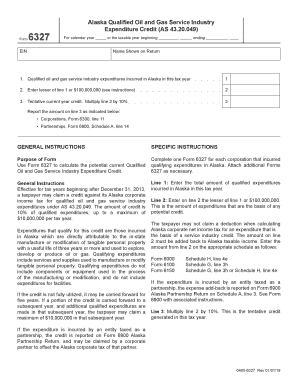
- In the first section, enter the total amount of qualified oil and gas service industry expenditures incurred in Alaska for the current tax year. This is crucial for determining your eligible credit.
- On line 2, input the lesser of the amount from line 1 or $100,000,000. This figure serves as the basis for calculating the potential credit.
- Next, multiply the amount entered on line 2 by 10% and input the result on line 3. This calculation represents your tentative current year credit.
- Ensure all the information is accurate before finalizing the form. Save your changes, then download or print the form as needed. You may also share it for further processing.
Start completing the AK Form 6327 online today to take advantage of your potential credit.
Yes, you can complete your W-4 electronically on various websites. Many platforms allow you to fill, save, and submit your W-4 forms online, making it more convenient. This feature also helps keep your data organized and connected, especially when handling multiple forms like the AK Form 6327.