Loading
Form preview
  • US Legal Forms
  • Other Templates
  • Tax Forms
  • Pennsylvania Tax Forms
  • Pa Psrs-1245 2019

Get Pa Psrs-1245 2019-2026

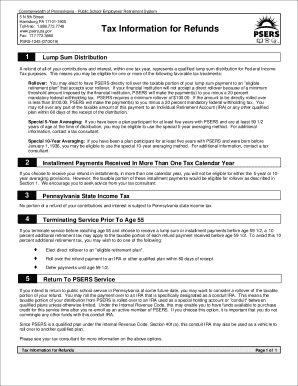
Rogram Refunds PSERS Insurance PSRS-1245 (08/2012) 1 Lump Sum Distribution A refund of all of your contributions and interest, within one tax year, represents a qualified lump sum distribution for Federal Income Tax purposes. This means you may be eligible for one or more of the following favorable tax treatments: Rollover: You may elect to have PSERS directly roll over the taxable portion of your lump sum payment to an "eligible retirement plan" that accepts your rollover. If your fin.

How it works

  1. Open form

    Open form follow the instructions

  2. Easily sign form

    Easily sign the form with your finger

  3. Share form

    Send filled & signed form or save

How to fill out the PA PSRS-1245 online

The PA PSRS-1245 form is an essential document for users seeking refunds of their contributions and interest from the Pennsylvania Public School Employees' Retirement System. This guide provides a detailed overview of how to complete the form online with clarity and efficiency.

Follow the steps to successfully complete the form.

  1. Click the ‘Get Form’ button to obtain the PA PSRS-1245 form and access it in your preferred online editing tool.
  2. Review the information section at the top of the form that outlines tax implications associated with lump sum distributions. Make sure you understand the options for rollovers and potential tax treatments.
  3. Fill in your personal information in the designated fields, including your name, address, and contact details. Ensure all information is accurate and complete.
  4. Indicate your choice regarding the distribution method—whether you prefer a lump sum, installment payments, or rollover to an eligible retirement plan. Provide any required details specific to your choice.
  5. Complete any additional sections that pertain to previous service, tax options, or special provisions for averaging. Input necessary details such as the length of your service and the age you will be upon distribution.
  6. Review the completed form to ensure all fields are filled out correctly. Check for any errors or items that may need clarification.
  7. Once satisfied with your form, save your changes. You may then download, print, or share the document as required.

Begin filling out your PA PSRS-1245 form online today to efficiently manage your retirement contributions.

Get form

Experience a faster way to fill out and sign forms on the web. Access the most extensive library of templates available.
Get form

Related content

Member Forms | Public School Employees' Retirement...
- PSRS 928. Tax Information for Refunds(opens in a new tab) - PSRS 1245. W-4P Federal Tax...
Learn more
The pulsar/supernova remnant connection
by BM Gaensler · 1995 · Cited by 90 — ... (PSRs) in 1967 (Hewish et al. 1968)...
Learn more

Related links form

AU Registration / PIC Application 2013 AU Resident Parking Permit Application - Holroyd City AU RF1637 2011 AU Section 149(2) & (5) Certification Application

Questions & Answers

Get answers to your most pressing questions about US Legal Forms API.

Contact support

To change your address with the Public School Employees’ Retirement System (PSERS), you can submit a change of address form directly to PSERS. This can often be done via their website or through the United States Postal Service. Properly updating your records is vital, especially when dealing with issues related to PA PSRS-1245 benefits.

Seniors are exempt from filing tax returns if their income is below a certain limit as defined by PA law. Factors such as Social Security benefits and pension income may influence this status. Understanding how the PA PSRS-1245 affects your financial situation can provide clarity on whether you need to file.

You must file a PA state income tax return if you are a resident or part-year resident of Pennsylvania with taxable income exceeding a specific threshold. Additionally, non-residents earning income sourced from Pennsylvania must also file. This includes consideration of the PA PSRS-1245, which may have implications for your taxable events.

Yes, seniors may need to file a PA state income tax if their income exceeds the filing threshold established by Pennsylvania law. The PA PSRS-1245 can influence how much tax you owe, depending on your retirement income. Therefore, it’s wise to check your financial status each year to ensure compliance.

In Pennsylvania, there is no specific age at which individuals are automatically exempt from filing income tax. However, if your income falls below a certain threshold set by the state, you may not need to file. It’s crucial to review your income situation each year, especially if you are affected by the PA PSRS-1245 classification.

The 2% 62 formula is a retirement benefit calculation method that provides 2% of the average salary per year of service, with a retirement age of at least 62. This formula applies to employees under specific pension plans, including PA PSRS-1245. It emphasizes the importance of both service length and retirement age in determining your final benefit. To demystify pension calculations, uslegalforms can offer detailed guidance tailored to your needs.

To be vested in the Pennsylvania Teachers pension system, you typically need to have at least 10 years of service. When you reach this milestone under the PA PSRS-1245 plan, you gain access to lifetime retirement benefits upon reaching the retirement age. Consider tracking your service years closely to ensure you achieve vesting status. If you’re looking for more information about pension plans, uslegalforms has the answers.

The retirement formula for PA teachers involves calculating your total years of service and multiplying them by the pension rate, often around 2.5% for the PA PSRS-1245 plan. This process helps teachers estimate their retirement benefits based on their accumulated service time and final salary. Understanding this formula can help you plan your financial future. If you need assistance breaking down these numbers, uslegalforms can be a great resource.

The formula for teacher retirement in Pennsylvania is straightforward: multiply your years of service by the pension multiplier, then multiply it by your average final salary. For PA PSRS-1245, this provides a clear picture of your potential retirement income. It’s important to keep track of your service years, as they directly influence your retirement benefits. For personalized assistance, check uslegalforms to find the necessary resources.

Similar to the retirement multiplier, the PA teacher pension multiplier plays a crucial role in determining the pension benefits for teachers. Under the PA PSRS-1245, this multiplier is typically set based on your average final compensation and years of service. Therefore, the longer you serve, the larger your eventual pension payout becomes. Understanding this multiplier can help you strategize your career and retirement.

Get This Form Now!

Use professional pre-built templates to fill in and sign documents online faster. Get access to thousands of forms.
Get form
If you believe that this page should be taken down, please follow our DMCA take down processhere.
Get PA PSRS-1245
Get form
  • Adoption
  • Bankruptcy
  • Contractors
  • Divorce
  • Home Sales
  • Employment
  • Identity Theft
  • Incorporation
  • Landlord Tenant
  • Living Trust
  • Name Change
  • Personal Planning
  • Small Business
  • Wills & Estates
  • Packages A-Z
  • Affidavits
  • Bankruptcy
  • Bill of Sale
  • Corporate - LLC
  • Divorce
  • Employment
  • Identity Theft
  • Internet Technology
  • Landlord Tenant
  • Living Wills
  • Name Change
  • Power of Attorney
  • Real Estate
  • Small Estates
  • Wills
  • All Forms
  • Forms A-Z
  • Other Templates
  • Legal Hub
  • About Us
  • Help Portal
  • Legal Resources
  • Blog
  • Affiliates
  • Contact Us
  • Delete My Account
  • Site Map
  • Industries
  • Forms in Spanish
  • Localized Forms
  • State-specific Forms
  • Forms Kit
  • Real Estate Handbook
  • All Guides
  • Notarize
  • Incorporation services
  • For Consumers
  • For Small Business
  • For Attorneys
  • USLegal
  • FormsPass
  • pdfFiller
  • signNow
  • altaFlow
  • DocHub
  • Instapage
Form Packages
  • Adoption
  • Bankruptcy
  • Contractors
  • Divorce
  • Home Sales
  • Employment
  • Identity Theft
  • Incorporation
  • Landlord Tenant
  • Living Trust
  • Name Change
  • Personal Planning
  • Small Business
  • Wills & Estates
  • Packages A-Z
Form Categories
  • Affidavits
  • Bankruptcy
  • Bill of Sale
  • Corporate - LLC
  • Divorce
  • Employment
  • Identity Theft
  • Internet Technology
  • Landlord Tenant
  • Living Wills
  • Name Change
  • Power of Attorney
  • Real Estate
  • Small Estates
  • Wills
  • All Forms
  • Forms A-Z
  • Other Templates
Customer Service
  • Legal Hub
  • About Us
  • Help Portal
  • Legal Resources
  • Blog
  • Affiliates
  • Contact Us
  • Delete My Account
  • Site Map
  • Industries
  • Forms in Spanish
  • Localized Forms
  • State-specific Forms
  • Forms Kit
Legal Guides
  • Real Estate Handbook
  • All Guides
Prepared for you
  • Notarize
  • Incorporation services
Our Customers
  • For Consumers
  • For Small Business
  • For Attorneys
Our Sites
  • USLegal
  • FormsPass
  • pdfFiller
  • signNow
  • altaFlow
  • DocHub
  • Instapage
Social Media
Call us now toll free:
+1 833 426 79 33
As seen in:
© Copyright 1999-2026 airSlate Legal Forms, Inc. 17 Station Street, Ste. 203, Brookline, MA 02445
  • Your Privacy Choices
  • Terms of Service
  • Privacy Notice
  • Content Takedown Policy
  • Bug Bounty Program