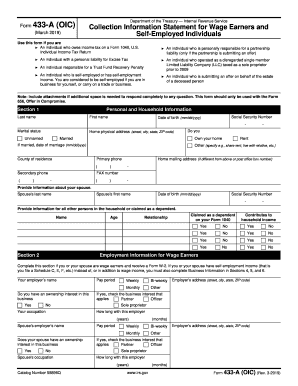
Get Irs 433-a (oic) 2019
How it works
-

Open form follow the instructions
-

Easily sign the form with your finger
-

Send filled & signed form or save
How to fill out the IRS 433-A (OIC) online
The IRS 433-A (OIC) form is a crucial document for individuals seeking to submit an Offer in Compromise to settle their tax debt. This guide provides clear, step-by-step instructions for completing the form online, ensuring users understand each component thoroughly.
Follow the steps to complete your IRS 433-A (OIC) form online easily.
- Press the ‘Get Form’ button to access the IRS 433-A (OIC) form and open it in your preferred online editor.
- Begin by filling out Section 1 for personal and household information. Provide your last name, first name, Social Security number, date of birth, marital status, physical address, and contact numbers as required.
- In Section 2, complete the employment information if you or your spouse are wage earners. Provide information about your employers, pay periods, and ownership interests in any business.
- Proceed to Section 3 where you will report personal assets. Enter details about cash, investments, real property, vehicles, and other valuable items, ensuring to round amounts to the nearest dollar.
- If self-employed, complete Section 4. Indicate if your business is a sole proprietorship and provide associated information, such as business name, address, and Employer Identification Number.
- Continue to Section 5 to list business assets and their values, excluding personal assets from Section 3. Ensure to enter amounts in whole dollars and provide needed details for each asset.
- In Section 6, fill in your business income and expenses. Enter total gross monthly income and business expenses. Use the most recent financial data for accuracy.
- Section 7 involves entering your household's gross monthly income and average monthly expenses. Account for all household contributors and their income sources.
- Move to Section 8 to calculate your minimum offer amount. Based on your financial inputs, determine the total available assets and future remaining income.
- Complete Section 9 by providing any additional information needed. This includes bankruptcy status, litigation involvement, and details about any trusts.
- Finally, sign in Section 10 where you declare the information provided is accurate. Ensure to include all required attachments before submitting the form.
- Once completed, users can save the changes made, download, print, or share the filled IRS 433-A (OIC) form as necessary.
Start filling out your IRS 433-A (OIC) form online today to take the next step towards resolving your tax obligations.
Get form
Related links form
To enhance your chances of getting your IRS 433-A (OIC) approved, ensure you provide a complete and accurate financial picture. Engage in thorough preparation by documenting your income, expenses, and liabilities, as this transparency is key. Additionally, consulting with a tax professional can offer valuable insights. Approaching the IRS with a clear rationale for your offer will also strengthen your case.