Loading
Get Irs 1042-t 2019
This website is not affiliated with IRS
How it works
-

Open form follow the instructions
-

Easily sign the form with your finger
-

Send filled & signed form or save
How to fill out the IRS 1042-T online
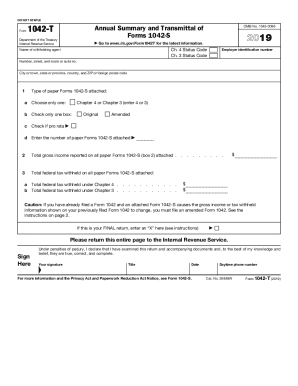
Filling out the IRS 1042-T form accurately is essential for transmitting Forms 1042-S to the Internal Revenue Service. This guide will help you complete the form step-by-step, ensuring all required information is provided correctly.
Follow the steps to successfully complete the IRS 1042-T form.
- Press the ‘Get Form’ button to access the IRS 1042-T online and open it in your editing platform.
- Fill in the name of the withholding agent as it appears on the associated Forms 1042-S.
- Enter the employer identification number (EIN) in the designated field.
- Provide the complete address of the withholding agent including number, street, city, state, and zip code.
- Select the type of paper Forms 1042-S you are attaching by indicating either Chapter 4 or Chapter 3 in line 1a.
- In line 1b, mark the appropriate box to indicate if the information is original or amended.
- If applicable, check the box in line 1c for pro rata Forms.
- Enter the number of attached Forms 1042-S in line 1d.
- Input the total gross income as reported on the attached Forms 1042-S in line 2.
- Complete line 3 with the total federal tax withheld from the attached Forms, selecting the appropriate chapter in either line 3a or 3b, but not both.
- If this is your final return, mark an 'X' in the specified box.
- At the bottom of the form, provide your signature, title, and the date of signing.
- Finally, ensure you save your changes. You can download, print, or share the completed form as needed.
Start filling out your IRS 1042-T online today and ensure compliance.
Get form
Experience a faster way to fill out and sign forms on the web. Access the most extensive library of templates available.
Related links form
The key difference between a W-2 and a 1042-S lies in their intended audiences. A W-2 is provided to U.S. employees detailing wages and taxes withheld. Conversely, a 1042-S is for foreign individuals or entities, reporting income and withholding on payments made to them. Understanding these distinctions is vital for proper tax reporting.
Get This Form Now!
Use professional pre-built templates to fill in and sign documents online faster. Get access to thousands of forms.