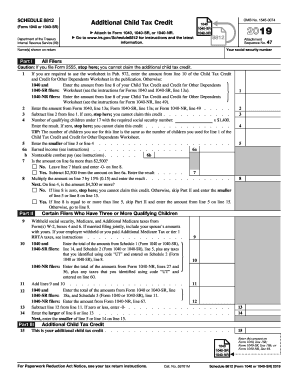
E 15. Part III Attachment Sequence No. 47 Your social security number Name(s) shown on return Part I 2018 1040NR Attach to Form 1040 or Form 1040NR. Go to www.irs.gov/Schedule8812 for instructions and the latest information. OMB No. 1545-0074 9 10 11 . . . . . . . 12 . . . . . . . . . . . . . . . . 13 14 . . . . . . 15 Additional Child Tax Credit This is your additional child tax credit . . . . . . . . . . . . . Enter this amount on.
Open form follow the instructions
Easily sign the form with your finger
Send filled & signed form or save
How to fill out the IRS 1040 - Schedule 8812 online
Filling out the IRS 1040 - Schedule 8812 can seem complicated, but with the right guidance, you can complete it efficiently online. This schedule allows you to claim the Additional Child Tax Credit, which may provide significant financial benefits for you and your family.
Follow the steps to accurately complete the form online.
- Click ‘Get Form’ button to access the IRS 1040 - Schedule 8812 and open it in the editor.
- Begin by entering your social security number and the names of all individuals listed on your tax return in the designated fields.
- In Part I, if you're required to use the worksheet from Publication 972, input the amount from line 10 of the Child Tax Credit and Credit for Other Dependents Worksheet. If not required, enter the amount from line 8 of the same worksheet specific to your form type.
- Proceed to line 2 and enter the amount found on line 13a of your Form 1040, 1040-SR, or 1040-NR.
- For line 3, subtract line 2 from line 1. If the result is zero, you are not eligible for the credit and can stop here.
- On line 4, indicate the number of qualifying children under 17 who have valid social security numbers, then multiply this number by $1,400. If the result is zero, you cannot claim this credit.
- Enter the smaller value from line 3 or line 4 on line 5.
- Fill out line 6a with your earned income, and if applicable, record any nontaxable combat pay on line 6b.
- Answer line 7 by determining if the amount on line 6a exceeds $2,500. If it does not, leave this line blank and enter zero on line 8. Otherwise, subtract $2,500 from the amount on line 6a and enter the result.
- Multiply the value on line 7 by 15% (0.15) and write the result on line 8. Then evaluate if the amount on line 4 is $4,200 or more to determine your next steps.
- Depending on your findings from line 8, if zero or if applicable amounts allow, skip Part II and enter the smaller value from line 5 or line 8 onto line 15.
- For Part II, complete lines 9 through 15 as prompted, ensuring accuracy in the amounts you cross-reference with your main Form 1040, 1040-SR, or 1040-NR.
- Once you finish, review all inputs for correctness, and save your changes, download, print, or share your completed Schedule 8812 as necessary.
Complete your IRS forms online today to take advantage of available credits.
Experience a faster way to fill out and sign forms on the web. Access the most extensive library of templates available.
Related content
Oct 16, 2024 — Use Schedule 8812 (Form 1040) to figure your child tax credits, to report...
If the amount on line 12 is more than the amount on line 14, you may be able to take the...
Answer the following questions for each dependent listed on Form 1040, line 6c; Form...
Get answers to your most pressing questions about US Legal Forms API.
What line on 1040 shows Child Tax Credit?
The line that shows the Child Tax Credit on IRS Form 1040 is line 16. It’s important to calculate this amount on Schedule 8812 before entering it on your main tax form. This careful process ensures that you claim the correct credit, benefiting from the tax relief it offers. For additional help, consider consulting uslegalforms for a step-by-step approach.
Where do I put a Child Tax Credit on a 1040?
You will report the Child Tax Credit on line 16 of your IRS Form 1040. This entry reflects the amount calculated on Schedule 8812, which you must complete in advance. Correctly entering this information is vital to successfully claiming your credit. If you ever feel unsure, don’t hesitate to seek expert guidance.
How to file a schedule 8812?
To file Schedule 8812, gather your dependent information and calculate your income in relation to the Child Tax Credit. After accurately filling in the required fields, make sure to transfer the calculated credit amount to your IRS Form 1040. It's essential to check for accuracy to prevent delays or issues with your tax return. Tools like uslegalforms can streamline this process for you.
Do I have to make $2500 to get a Child Tax Credit?
While earning at least $2,500 can help you qualify for the refundable portion of the Child Tax Credit, it is not a strict requirement to receive some benefits. The amount you can credit may also depend on your filing status and number of dependents. It’s vital to review the current IRS guidelines to assess your unique situation regarding the IRS 1040 - Schedule 8812. If you need assistance, resources like uslegalforms can provide valuable insights.
What line on the 1040 is the Child Tax Credit?
The Child Tax Credit is specifically entered on line 16 of IRS Form 1040. To ensure that this line reflects the correct information, it’s crucial that you complete Schedule 8812 beforehand. This schedule will calculate the credit amount that you are eligible to claim. Take your time completing these forms to avoid errors.
How do I file Schedule 8812?
Filing Schedule 8812 requires detailing your qualifying children and calculating the appropriate Child Tax Credit amount. Start by gathering information about your dependents and your income level. Then, fill out the form, making sure to follow the instructions closely for accuracy. If the task feels overwhelming, online services like uslegalforms can guide you through the filing process.
How do I claim the Child Tax Credit on my taxes?
Claiming the Child Tax Credit involves filling out IRS Form 1040 and including Schedule 8812. You will need to provide details about your qualifying dependents and your adjusted gross income. Once you complete these forms, you can report the credit on line 16 of 1040. Just ensure you gather all necessary documentation to support your claim.
What IRS tax form do I use for Child Tax Credit?
To claim the Child Tax Credit, you should use IRS Form 1040 along with Schedule 8812. The main form captures your overall income and tax situation, while Schedule 8812 specifically focuses on the details for the Child Tax Credit. This two-step process helps you provide accurate information to the IRS. If you need guidance, consider using uslegalforms, which simplifies tax form navigation.
Where does Child Tax Credit go on 1040?
The Child Tax Credit is reported on line 16 of your IRS Form 1040. To determine the amount to enter on this line, you must first complete Schedule 8812. This form calculates the credit based on your qualifications and provides you with the right amount to claim. Following the correct procedures ensures that you maximize your benefits.
What do I put on line 16 of 1040?
Line 16 of IRS Form 1040 is where you will report your Child Tax Credit amount. This figure is derived from your calculations on Schedule 8812, which determines your eligibility and credit amount based on your income and dependent status. Make sure to complete Schedule 8812 accurately to ensure you report the correct value on line 16. Taking the time to verify your entries can help you avoid any potential tax issues.
Use professional pre-built templates to fill in and sign documents online faster. Get access to thousands of forms.
If you believe that this page should be taken down, please follow our DMCA take down process here.
This form is available in several versions. Select the version you need from the drop-down list below.