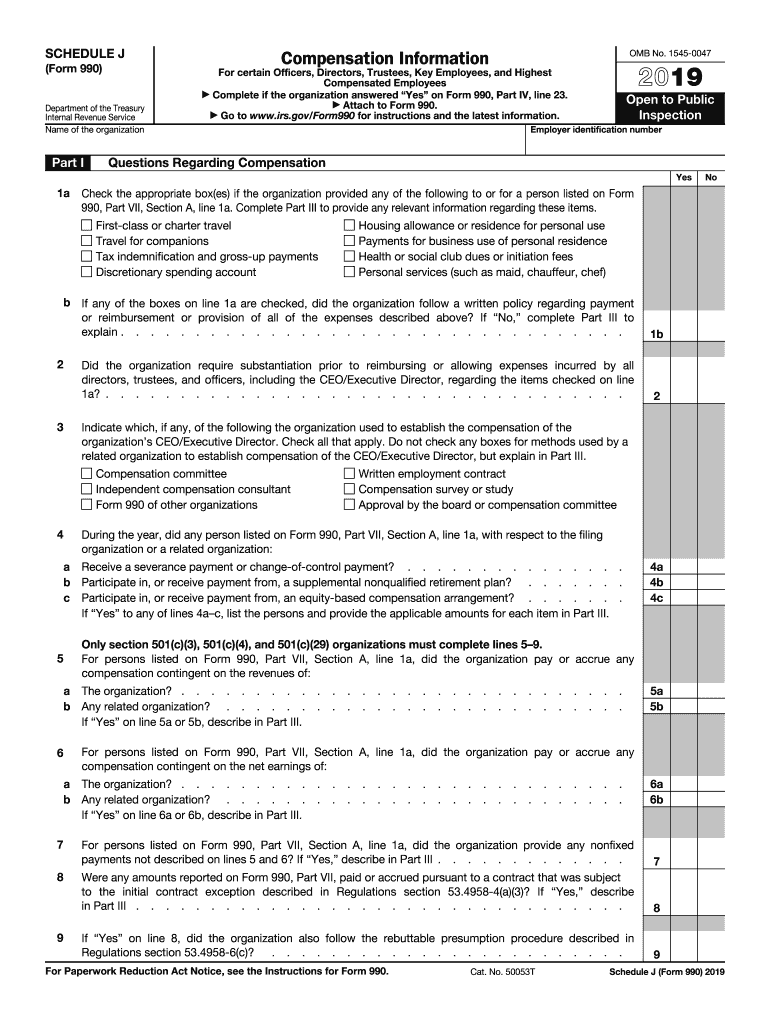
Employees, and Highest Compensated Employees Complete if the organization answered Yes on Form 990, Part IV, line 23. Attach to Form 990. Go to www.irs.gov/Form990 for instructions and the latest information. Open to Public Inspection Employer identification number Questions Regarding Compensation Yes 1a Check the appropriate box(es) if the organization provided any of the following to or for a person listed on Form 990, Part VII, Section A, line 1a. Complete Part III to.
Loading

Open form follow the instructions

Easily sign the form with your finger

Send filled & signed form or save
How to fill out the IRS 990 - Schedule J online
Filling out the IRS 990 - Schedule J is essential for organizations reporting compensation for certain officers, directors, trustees, and key employees. This guide provides a detailed, step-by-step approach to assist you in completing the form accurately and efficiently online.
Follow the steps to successfully complete the IRS 990 - Schedule J
- Press the ‘Get Form’ button to download the form and open it for filling out online.
- Begin with Part I: Compensation Information. Ensure you understand which individuals require reporting based on your organization’s response in Form 990, Part IV, line 23. Complete this section with accurate compensation details.
- In Part I, check the appropriate boxes if any mentioned benefits were provided to the listed individuals. If you check any box, additional details must be provided in Part III.
- Confirm whether a written policy regarding the payment or reimbursement of expenses exists. If the answer is 'No', provide an explanation in Part III.
- Identify the methods used to determine the compensation of your organization’s CEO or Executive Director in lines 4a-4e. Be precise and thorough, as this affects overall compensation reporting.
- For each individual listed, report their compensation from both your organization and any related entities as required in Part II. This section needs exact figures for base compensation, bonus and incentive compensation, retirement contributions, and total compensation.
- Complete Part III with any necessary supplemental information associated with the lines from Part I, including any unique circumstances or further details that might clarify the compensation structure.
- Review all entries for accuracy. Ensure that all totals in Part II align correctly with those reported earlier in Form 990.
- After finalizing the form, save any changes made, and download or print the document as needed for your records.
Complete and file your IRS 990 - Schedule J online to ensure compliance and transparency.
Experience a faster way to fill out and sign forms on the web. Access the most extensive library of templates available.
Related content
For each individual whose compensation must be reported on Schedule J, report compensation...
Jul 20, 2012 — Schedule J (Form 990) is used by an organization that files Form 990 to...
1. Contributions, gifts, grants, etc., received (attach schedule). 2. Check ▷ if the...
Get answers to your most pressing questions about US Legal Forms API.
Can an IRS Form 990 be filed electronically?
Yes, you can file IRS Form 990 electronically through the IRS e-file system. This option is available for most types of Form 990, including the IRS 990 - Schedule J, ensuring a quicker processing time. Filing electronically offers several benefits, such as immediate confirmation of receipt and reduced paperwork. Platforms like US Legal Forms can provide you with resources and step-by-step guidance for online filing.
Where do I send the IRS Form 990?
You should send IRS Form 990 to the address specified in the form instructions based on your organization’s location. Generally, non-profit organizations can mail their form to the address listed for their specific state and if you are filing Form 990-N, you will submit it electronically. Ensure that you confirm the appropriate mailing address each tax year, as these can change. US Legal Forms can assist you with the submission process and help you find the correct information.
Does TurboTax do Form 990?
TurboTax does not provide support for Form 990, including the IRS 990 - Schedule J. Instead, you can use specialized tax filing software designed for nonprofit organizations. These tools often include features tailored to the complexities of Form 990, ensuring you have the necessary guides to complete it accurately. For reliable assistance, consider using platforms like US Legal Forms, which can help you navigate the requirements.
What is the Schedule J Part 3?
Schedule J Part 3 addresses information about the organization's compensation practices and governance. It requires organizations to provide context about how compensation decisions are made and the rationale behind them. This part helps demonstrate adherence to fair compensation standards and promotes transparency.
What are the schedules for Form 990?
Form 990 has several schedules, including Schedules A through R, each aimed at capturing specific financial and operational details of the organization. Schedule J is one of these, focusing primarily on executive compensation. Familiarizing yourself with these schedules will enhance your understanding and compliance when filing.
What is a Schedule J distribution?
A Schedule J distribution refers to the allocation of compensation outlined in Schedule J of the IRS 990 form. This section details how funds are distributed as compensation to identified employees or executives. Proper documentation fosters accountability and reflects an organization's commitment to transparency.
What is Schedule J on tax return?
On your tax return, Schedule J is essential for nonprofits to explain how compensation is structured for their executives or key employees. This information informs the IRS and the public of how funds are allocated within the organization. Accuracy here is crucial for maintaining exemplary tax compliance.
What is Schedule J?
Schedule J is a supplemental form that nonprofit organizations must attach to their IRS 990 filing. It provides specific information about compensation arrangements for high-ranking employees and board members. This schedule aims to enhance transparency and accountability in financial disclosures.
Are IRS 990 forms public record?
Yes, IRS 990 forms are considered public records, allowing anyone to access them. This transparency helps ensure accountability among nonprofit organizations. By examining these forms, you can gain valuable insights into an organization’s financial strategies and operations. For deeper analysis, the IRS 990 - Schedule J sheds light on employee compensation, which enhances your understanding of their financial dynamics.
Who must file Schedule J?
Nonprofits that provide compensation to individuals in leadership positions must file Schedule J. This includes key employees, officers, and directors whose compensation exceeds certain thresholds. By including this schedule with their Form 990 filings, organizations ensure transparency regarding compensation practices. Therefore, understanding the requirements of the IRS 990 - Schedule J is essential for maintaining compliance and building trust.
Use professional pre-built templates to fill in and sign documents online faster. Get access to thousands of forms.
If you believe that this page should be taken down, please follow our DMCA take down process here.
This form is available in several versions. Select the version you need from the drop-down list below.