Loading
Form preview
  • US Legal Forms
  • Form Library
  • Tax Forms
  • Executive Department Treasury IRS Forms
  • Irs 8879-eo 2019

Get Irs 8879-eo 2019

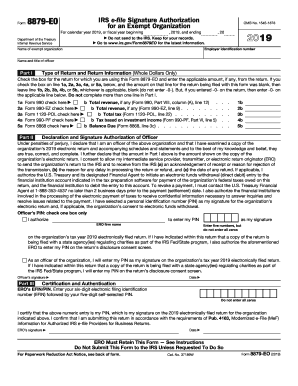
IRS. Keep for your records. Go to www.irs.gov/Form8879EO for the latest information. Department of the Treasury Internal Revenue Service Employer identification number Name of exempt organization Name and title of officer Part I Type of Return and Return Information (Whole Dollars Only) Check the box for the return for which you are using this Form 8879-EO and enter the applicable amount, if any, from the return. If you check the box on line 1a, 2a, 3a, 4a, or 5a, below, and the a.

This website is not affiliated with IRS

How it works

  1. Open form

    Open form follow the instructions

  2. Easily sign form

    Easily sign the form with your finger

  3. Share form

    Send filled & signed form or save

How to fill out the IRS 8879-EO online

The IRS 8879-EO form serves as the e-file signature authorization for exempt organizations, ensuring that an officer can electronically sign the relevant tax return with a personal identification number (PIN). This guide provides clear instructions to help individuals successfully navigate the form online.

Follow the steps to fill out the IRS 8879-EO effectively.

  1. Click ‘Get Form’ button to obtain the form and open it in the editor.
  2. Enter the employer identification number (EIN) and the name of the exempt organization at the top of the form.
  3. In Part I, check the appropriate box indicating the type of return being filed. Enter the amount from the return if applicable. Ensure to complete only one line in this section.
  4. Proceed to Part II to indicate the total revenue and any associated tax as applicable to the selected return. Leave any lines blank if the corresponding amounts from the return are not provided.
  5. Provide a declaration and signature authorization by reviewing the statement carefully. Confirm, by checking the box, whether the officer authorizes the electronic return originator (ERO) to enter their PIN.
  6. Enter the selected five-digit PIN, ensuring it is not all zeros. Sign and date the form to validate the submission.
  7. In Part III, the ERO will complete the required EFIN and self-selected PIN fields and provide their signature and date.
  8. After final review, users can save changes, download the completed form, print it for records, or share it as needed.

Complete the IRS 8879-EO form online today to ensure timely submission and compliance.

Get form

Experience a faster way to fill out and sign forms on the web. Access the most extensive library of templates available.

Related content

Form 8879-EO
Form 8879-EO is an IRS e-file signature authorization for exempt organizations, completed...
Learn more
IRS e-file Signature Authorization for an Exempt...
(Whole Dollars Only). Check the box for the return for which you are using this Form...
Learn more
2019
Apr 1, 2019 — Do Not Submit This Form to the IRS Unless Requested To Do So. 8879-EO. IRS...
Learn more

Related links form

Canada IQAS ECA for Immigration Purposes Application Checklist Canada PPTC 153 2001 NSNP 100 2015 Canada CAFC 909 EFW 2005

Questions & Answers

Get answers to your most pressing questions about US Legal Forms API.

Contact support

An IRS EO update provides important information about changes in tax regulations, compliance requirements, and procedures for exempt organizations. Staying informed about these updates is crucial for organizations using IRS 8879-EO, as it can impact filing processes and responsibilities. Utilizing resources from uslegalforms can assist organizations in keeping up with changes and completing necessary filings accurately.

The difference between a 501c3 and a 503c lies in their tax-exempt purposes. A 501c3 organization is generally a charitable organization, while a 503c designation is for specific tax-exempt social welfare organizations. Understanding these distinctions is important for organizations looking to apply for tax-exempt status and to ensure the appropriate use of IRS 8879-EO in their filings.

The 3-day rule for IRS 8879-EO requires that signed authorization be obtained within three days of filing the electronic return. This means that the organization must manage its documentation carefully to ensure compliance. Adhering to this rule can avoid potential issues with the IRS and helps maintain the integrity of the e-filing process.

Yes, the IRS 8879-EO can be digitally signed, making the e-filing process more convenient for organizations. Digital signatures provide a secure way to authorize tax returns while ensuring compliance with IRS requirements. By using platforms like uslegalforms, organizations can easily generate and e-file documents like the IRS 8879-EO with digital signatures.

Being an exempt entity means that an organization is recognized by the IRS as tax-exempt, often due to its charitable, educational, or religious purpose. These entities can benefit from certain tax advantages, but they must adhere to regulations and requirements outlined by the IRS, including filing IRS 8879-EO. Understanding your status as an exempt entity is vital for compliance and operational planning.

IRS form 8879 EO is an electronic signature authorization for e-filing an exempt organization’s tax return. It serves as a critical document confirming that the person signing the return has the authority to do so. Using IRS 8879-EO helps streamline the e-filing process for tax-exempt organizations and ensures timely submissions.

An IRS tax compliance officer ensures that taxpayers, including those related to the IRS 8879-EO, comply with federal tax laws. They conduct audits, provide guidance on tax obligations, and enforce compliance to protect tax revenue. Their role is crucial in maintaining fair practices and accurate reporting among exempt organizations.

Yes, you can use an electronic signature on your tax return, especially when you're using IRS 8879-EO. This option gives you the flexibility to authorize your preparer to file electronically, streamlining the entire process. Remember that your electronic signature carries the same legal weight as a traditional signature, making it a valid option for submitting your tax returns. Verify the specific requirements in your state to ensure compliance.

While many documents can be electronically signed, certain forms may require a physical signature. For instance, documents like wills or notarized documents often cannot be signed electronically. It's important to confirm which forms can utilize the IRS 8879-EO process to avoid any potential issues. Understanding what can and cannot be electronically signed helps you stay compliant.

Most states recognize electronic signatures for tax returns, especially when using forms like IRS 8879-EO for authorization. However, the allowed practices vary by state, so it's essential to check your specific state's requirements. Embracing electronic signatures not only simplifies your filing process but also aligns with modern tax practices. Be sure to confirm that your state complies before filing electronically.

Get This Form Now!

Use professional pre-built templates to fill in and sign documents online faster. Get access to thousands of forms.
If you believe that this page should be taken down, please follow our DMCA take down processhere.
Get IRS 8879-EO
  • Adoption
  • Bankruptcy
  • Contractors
  • Divorce
  • Home Sales
  • Employment
  • Identity Theft
  • Incorporation
  • Landlord Tenant
  • Living Trust
  • Name Change
  • Personal Planning
  • Small Business
  • Wills & Estates
  • Packages A-Z
  • Affidavits
  • Bankruptcy
  • Bill of Sale
  • Corporate - LLC
  • Divorce
  • Employment
  • Identity Theft
  • Internet Technology
  • Landlord Tenant
  • Living Wills
  • Name Change
  • Power of Attorney
  • Real Estate
  • Small Estates
  • Wills
  • All Forms
  • Forms A-Z
  • Form Library
  • Legal Hub
  • About Us
  • Help Portal
  • Legal Resources
  • Blog
  • Affiliates
  • Contact Us
  • Delete My Account
  • Site Map
  • Industries
  • Forms in Spanish
  • Localized Forms
  • State-specific Forms
  • Forms Kit
  • Real Estate Handbook
  • All Guides
  • Notarize
  • Incorporation services
  • For Consumers
  • For Small Business
  • For Attorneys
  • USLegal
  • FormsPass
  • pdfFiller
  • signNow
  • altaFlow
  • DocHub
  • Instapage
Form Packages
  • Adoption
  • Bankruptcy
  • Contractors
  • Divorce
  • Home Sales
  • Employment
  • Identity Theft
  • Incorporation
  • Landlord Tenant
  • Living Trust
  • Name Change
  • Personal Planning
  • Small Business
  • Wills & Estates
  • Packages A-Z
Form Categories
  • Affidavits
  • Bankruptcy
  • Bill of Sale
  • Corporate - LLC
  • Divorce
  • Employment
  • Identity Theft
  • Internet Technology
  • Landlord Tenant
  • Living Wills
  • Name Change
  • Power of Attorney
  • Real Estate
  • Small Estates
  • Wills
  • All Forms
  • Forms A-Z
  • Form Library
Customer Service
  • Legal Hub
  • About Us
  • Help Portal
  • Legal Resources
  • Blog
  • Affiliates
  • Contact Us
  • Delete My Account
  • Site Map
  • Industries
  • Forms in Spanish
  • Localized Forms
  • State-specific Forms
  • Forms Kit
Legal Guides
  • Real Estate Handbook
  • All Guides
Prepared for you
  • Notarize
  • Incorporation services
Our Customers
  • For Consumers
  • For Small Business
  • For Attorneys
Our Sites
  • USLegal
  • FormsPass
  • pdfFiller
  • signNow
  • altaFlow
  • DocHub
  • Instapage
Social Media
Call us now toll free:
+1 833 426 79 33
As seen in:
© Copyright 1999-2026 airSlate Legal Forms, Inc. 3720 Flowood Dr, Flowood, Mississippi 39232
  • Your Privacy Choices
  • Terms of Service
  • Privacy Notice
  • Content Takedown Policy
  • Bug Bounty Program
IRS 8879-EO
This form is available in several versions.
Select the version you need from the drop-down list below.
2020 IRS 8879-EO
Select form
  • 2020 IRS 8879-EO
  • 2019 IRS 8879-EO
  • 2018 IRS 8879-EO
  • 2017 IRS 8879-EO
  • 2016 IRS 8879-EO
  • 2015 IRS 8879-EO
  • 2013 IRS 8879-EO
Select form