Ts A and B. Step 2: Provide a copy of Wisconsin Temporary Event Operator and Seller Information (Form S 240) with Parts A and B completed to each seller participating in your event. To obtain additional copies of Form S 240 go to the Department of Revenue s website at revenue.wi.gov/ forms/sales/index.html. If you prefer, you may use the fill in form available from the same website. Step 3: Submission Event Operator. Submit compiled vendor information to the department as soon as.

How it works
  • Open form

    Open form follow the instructions

  • Easily sign form

    Easily sign the form with your finger

  • Share form

    Send filled & signed form or save

How to fill out the WI DoR S-240 online

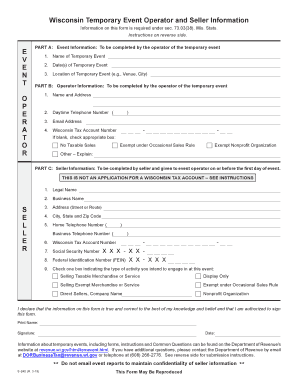
The WI DoR S-240 form is essential for individuals and entities participating as operators and sellers at temporary events in Wisconsin. This guide will provide you with step-by-step instructions to successfully complete the form online, ensuring compliance with state regulations.

Follow the steps to complete the WI DoR S-240 online.

  1. Click ‘Get Form’ button to obtain the form and open it in the editor. This will allow you to access the necessary fields to fill out the form correctly.
  2. In Part A, fill out the event information which includes the name of the temporary event, the date(s) of the event, and the location where it will take place.
  3. In Part B, provide your operator information by entering your name, address, daytime telephone number, email address, and Wisconsin tax account number. If you do not have a tax account number, check the appropriate box to indicate the reason.
  4. In Part C, complete the seller information section. Include the legal name, business name, address, telephone numbers, Wisconsin tax account number, and the last four digits of your social security number or federal identification number.
  5. Indicate the type of activity you intend to engage in at the event by checking the relevant box, such as selling taxable or exempt merchandise.
  6. Sign and date the form, confirming that the information provided is accurate to the best of your knowledge. Ensure you maintain a copy for your records.
  7. Submit the completed form to the event operator on or before the first day of the event. This ensures that all required information has been recorded and processed.
  8. Once you have completed the necessary steps, you can save your changes, download a copy, print the form, or share it as needed.

Complete your WI DoR S-240 form online today to ensure your participation in temporary events!

Get form

Experience a faster way to fill out and sign forms on the web. Access the most extensive library of templates available.

Related content

October 2023 S-240 Wisconsin Temporary Event...

Temporary event operators must complete and submit Form S-240 with information about each...

Learn more
TEMPORARY EVENTS FORM S-240

Form S-240 is for temporary events where taxable items are sold. Market management must...

Learn more
Manual do usuário

Conecte essa TV LED Smart Philips à Internet e descubra um novo mundo de televisão...

Learn more
Questions & Answers

Get answers to your most pressing questions about US Legal Forms API.

Contact support

What is an S240?

An S240, specifically the WI DoR S-240, relates to specific tax identification and state tax obligations in Wisconsin. This form is instrumental for businesses looking to manage their tax responsibilities efficiently. Utilizing the resources associated with the WI DoR S-240 can significantly simplify the tax process.

A Wisconsin tax ID number typically consists of 15 digits. This number is vital for identifying your business for tax purposes. When using tools like the WI DoR S-240, you can ensure you're working with accurate and appropriate identifiers.

Yes, you can find your Wisconsin tax ID number online through the Wisconsin Department of Revenue portal. You may need to provide certain identifying information to access your account. The WI DoR S-240 can guide you through the online retrieval process efficiently.

You can find Wisconsin tax forms on the Wisconsin Department of Revenue's official website. The site offers a comprehensive list of available forms for various tax-related needs. Utilizing the WI DoR S-240 can also assist you in obtaining and understanding the necessary forms.

To locate your Wisconsin tax ID number, review your business records or previous tax filings. If you do not have access to these documents, you can contact the Wisconsin Department of Revenue for assistance. Integrating tools like the WI DoR S-240 can help you manage your tax identification more efficiently.

Your state tax ID number is a unique identifier that the state uses for tax purposes, including sales tax and employment tax. This number is critical for businesses operating in Wisconsin. If you’re new to navigating tax matters, resources like the WI DoR S-240 can help clarify any confusion regarding tax IDs.

To apply for tax exemption in Wisconsin, you need to complete the appropriate forms available on the Wisconsin Department of Revenue's website. It is important to adhere to guidelines specified for your exemption type. For clarity, the WI DoR S-240 can provide necessary insights and streamline your application process.

You can find your Wisconsin tax number by checking your tax documents, such as previous tax returns or official correspondence from the Wisconsin Department of Revenue. If you cannot locate any documents, you can contact the Department directly for assistance. By using the WI DoR S-240, you can ensure the accuracy of your tax identification process.

To manage sales tax step by step, start by registering your business to collect taxes using the WI DoR S-240 form. Next, keep detailed records of all sales transactions and the taxes collected. Then, periodically file your sales tax returns to the Wisconsin Department of Revenue, ensuring you report accurate amounts. Lastly, submit your collected sales taxes on time to avoid penalties, helping you remain compliant.

You can acquire a Wisconsin sales tax ID number by submitting an application through the WI DoR S-240 form. This online process ensures that you provide the necessary business information efficiently. Once submitted, you will receive your sales tax ID number, which is essential for collecting sales tax on your taxable sales. Remember, obtaining this ID is a crucial step for compliance and business operations in Wisconsin.

Get This Form Now!

Use professional pre-built templates to fill in and sign documents online faster. Get access to thousands of forms.

If you believe that this page should be taken down, please follow our DMCA take down process here.

Get WI DoR S-240