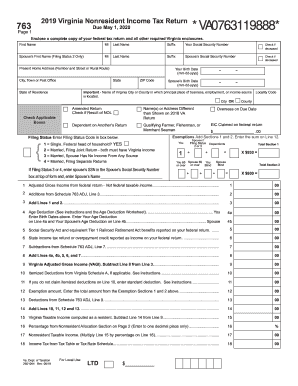
Get Va Dot 763 2019
How it works
-

Open form follow the instructions
-

Easily sign the form with your finger
-

Send filled & signed form or save
How to fill out the VA DoT 763 online
The VA DoT 763 is an important document for filing Virginia nonresident income tax returns. This guide will provide clear, step-by-step instructions on how to fill out each section of the form online, ensuring a smooth and accurate filing experience.
Follow the steps to complete your VA DoT 763 effectively.
- Click the ‘Get Form’ button to access the form and open it in your digital platform.
- Begin by completing your personal information. Enter your first name, middle initial, last name, and suffix in the designated fields. Be sure to include your Social Security number and check the box if you are deceased.
- If you are filing jointly, provide your spouse’s personal details. Include their first name, middle initial, last name, suffix, and Social Security number, along with their birth date, and mark if deceased.
- Fill in your present home address, including number, street, city, state, and ZIP code. Ensure that this information is current.
- Identify your locality code and provide your state of residence. Complete the required checkboxes relevant to your tax situation.
- Enter your exemptions as instructed, summing up the values from Sections 1 and 2, and include the total on Line 12.
- Select your filing status by entering the appropriate Filing Status Code in the designated box below.
- Complete the income sections, starting with the adjusted gross income from your federal return on Line 1. Add any necessary additions and subtractions as instructed in the lines that follow.
- Calculate your Virginia taxable income and determine any credits. Enter these amounts accurately in their respective lines.
- If applicable, fill out the Direct Deposit section to expedite any potential refund.
- Review all entered information for accuracy and completeness before finalizing your form.
- Once you have completed the form, you can save your changes, download the document, print a copy, or share it as necessary for submission.
Complete your VA DoT 763 online now to ensure timely processing of your tax return.
Get form
Related links form
You may encounter issues with electronic filing for numerous reasons, such as having a tax form that is not eligible for e-filing or technical problems with your filing software. Additionally, if your income includes complex situations requiring special documentation, your VA DoT 763 may not qualify for electronic submission. It's advisable to review your specific situation and consult local tax authorities or professionals for assistance to ensure a smooth filing process.