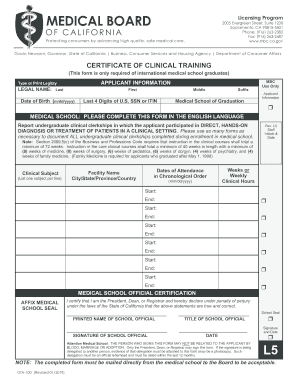
Ol graduates) APPLICANT INFORMATION Type or Print Legibly LEGAL NAME: Last First Date of Birth (m/dd/yyyy) Middle Last 4 Digits of U.S. SSN or ITIN Suffix Medical School of Graduation MBC Use Only Applicant Information MEDICAL SCHOOL: PLEASE COMPLETE THIS FORM IN THE ENGLISH LANGUAGE Report undergraduate clinical clerkships in which the applicant participated in DIRECT, HANDS-ON DIAGNOSIS OR TREATMENT OF PATIENTS IN A CLINICAL SETTING. Please use as many forms as necessary to do.
Open form follow the instructions
Easily sign the form with your finger
Send filled & signed form or save
How to fill out the CA 07A-100 L5 online
The CA 07A-100 L5 form is essential for international medical school graduates seeking certification of clinical training in California. This guide provides clear and concise instructions to facilitate the online completion of this important document.
Follow the steps to efficiently fill out the CA 07A-100 L5 online
- Click the ‘Get Form’ button to obtain the form and access it in your online editor.
- Begin by entering the legal name of the applicant in the designated fields, ensuring accuracy in the last name, first name, middle name, and any suffix.
- Input the date of birth in the specified format (m/dd/yyyy) and provide the last four digits of the U.S. social security number or individual taxpayer identification number.
- List the medical school of graduation, ensuring it is completed in the English language as specified.
- Detail the undergraduate clinical clerkships the applicant participated in, focusing solely on hands-on diagnosis or treatment. Use one line per clinical subject and include the facility name, city, state, province, and country.
- Indicate the dates of attendance for each clerkship in chronological order using the format (mm/dd/yyyy) for both start and end dates.
- For each clerkship, indicate the total weeks or clinical hours completed.
- The medical school official must certify the information by providing their printed name, title, and signature, along with the date.
- Ensure that the signature does not come from a relative of the applicant, as specified, and attach any necessary delegation evidence if needed.
- After completing all sections, be sure to save changes, and download or print the form as necessary. Remember that the completed form must be mailed directly from the medical school to the Board for acceptance.
Begin completing your CA 07A-100 L5 form online today.
Experience a faster way to fill out and sign forms on the web. Access the most extensive library of templates available.
Related content
Nov 4, 2010 — 07A-100-L5 (Rev. 12/05). 60. Page 24. STATE OF CALIFORNIA •• STATE AND...
by C Bethge · 2011 · Cited by 53 — wavelength imaging telescope for full-disk synoptic...
Feb 10, 2016 — Availability of several computing module partners for customization for...
Get answers to your most pressing questions about US Legal Forms API.
When should I file CA-7?
You should file a CA-7 form as soon as you realize you have an eligible loss of wages due to a work-related injury or illness. Early filing helps ensure you receive the benefits needed to support your recovery. Make sure to stay informed about the CA 07A-100 L5 and any associated deadlines to avoid potential issues with your claim.
How long can you be on federal workers' compensation?
The duration of federal workers' compensation coverage varies based on the specifics of each case. Generally, you can remain on benefits as long as you are unable to return to work due to your job-related injury or illness. It is essential to keep track of your eligibility and consult with your representative about the CA 07A-100 L5 for accurate timelines.
What is CA7 used for?
CA7 is a tool used primarily for tracking and managing the workload of CA-7 forms within the workers' compensation framework. It provides a structured approach to monitor claims and ensure compliance with federal regulations. By integrating CA 07A-100 L5 into your processes, you can enhance oversight and improve claim management.
What is CA-7 workload automation?
CA-7 workload automation is a system designed to streamline the handling of CA-7 forms and related processes. This technology can significantly reduce the time spent on administrative tasks, improving efficiency and accuracy. By utilizing CA 07A-100 L5 features, organizations can ensure claims are processed promptly, which benefits all parties involved.
What is a CA-7 job?
7 job refers to a specific position or task that involves managing and processing CA7 forms within the federal workers' compensation system. Individuals in these roles often assist employees in completing their forms accurately and submitting them in a timely manner. Understanding the CA 07A100 L5 helps streamline this process for those handling workers' compensation claims.
How do I file CA-7 on Ecomp?
Filing a CA-7 on Ecomp is a straightforward process. First, log into your Ecomp account and navigate to the claims section. Once there, you will find the CA 07A-100 L5 form available for completion. Fill out the required fields, attach any necessary documents, and submit your form for processing.
What is a CA-7 form used for?
7 form is used to report wage loss related to job injuries or illnesses covered under federal workers' compensation. This form allows employees to request compensation for lost earnings while they recover. Understanding the purpose of the CA 07A100 L5 is crucial for ensuring that you receive the appropriate benefits during your recovery period.
How long does it take for a CA-7 to get approved?
The approval time for a CA-7 form can vary based on many factors, including the complexity of the claim and the quality of the submitted information. Typically, you can expect a decision within a few weeks. However, if additional documentation is needed, this process may take longer. Be sure to provide complete and accurate information to expedite the approval of your CA 07A-100 L5.
Use professional pre-built templates to fill in and sign documents online faster. Get access to thousands of forms.
If you believe that this page should be taken down, please follow our DMCA take down process here.