Loading
Form preview
  • US Legal Forms
  • Form Library
  • Tax Forms
  • Virginia Tax Forms
  • Va Dot 502 2019

Get Va Dot 502 2019

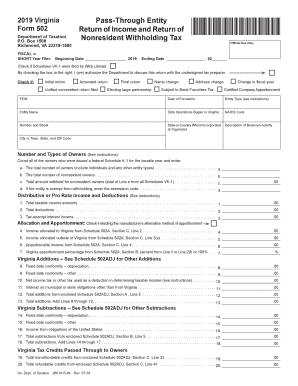
FISCAL or SHORT Year Filer: Beginning Date 2018; Ending Date , 20 Check if Schedules VK-1 were filed by Web Upload By checking the box to the right, I (we) authorize the Department to discuss this return with the undersigned tax preparer. Check if: Initial return Unified nonresident return filed Amended return Final return Electing large partnership Name change Address change Subject.

How it works

  1. Open form

    Open form follow the instructions

  2. Easily sign form

    Easily sign the form with your finger

  3. Share form

    Send filled & signed form or save

How to fill out the VA DoT 502 online

Filling out the VA DoT 502 form is an essential task for pass-through entities operating in Virginia, ensuring compliance with state tax regulations. This guide provides clear, step-by-step instructions to help users successfully complete this form online.

Follow the steps to effectively complete the VA DoT 502 form.

  1. Press the ‘Get Form’ button to access the VA DoT 502 form and open it in the online editor.
  2. Indicate whether you are filing as an initial return, amended return, or final return by checking the appropriate box. This step is crucial as it impacts the assessment of your tax obligations.
  3. Enter the fiscal year start and end dates in the designated fields to specify the time period for which you are reporting.
  4. Fill in your entity information, including the federal employer identification number (FEIN), date of formation, entity type, and name. Ensure all details are accurate to avoid processing delays.
  5. Complete the information about your business operations, including the date operations began in Virginia, the NAICS code, and a brief description of your business activity.
  6. Provide details about the owners, specifically total owners, nonresident owners, and the total amount withheld for nonresident owners. This information helps calculate tax withholdings properly.
  7. Fill in the income amounts, deductions, and other relevant figures as specified in the various lines of the form to accurately reflect the financial activities of your entity.
  8. Complete the sections related to withholding payment reconciliation, indicating any offsets such as overpayments and the total withholding tax due.
  9. Review all entries for accuracy before saving. Make sure you have filled in every required field to prevent any issues.

Complete your VA DoT 502 form online efficiently today!

Get form

Experience a faster way to fill out and sign forms on the web. Access the most extensive library of templates available.

Related content

2022 Form 502 - Pass-Through Entity Return of...
Include a copy of your federal return with Form 502. Important: do not include a federal...
Learn more
VA Louisville Health Care | Veterans Affairs
Robley Rex Department of Veterans Affairs Medical Center ; Main phone: 502-287-4000Main...
Learn more
INSTRUÇÕES DE USO GRAVADOR DIGITAL DE VOZ
s Inclui uma tela “full-dot” com iluminação (Painel LCD). s Compatível com a...
Learn more

Related links form

NE Form 521 2011 NY 6 NYCRR 367 NY Auxiliary Police Officer Candidate Questionnaire NY DEP WQ-D-001 2010

Questions & Answers

Get answers to your most pressing questions about US Legal Forms API.

Contact support

Making a VA PTET election involves submitting the election form to the state by the prescribed due date. It’s essential to check the latest guidelines provided by the Virginia Department of Taxation. Utilizing resources like the VA DoT 502 can simplify the steps needed to successfully execute your election.

To make a Virginia PTET election, complete the necessary election form and file it with the Virginia Department of Taxation. This must be done within the specified deadline to ensure eligibility for the benefit. The VA DoT 502 can help guide you through this process and ensure you are correctly registered.

While the Pass-Through Entity Tax (PTET) can offer certain benefits, it also has drawbacks. One disadvantage is the potential for increased administrative costs due to compliance with additional tax reporting. Additionally, understanding the nuances of the VA DoT 502 must be considered to fully grasp how PTET affects your business tax situation.

To make an 831 b election, you need to file the election statement with the IRS on or before the tax return due date. This election allows certain small insurance companies the opportunity to choose special tax treatment. By using the VA DoT 502, you can better manage your tax obligations related to this election.

You can file Form 502 with the Virginia Department of Taxation. The department's online portal offers the easiest method for submitting your VA DoT 502 form. Alternatively, you can also mail your completed form to the indicated address on the document, ensuring you follow all mailing instructions correctly.

To make a Section 528 election in Virginia, you must complete the appropriate paperwork and submit it to the Virginia Department of Taxation. The VA DoT 502 form needs to be filled out accurately, providing necessary information about your business. Ensure that you file your election on or before the due date specified by the department to avoid penalties.

Yes, Virginia requires nonresident withholding for certain types of income earned by nonresidents. If you earn income in Virginia as a nonresident, you may need to ensure proper withholding to comply with state tax regulations. Understanding the requirements for nonresident withholding helps you navigate the complexities of your tax filings, including the use of the VA DoT 502.

The VA tax return should be sent to the designated address mentioned in the tax return instructions. This can vary based on whether you're filing electronically or by mail. When you use the VA DoT 502, you ensure you have the right information at hand and reduce the chance of errors in your filing.

Virginia Form 500 should also be mailed to the address specified within the form's instruction booklet. It's crucial to be diligent in ensuring you are sending it to the right location to avoid any processing issues. By using the VA DoT 502, your experience with your tax documentation could become much simpler and clearer.

You should mail your VA Form 502 to the address specified in the instructions provided with the form. Make sure to check the latest details on the Virginia Department of Taxation's website for any updates. Utilizing the VA DoT 502 allows you to file accurately, ensuring no missteps in sending your forms to the correct location.

Get This Form Now!

Use professional pre-built templates to fill in and sign documents online faster. Get access to thousands of forms.
If you believe that this page should be taken down, please follow our DMCA take down processhere.
Get VA DoT 502
  • Adoption
  • Bankruptcy
  • Contractors
  • Divorce
  • Home Sales
  • Employment
  • Identity Theft
  • Incorporation
  • Landlord Tenant
  • Living Trust
  • Name Change
  • Personal Planning
  • Small Business
  • Wills & Estates
  • Packages A-Z
  • Affidavits
  • Bankruptcy
  • Bill of Sale
  • Corporate - LLC
  • Divorce
  • Employment
  • Identity Theft
  • Internet Technology
  • Landlord Tenant
  • Living Wills
  • Name Change
  • Power of Attorney
  • Real Estate
  • Small Estates
  • Wills
  • All Forms
  • Forms A-Z
  • Form Library
  • Legal Hub
  • About Us
  • Help Portal
  • Legal Resources
  • Blog
  • Affiliates
  • Contact Us
  • Delete My Account
  • Site Map
  • Industries
  • Forms in Spanish
  • Localized Forms
  • State-specific Forms
  • Forms Kit
  • Real Estate Handbook
  • All Guides
  • Notarize
  • Incorporation services
  • For Consumers
  • For Small Business
  • For Attorneys
  • USLegal
  • FormsPass
  • pdfFiller
  • signNow
  • altaFlow
  • DocHub
  • Instapage
Form Packages
  • Adoption
  • Bankruptcy
  • Contractors
  • Divorce
  • Home Sales
  • Employment
  • Identity Theft
  • Incorporation
  • Landlord Tenant
  • Living Trust
  • Name Change
  • Personal Planning
  • Small Business
  • Wills & Estates
  • Packages A-Z
Form Categories
  • Affidavits
  • Bankruptcy
  • Bill of Sale
  • Corporate - LLC
  • Divorce
  • Employment
  • Identity Theft
  • Internet Technology
  • Landlord Tenant
  • Living Wills
  • Name Change
  • Power of Attorney
  • Real Estate
  • Small Estates
  • Wills
  • All Forms
  • Forms A-Z
  • Form Library
Customer Service
  • Legal Hub
  • About Us
  • Help Portal
  • Legal Resources
  • Blog
  • Affiliates
  • Contact Us
  • Delete My Account
  • Site Map
  • Industries
  • Forms in Spanish
  • Localized Forms
  • State-specific Forms
  • Forms Kit
Legal Guides
  • Real Estate Handbook
  • All Guides
Prepared for you
  • Notarize
  • Incorporation services
Our Customers
  • For Consumers
  • For Small Business
  • For Attorneys
Our Sites
  • USLegal
  • FormsPass
  • pdfFiller
  • signNow
  • altaFlow
  • DocHub
  • Instapage
Social Media
Call us now toll free:
+1 833 426 79 33
As seen in:
© Copyright 1999-2026 airSlate Legal Forms, Inc. 3720 Flowood Dr, Flowood, Mississippi 39232
  • Your Privacy Choices
  • Terms of Service
  • Privacy Notice
  • Content Takedown Policy
  • Bug Bounty Program
VA DoT 502
This form is available in several versions.
Select the version you need from the drop-down list below.
2021 VA DoT 502
Select form
  • 2021 VA DoT 502
  • 2020 VA DoT 502
  • 2019 VA DoT 502
  • 2018 VA DoT 502
  • 2011 VA DoT 502
Select form