Loading
Form preview
  • US Legal Forms
  • Other Templates
  • Tax Forms
  • Executive Department Treasury IRS Forms
  • Irs 1040 - Schedule H 2019

Get Irs 1040 - Schedule H 2019

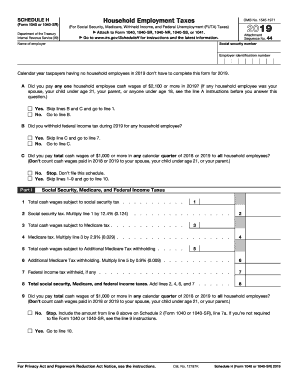
At are taxable for FUTA tax also taxable for your state s unemployment tax? . . . . . 10 11 12 Next: If you checked the Yes box on all the lines above, complete Section A. If you checked the No box on any of the lines above, skip Section A and complete Section B. Section A 13 Name of the state where you paid unemployment contributions 14 Contributions paid to your state unemployment fund . . . . . . 14 15 Total cash wages subject to FUTA tax . . . . . . . . . . . . . . . . .

This website is not affiliated with IRS

How it works

  1. Open form

    Open form follow the instructions

  2. Easily sign form

    Easily sign the form with your finger

  3. Share form

    Send filled & signed form or save

How to fill out the IRS 1040 - Schedule H online

Filling out the IRS 1040 - Schedule H is essential for those who have employed household workers and need to report household employment taxes. This guide provides clear, step-by-step instructions to assist users in completing the form online.

Follow the steps to successfully complete the IRS 1040 - Schedule H.

  1. Click ‘Get Form’ button to obtain the form and open it in the editor.
  2. Begin with entering your social security number and the name of the employer in the appropriate fields at the top of the form.
  3. Complete the employer identification number section, if applicable, for easier identification.
  4. Answer question A regarding whether you paid any household employee cash wages of $2,100 or more. If yes, skip to line 1; if no, proceed to question B.
  5. In question B, indicate whether you withheld federal income tax during the year. Answer appropriately and proceed to question C.
  6. For question C, state if you paid total cash wages of $1,000 or more in any quarter of the year to household employees, skipping to line 10 if the answer is yes.
  7. In Part I, report total cash wages subject to social security tax and calculate the total social security tax due.
  8. Continue with Medicare tax calculations, stating the necessary amounts in the respective fields for total cash wages and calculating the total Medicare tax.
  9. If applicable, fill out Part II regarding federal unemployment tax, following the instructions provided in sections A and B as required.
  10. Complete the final sections, including any additional taxes and the total amounts due for household employment taxes.
  11. Once you have filled in all sections, save your changes and choose to download, print, or share the completed form as per your preference.

Complete your IRS 1040 - Schedule H online to ensure accurate reporting of household employment taxes.

Get form

Experience a faster way to fill out and sign forms on the web. Access the most extensive library of templates available.

Related content

About Schedule H (Form 1040), Household Employment...
Jan 17, 2025 — Use Schedule H (Form 1040) to report household employment taxes if you...
Learn more
FORM 1040
Schedule I.—NONTAXABLE INCOME OTHER THAN INTEREST REPORTED IN SCHEDULE B. ... Schedule...
Learn more
2017 General Instructions for Forms W-2 and W-3
May 2, 2017 — On Form W-3 check the “Hshld. emp.” checkbox in box b. For more...
Learn more

Related links form

YMCA of Metropolitan Washington Employment Application Your Best Friend's Friend Employment Application Form AAA Insurance 575-12 AARP D18358

Questions & Answers

Get answers to your most pressing questions about US Legal Forms API.

Contact support

Schedule B is a form attached to the IRS 1040 that reports interest and dividend income. If you have received substantial income from these sources, it's essential to fill out Schedule B to ensure your tax return is complete and accurate. Understanding its role, alongside other schedules like the IRS 1040 - Schedule H, can enhance your overall tax comprehension. For assistance with filling out Schedule B, consider using US Legal Forms to simplify the process.

A schedule form is a supplementary attachment to your main tax form, like the IRS 1040. These forms provide additional details regarding specific income types, deductions, or credits that are not included in the standard return. For instance, the IRS 1040 - Schedule H is specifically for reporting household employee wages. Proper completion of these schedules ensures compliance and can optimize your tax return.

The main tax filing form in the United States is the IRS 1040. This form serves as the cornerstone for individual tax reporting and calculates your total income, deductions, and tax liability. Depending on your circumstances, you may need to file additional schedules, like the IRS 1040 - Schedule H, which addresses household employment taxes. Utilizing platforms like US Legal Forms can guide you through accurately completing the IRS 1040.

Schedule 1, 2, and 3 are additional forms attached to the IRS 1040 tax return that report various income, adjustments, and credits. Schedule 1 captures additional income like unemployment or rental income, while Schedule 2 deals with additional taxes owed, such as self-employment tax. Schedule 3 covers nonrefundable credits that can reduce the amount of tax owed. Understanding these schedules is essential for accurate filing and ensures you maximize your tax benefits.

Choosing between IRS 1040 and 1040NR depends on your residency status. If you are a U.S. resident, use the 1040 form; if you are a non-resident alien, then the 1040NR is your best option. Using the incorrect form could lead to delays or issues with your tax return. For additional clarity on your residency status and the appropriate form to use, consider checking resources like UsLegalForms.

To attach forms to your tax return, ensure that you follow the instructions provided for each form, including the IRS 1040 - Schedule H. Generally, you should place the additional forms behind your main tax return when filing by mail. If you're using e-filing, the software will usually guide you through the process of attaching any necessary forms. Always double-check to ensure all forms are included for a complete submission.

The primary difference between the IRS 1040 and 1040SR forms lies in the target audience. The 1040 form serves all taxpayers, while the 1040SR is specifically designed for seniors aged 65 and older. For seniors, the 1040SR has larger print and simplifies the process by eliminating the need for Schedule H unless necessary. When choosing the right form, consider your age and income sources for a smoother tax filing experience.

Schedules 1, 2, and 3 are additional forms that accompany the IRS 1040 to report various types of income and tax adjustments. Schedule 1 deals with other income sources, while Schedule 2 includes additional taxes, and Schedule 3 covers nonrefundable credits. By using these schedules along with your IRS 1040, you can ensure that all your tax scenarios are accurately represented.

The IRS 1040 and W-2 serve different purposes in the tax filing process. A W-2 form is issued by your employer and shows your earned income and taxes withheld for the year. In contrast, the IRS 1040 is the main form you use to file your taxes and summarize all your income, including the income reported on your W-2.

Your choice between 1040 and 1040 NR depends on your residency status. The IRS 1040 - Schedule H is for U.S. citizens and residents, while 1040 NR is for nonresident aliens. Understanding your residency can ensure proper tax treatment. If you're uncertain, accessing platforms like US Legal Forms can provide additional support, helping you make an informed decision.

Get This Form Now!

Use professional pre-built templates to fill in and sign documents online faster. Get access to thousands of forms.
If you believe that this page should be taken down, please follow our DMCA take down processhere.
Get IRS 1040 - Schedule H
  • Adoption
  • Bankruptcy
  • Contractors
  • Divorce
  • Home Sales
  • Employment
  • Identity Theft
  • Incorporation
  • Landlord Tenant
  • Living Trust
  • Name Change
  • Personal Planning
  • Small Business
  • Wills & Estates
  • Packages A-Z
  • Affidavits
  • Bankruptcy
  • Bill of Sale
  • Corporate - LLC
  • Divorce
  • Employment
  • Identity Theft
  • Internet Technology
  • Landlord Tenant
  • Living Wills
  • Name Change
  • Power of Attorney
  • Real Estate
  • Small Estates
  • Wills
  • All Forms
  • Forms A-Z
  • Other Templates
  • Legal Hub
  • About Us
  • Help Portal
  • Legal Resources
  • Blog
  • Affiliates
  • Contact Us
  • Delete My Account
  • Site Map
  • Industries
  • Forms in Spanish
  • Localized Forms
  • State-specific Forms
  • Forms Kit
  • Real Estate Handbook
  • All Guides
  • Notarize
  • Incorporation services
  • For Consumers
  • For Small Business
  • For Attorneys
  • USLegal
  • FormsPass
  • pdfFiller
  • signNow
  • altaFlow
  • DocHub
  • Instapage
Form Packages
  • Adoption
  • Bankruptcy
  • Contractors
  • Divorce
  • Home Sales
  • Employment
  • Identity Theft
  • Incorporation
  • Landlord Tenant
  • Living Trust
  • Name Change
  • Personal Planning
  • Small Business
  • Wills & Estates
  • Packages A-Z
Form Categories
  • Affidavits
  • Bankruptcy
  • Bill of Sale
  • Corporate - LLC
  • Divorce
  • Employment
  • Identity Theft
  • Internet Technology
  • Landlord Tenant
  • Living Wills
  • Name Change
  • Power of Attorney
  • Real Estate
  • Small Estates
  • Wills
  • All Forms
  • Forms A-Z
  • Other Templates
Customer Service
  • Legal Hub
  • About Us
  • Help Portal
  • Legal Resources
  • Blog
  • Affiliates
  • Contact Us
  • Delete My Account
  • Site Map
  • Industries
  • Forms in Spanish
  • Localized Forms
  • State-specific Forms
  • Forms Kit
Legal Guides
  • Real Estate Handbook
  • All Guides
Prepared for you
  • Notarize
  • Incorporation services
Our Customers
  • For Consumers
  • For Small Business
  • For Attorneys
Our Sites
  • USLegal
  • FormsPass
  • pdfFiller
  • signNow
  • altaFlow
  • DocHub
  • Instapage
Social Media
Call us now toll free:
+1 833 426 79 33
As seen in:
© Copyright 1999-2026 airSlate Legal Forms, Inc. 17 Station Street, Ste. 203, Brookline, MA 02445
  • Your Privacy Choices
  • Terms of Service
  • Privacy Notice
  • Content Takedown Policy
  • Bug Bounty Program
IRS 1040 - Schedule H
This form is available in several versions.
Select the version you need from the drop-down list below.
2024 IRS 1040 - Schedule H
Select form
  • 2024 IRS 1040 - Schedule H
  • 2022 IRS 1040 - Schedule H
  • 2020 IRS 1040 - Schedule H
  • 2019 IRS 1040 - Schedule H
  • 2018 IRS 1040 - Schedule H
  • 2017 IRS 1040 - Schedule H
  • 2016 IRS 1040 - Schedule H
  • 2015 IRS 1040 - Schedule H
  • 2014 IRS 1040 - Schedule H
  • 2013 IRS 1040 - Schedule H
  • 2011 IRS 1040 - Schedule H
  • 2010 IRS 1040 - Schedule H
  • IRS 1040 - Schedule H_DSA
Select form