Loading
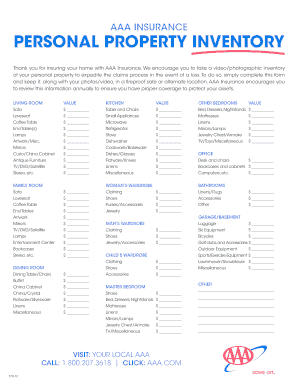
Get Aaa Insurance 575-12
How it works
-

Open form follow the instructions
-

Easily sign the form with your finger
-

Send filled & signed form or save
How to fill out the AAA Insurance 575-12 online
Completing the AAA Insurance 575-12 form can help ensure that you have a comprehensive inventory of your personal property. This guide will walk you through each step of filling out the form online, making the process simple and efficient.
Follow the steps to complete your personal property inventory form.
- Click ‘Get Form’ button to obtain the form and open it in the editor.
- Begin by entering the value of each item in the appropriate categories listed, such as Living Room, Kitchen, and Bedrooms. Be as detailed as possible to ensure accurate documentation of your possessions.
- For each item listed, input the estimated value in the blank spaces provided next to the item descriptions. This may include furniture, appliances, and miscellaneous items.
- Review all entries for accuracy and ensure that all significant items have been included in your inventory.
- Once you have completed the form, ensure you save your changes. This will allow you to keep a record of your personal property inventory.
- Consider downloading or printing the form to keep a physical copy in a safe location, ideally alongside any photos or videos you have taken of your items.
- Annually review and update this inventory to reflect any new purchases or disposals to maintain suitable coverage.
Start completing your AAA Insurance 575-12 form online today for better protection of your assets.
Filing an automobile insurance claim involves three straightforward steps: notify your insurance company, gather information, and submit the claim. Begin by contacting AAA Insurance 575-12 to report the accident. Afterward, collect all relevant documentation and evidence. Finally, submit your claim to ensure a seamless processing experience.