Loading
Form preview
  • US Legal Forms
  • Other Templates
  • Tax Forms
  • Executive Department Treasury IRS Forms
  • Irs Instruction 1099-b 2019

Get Irs Instruction 1099-b 2019

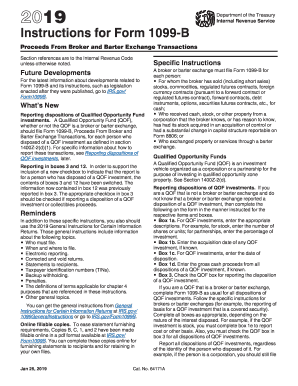
Herwise noted. Future Developments For the latest information about developments related to Form 1099-B and its instructions, such as legislation enacted after they were published, go to IRS.gov/ Form1099B. Reminder In addition to these specific instructions, you should also use the 2018 General Instructions for Certain Information Returns. Those general instructions include information about the following topics. Who must file (nominee/middleman; certain FFIs and U.S. payers that report on.

This website is not affiliated with IRS

How it works

  1. Open form

    Open form follow the instructions

  2. Easily sign form

    Easily sign the form with your finger

  3. Share form

    Send filled & signed form or save

How to fill out the IRS Instruction 1099-B online

Filling out the IRS Instruction 1099-B online is an essential process for reporting proceeds from broker and barter exchange transactions. This guide provides clear, step-by-step instructions tailored for users of all experience levels, ensuring accurate completion of the form.

Follow the steps to complete the IRS Instruction 1099-B effectively.

  1. Click ‘Get Form’ button to obtain the form and open it in the editor.
  2. Begin by entering your information in the designated fields including your name, address, and taxpayer identification number (TIN). Ensure that all details are accurate, as errors can result in delays or penalties.
  3. In box 1a, provide a brief description of the property or securities involved in the transaction, including the number of shares and the type of investment.
  4. Enter the acquisition date of the securities in box 1b. If the securities were acquired on various dates, leave this box blank.
  5. Indicate the date of disposition in box 1c, which is critical for determining the holding period and any potential capital gains.
  6. In box 1d, report the gross cash proceeds from the sale of the securities. If a loss occurred, report it as a negative amount.
  7. Complete box 1e to reflect the cost or other basis of the securities sold. If you check box 5 for a noncovered security, this box can be left blank.
  8. Use box 2 to classify whether the gain or loss is short-term or long-term based on the holding period of the asset.
  9. If applicable, check box 3 to indicate whether the proceeds are from collectibles or Qualified Opportunity Fund (QOF) investments.
  10. Enter any federal income tax withheld in box 4 if backup withholding applies.
  11. Complete any additional boxes relevant to your transaction, such as boxes for accrued market discounts or wash sale losses.
  12. Once all sections are completed, review the form for accuracy. Save your changes, and you may download, print, or share the completed form as needed.

Prepare and file your IRS Instruction 1099-B online to ensure compliance and avoid penalties.

Get form

Experience a faster way to fill out and sign forms on the web. Access the most extensive library of templates available.

Related content

Instructions for Form 1099-B (2025)
Jan 16, 2025 — A broker or barter exchange must file Form 1099-B for each person:...
Learn more
26 CFR § 1.6045-3 - Information reporting for an...
A broker must furnish Form 1099-B to the customer on or before February 15 of the year...
Learn more
Form 1099-CAP (Rev. April 2025)
Form 1099-CAP is sent when a corporation's stock has a change in control or capital...
Learn more

Related links form

Humble ISD Verification of Address Affidavit IESA Volleyball Lineup Sheet IL DU Transcript Request Form 2011 JSU Light Cue Sheet

Questions & Answers

Get answers to your most pressing questions about US Legal Forms API.

Contact support

Yes, you must report information from the 1099-B on your tax return. Failing to do so may raise red flags during your audit. The IRS Instruction 1099-B provides guidance on how and where to include this information in your return. Understanding this process will help you stay compliant and avoid penalties.

Typically, you do not have to file a 1099-B if the proceeds from sales are under $600. However, it's important to consult the IRS Instruction 1099-B to understand your specific obligations. Even if you're below this threshold, tracking your transactions is wise for your tax reporting. Staying informed can help you avoid future issues.

Filling out a 1099-B form requires careful attention to detail. First, you need to accurately complete all fields, including the recipient's information and details about the transactions. The IRS Instruction 1099-B guides you on how to report sales of stocks, bonds, and other securities. Make sure to follow these instructions closely to avoid any mistakes.

You report accrued market discount on your 1099-B by including it in your income calculations. Your tax software or tax professional can help you navigate this process, guided by IRS Instruction 1099-B. Ensure you understand how accrued market discount impacts your taxable income to remain compliant.

Yes, you can typically upload your 1099-B directly into tax preparation software. Many platforms accept these uploads for ease of use, in line with IRS Instruction 1099-B. This method can save time and ensure your information is entered accurately.

To paper file 1099s with the IRS, you must complete the necessary forms and send them along with a cover letter. Make sure you follow IRS Instruction 1099-B for guidance on proper formatting and submission. It’s crucial to mail your forms to the correct address by the deadline to avoid any penalties.

To enter your 1099-B in TaxAct, go to the Income section and select 'Investments.' Then, follow the prompts to input your 1099-B details, based on the guidelines provided in IRS Instruction 1099-B. TaxAct provides a straightforward approach to ensure you accurately report your earnings.

In TurboTax, you can enter your 1099-B information by navigating to the Income section and selecting 'Investment Income.' Follow the prompts to enter your details, guided by IRS Instruction 1099-B, ensuring accurate reporting of your transactions. TurboTax simplifies this process for you.

You report the information from your 1099-B on Schedule D and Form 8949 of your tax return. This is where you calculate your capital gains and losses, following IRS Instruction 1099-B. Proper reporting is crucial to avoid any tax issues, so make sure you fill these forms carefully.

You should report your 1099 income on your tax return using Schedule D and Form 8949. IRS Instruction 1099-B helps ensure that you accurately reflect your capital gains and losses. If you’re unsure of how to proceed, consider using platforms like uslegalforms to find the right forms and guidance.

Get This Form Now!

Use professional pre-built templates to fill in and sign documents online faster. Get access to thousands of forms.
If you believe that this page should be taken down, please follow our DMCA take down processhere.
Get IRS Instruction 1099-B
  • Adoption
  • Bankruptcy
  • Contractors
  • Divorce
  • Home Sales
  • Employment
  • Identity Theft
  • Incorporation
  • Landlord Tenant
  • Living Trust
  • Name Change
  • Personal Planning
  • Small Business
  • Wills & Estates
  • Packages A-Z
  • Affidavits
  • Bankruptcy
  • Bill of Sale
  • Corporate - LLC
  • Divorce
  • Employment
  • Identity Theft
  • Internet Technology
  • Landlord Tenant
  • Living Wills
  • Name Change
  • Power of Attorney
  • Real Estate
  • Small Estates
  • Wills
  • All Forms
  • Forms A-Z
  • Other Templates
  • Legal Hub
  • About Us
  • Help Portal
  • Legal Resources
  • Blog
  • Affiliates
  • Contact Us
  • Delete My Account
  • Site Map
  • Industries
  • Forms in Spanish
  • Localized Forms
  • State-specific Forms
  • Forms Kit
  • Real Estate Handbook
  • All Guides
  • Notarize
  • Incorporation services
  • For Consumers
  • For Small Business
  • For Attorneys
  • USLegal
  • FormsPass
  • pdfFiller
  • signNow
  • altaFlow
  • DocHub
  • Instapage
Form Packages
  • Adoption
  • Bankruptcy
  • Contractors
  • Divorce
  • Home Sales
  • Employment
  • Identity Theft
  • Incorporation
  • Landlord Tenant
  • Living Trust
  • Name Change
  • Personal Planning
  • Small Business
  • Wills & Estates
  • Packages A-Z
Form Categories
  • Affidavits
  • Bankruptcy
  • Bill of Sale
  • Corporate - LLC
  • Divorce
  • Employment
  • Identity Theft
  • Internet Technology
  • Landlord Tenant
  • Living Wills
  • Name Change
  • Power of Attorney
  • Real Estate
  • Small Estates
  • Wills
  • All Forms
  • Forms A-Z
  • Other Templates
Customer Service
  • Legal Hub
  • About Us
  • Help Portal
  • Legal Resources
  • Blog
  • Affiliates
  • Contact Us
  • Delete My Account
  • Site Map
  • Industries
  • Forms in Spanish
  • Localized Forms
  • State-specific Forms
  • Forms Kit
Legal Guides
  • Real Estate Handbook
  • All Guides
Prepared for you
  • Notarize
  • Incorporation services
Our Customers
  • For Consumers
  • For Small Business
  • For Attorneys
Our Sites
  • USLegal
  • FormsPass
  • pdfFiller
  • signNow
  • altaFlow
  • DocHub
  • Instapage
Social Media
Call us now toll free:
+1 833 426 79 33
As seen in:
© Copyright 1999-2026 airSlate Legal Forms, Inc. 17 Station Street, Ste. 203, Brookline, MA 02445
  • Your Privacy Choices
  • Terms of Service
  • Privacy Notice
  • Content Takedown Policy
  • Bug Bounty Program
IRS Instruction 1099-B
This form is available in several versions.
Select the version you need from the drop-down list below.
2020 IRS Instruction 1099-B
Select form
  • 2020 IRS Instruction 1099-B
  • 2019 IRS Instruction 1099-B
  • 2018 IRS Instruction 1099-B
  • 2017 IRS Instruction 1099-B
  • 2016 IRS Instruction 1099-B
  • 2012 IRS Instruction 1099-B
Select form