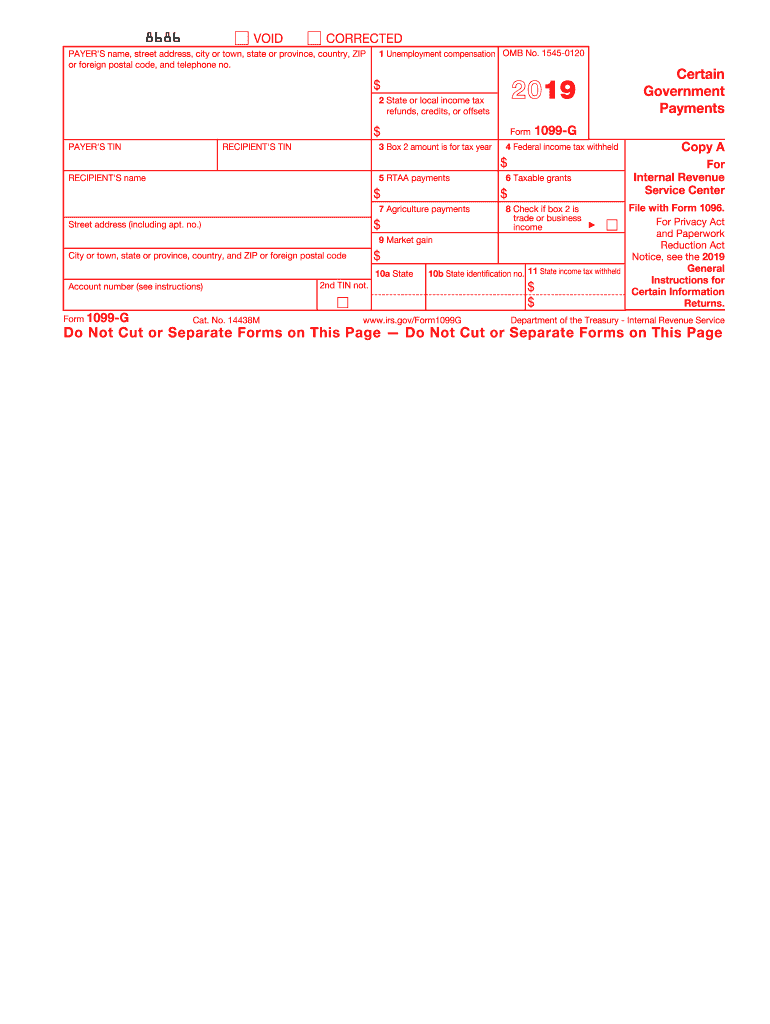
T. no.) For State Tax Department 6 Taxable grants $ 7 Agriculture payments 8 Check if box 2 is trade or business income Copy 1 9 Market gain City or town, state or province, country, and ZIP or foreign postal code $ 10a State Form 1099-G 10b State identification no. 11 State income tax withheld $ $ Account number (see instructions) www.irs.gov/Form1099G Department of the Treasury - Internal Revenue Service CORRECTED (if checked) PAYER'S name, street address, city or town, st.
Loading

Open form follow the instructions

Easily sign the form with your finger

Send filled & signed form or save
How to fill out the IRS 1099-G online
Understanding how to complete the IRS 1099-G form is crucial for accurate tax reporting. This guide provides a step-by-step approach to ensure you fill out the form correctly and efficiently.
Follow the steps to complete the IRS 1099-G form with ease.
- Press the ‘Get Form’ button to access the form and open it in your editing platform.
- Enter the payer's name and address in the designated fields. Ensure that correct and complete information is recorded.
- Fill in the payer's taxpayer identification number (TIN) alongside the recipient's TIN.
- In box 1, report the total unemployment compensation paid to the recipient during the tax year.
- For box 2, indicate any state or local income tax refunds received. This amount may be taxable if it was previously deducted.
- In box 3, specify the tax year related to the amount in box 2, ensuring it is accurate.
- Enter any federal income tax withheld in box 4. This may include taxes that were withheld from unemployment compensation.
- If applicable, report any reemployment trade adjustment assistance (RTAA) payments in box 5.
- In box 6, include taxable grants received from government entities.
- Fill in box 7 if there were any taxable agriculture payments reported.
- Box 8 should be checked if the amount in box 2 is considered trade or business income.
- Report any market gains in box 9 related to commodity credit corporation (CCC) loans.
- For boxes 10a and 11, include state income tax withheld details as necessary.
- Double-check all entries for accuracy before finalizing the form.
- Once completed, you can save changes, download, print, or share the form as needed.
Complete your IRS 1099-G form online today for a smooth tax filing experience.
Experience a faster way to fill out and sign forms on the web. Access the most extensive library of templates available.
Related content
Mar 20, 2025 — Federal, state, or local governments file this form if they made payments...
Apr 17, 2023 — This fact sheet reviews the IRS Form 1099-G and provides examples of...
Mar 1, 2017 — Form 1099G. If you receive $10 or more in unemployment compensation, you...
Get answers to your most pressing questions about US Legal Forms API.
Will I get in trouble if I don't claim my 1099?
Failing to claim your IRS 1099-G may lead to serious consequences. The IRS expects all income to be reported, and not doing so can result in penalties or interest if they uncover the omission. It's important to be proactive about your tax responsibilities and consider using tools like uslegalforms to streamline this process and guarantee compliance.
How do I enter my 1099-G in TurboTax?
To enter your IRS 1099-G in TurboTax, start by navigating to the 'Wages & Income' section. Then, look for the option related to unemployment or state tax refunds. Enter the amounts as they appear on your form to ensure your tax return is accurate. Using TurboTax can simplify this process, guiding you through step-by-step instructions.
Where do I enter 1099-G on the TaxAct?
In TaxAct, enter your IRS 1099-G information on the 'Income' section of the software. Look specifically for the area designated for unemployment compensation or state tax refunds, depending on what your 1099-G reflects. Completing this step ensures your return accurately represents your financial situation, helping to avoid potential issues with the IRS.
Will the IRS catch a missing 1099-G?
Yes, the IRS has systems in place to identify missing IRS 1099-G forms. They compare the income you report against the data they receive from employers and government agencies. If they detect inconsistencies, it could trigger further review or audits. Being proactive and including all required forms can save you from future headaches.
Can I file my taxes without my 1099-G form?
Filing your taxes without your IRS 1099-G is not advisable. The IRS uses this form to match your reported income. If you submit your return without it, you may risk delays in processing and possible audits later on. It's best to wait until you receive your 1099-G form before completing your tax return.
How do I know if I need to file a 1099-G?
You typically need to file an IRS 1099-G if you received certain types of government payments. This includes unemployment compensation, state tax refunds, or other government payments. If you are uncertain, checking your income statements from your state can clarify whether you received a payment that is reportable. This awareness will help ensure accurate tax reporting.
What happens if I don't include my 1099-G?
Not including your IRS 1099-G can lead to complications during tax filing. If the IRS notices a discrepancy between your reported income and the information on their records, you may face penalties. Additionally, omitting your 1099-G could prolong the processing of your tax return, delaying any refunds due to you. It is crucial to ensure this form is part of your tax filing to avoid these issues.
What happens if I don't report my 1099-G?
If you don't report your IRS 1099-G, the IRS may send you a notice about discrepancies on your tax return. This can lead to penalties, interest, or even an audit. It’s essential to report all income accurately to avoid these potential issues. To ensure you're compliant, you can use the helpful tools provided by uslegalforms.
What does 'benefits repaid' mean on 1099-G?
'Benefits repaid' on your IRS 1099-G indicates that you returned some unemployment benefits, which can affect your taxable income. If you repaid a portion of benefits, you may need to adjust your reported income accordingly. This adjustment can help to lower your tax liability. For assistance in navigating these situations, the uslegalforms platform offers valuable resources.
What is the IRS Form 1099-G used for?
The IRS Form 1099-G is used to report certain types of government payments to individuals. This includes unemployment benefits and state or local tax refunds. Its purpose is to inform both taxpayers and the IRS of the amount received during the tax year. For more detailed guidance on using this form, explore the resources available on uslegalforms.
Use professional pre-built templates to fill in and sign documents online faster. Get access to thousands of forms.
If you believe that this page should be taken down, please follow our DMCA take down process here.
This form is available in several versions. Select the version you need from the drop-down list below.