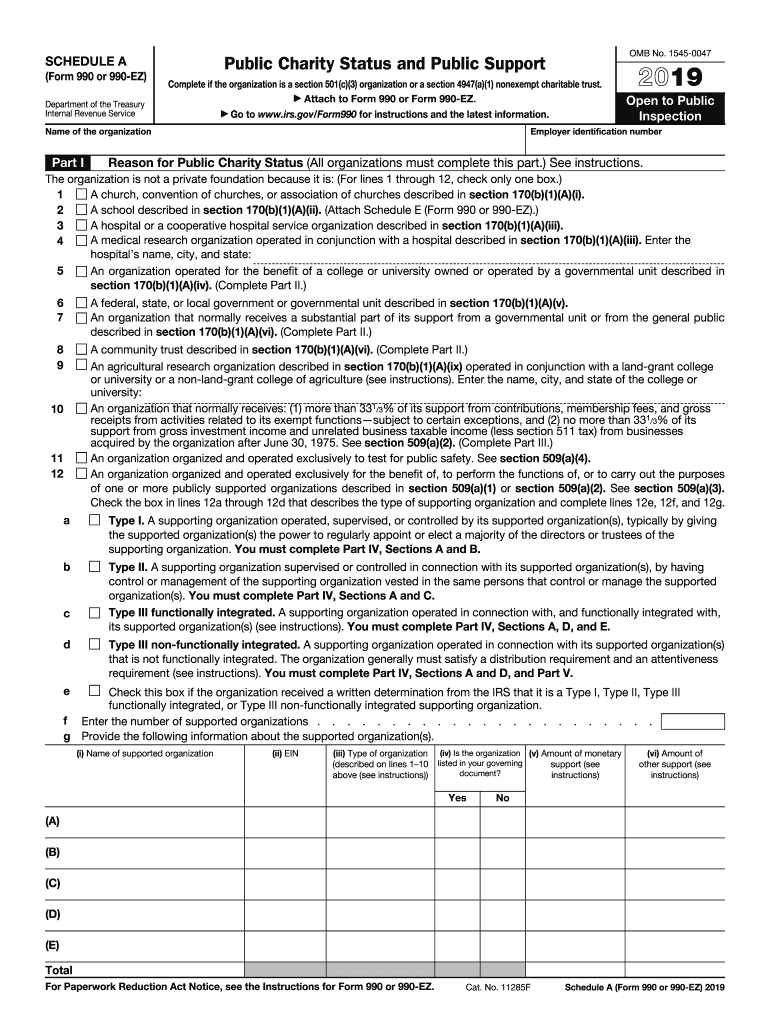
Grated. The organization generally must satisfy a distribution requirement and an attentiveness requirement (see instructions). You must complete Part IV, Sections A and D, and Part V. e Check this box if the organization received a written determination from the IRS that it is a Type I, Type II, Type III functionally integrated, or Type III non-functionally integrated supporting organization. f Enter the number of supported organizations . . . . . . . . . . . . . . . . . . . . . . . g Provide.
Loading

Open form follow the instructions

Easily sign the form with your finger

Send filled & signed form or save
How to fill out the IRS 990 - Schedule A online
This guide provides a clear and supportive process for completing the IRS 990 - Schedule A online. Designed for organizations seeking to demonstrate their public charity status, this guide breaks down the specific sections and fields you'll encounter.
Follow the steps to fill out the form accurately and efficiently.
- Press the ‘Get Form’ button to access the IRS 990 - Schedule A and open it in your digital document editor.
- Begin by filling out the organization’s name and employer identification number at the top of the form. Ensure that this information matches the records you have on file.
- In Part I, select the appropriate box that describes the reason for your organization’s public charity status. Review the available options carefully and check only one.
- For organizations that qualify under Part II, proceed to that section to provide a support schedule. Input all relevant amounts related to public support from the previous years as prompted.
- In Part III, if applicable, fill out the details related to organizations described under section 509(a)(2). Ensure you accurately report contributions and support information.
- Part IV addresses supporting organizations. If you indicated that you are a supporting organization, complete the required sections and provide detailed answers to the questions posed.
- In Part V, if applicable, compute the distributable amounts and ensure all required distributions are documented correctly. This includes any support provided to organizations.
- Finally, review each section of the completed form for accuracy and completeness. You can then save your changes, download, print, or share the filled-out form as necessary.
Complete your IRS 990 - Schedule A online to ensure compliance and demonstrate your organization's public charity status.
Experience a faster way to fill out and sign forms on the web. Access the most extensive library of templates available.
Related content
Complete if the organization is a section 501(c)(3) organization or a section 4947(a)(1)...
Dec 8, 2022 — Form 990-EZ is a short form annual return for organizations exempt from...
1. Contributions, gifts, grants, etc., received (attach schedule). 2. Check ▷ if the...
Get answers to your most pressing questions about US Legal Forms API.
What are excess contributions taxed at?
Excess contributions may be subject to an excise tax if they exceed allowable limits by the IRS. The tax rate typically sits at a certain percentage on the excess amount, which varies depending on specific IRS regulations. It's important for organizations to be aware of these implications and report accordingly on IRS 990 - Schedule A. Engaging with a tax professional can provide further insights on managing excess contributions effectively.
What are excess contributions on 990 Schedule A?
Excess contributions refer to donations received by a non-profit that exceed the established limits set by the IRS. These contributions may impact the non-profit’s tax-exempt status if not reported correctly. It is crucial to differentiate between regular and excess contributions within IRS 990 - Schedule A to ensure compliance and avoid penalties. Ensuring accurate reporting can safeguard the organization’s standing.
What is a substantial contributor on 990?
A substantial contributor is a person or entity that gives a significant amount to a non-profit organization, often defined by a threshold set by the IRS. The contributions from substantial contributors can affect the organization’s tax status and reporting requirements. It is essential to identify and report these contributions accurately when completing IRS 990 - Schedule A. Understanding these dynamics helps improve financial accountability.
What qualifies as an unusual grant?
An unusual grant typically refers to funding that deviates from the organization’s standard revenue sources or purposes. For instance, grants that are irregular in size, frequency, or stipulations may qualify as unusual. Organizations should report these grants accurately in IRS 990 - Schedule A to maintain compliance and transparency. Always consult a tax professional for tailored advice on unusual grants.
Is Form 990 hard to fill out?
Filling out Form 990 can be straightforward, but it requires attention to detail. Non-profits must report financial activity, which may seem complex without proper organization. Utilizing platforms like US Legal Forms can simplify the process by providing templates and guidance. With the right support, you can navigate IRS 990 - Schedule A with confidence.
What is the schedule A on a 990?
Schedule A of Form 990 outlines the public charity status of an organization. It includes details about how the charity receives its funding, ensuring compliance with tax-exempt regulations. Understanding Schedule A is crucial for non-profits as it directly affects their eligibility for donations and grants. This section provides vital transparency to stakeholders about financial sources.
How do I report a non-profit to the IRS?
Reporting a non-profit to the IRS involves submitting Form 13909, the Request for Tax-Exempt Status Identification Number. The IRS needs accurate information about the non-profit’s activities, mission, and finances. You may also need to provide specific details about complaints, such as potential misconduct or failure to comply with tax laws. Remember, the IRS 990 - Schedule A can guide you on determining the tax-exempt status of non-profits.
Who signs a 990 for nonprofits?
In a nonprofit organization, the Form 990 must be signed by an authorized officer, typically the president or treasurer. This signature verifies that the information provided is true and complete, complying with IRS regulations. Additionally, the IRS 990 - Schedule A must also be included in this signing process, ensuring full disclosure of the organization’s public charity status. It is important for organizations to ensure that the person signing has the authority to do so, as this impacts their legal standing.
Who can prepare 990?
Individuals who can prepare Form 990 include certified public accountants (CPAs), tax attorneys, and experienced nonprofit finance staff. It is essential that the preparer understands the IRS guidelines and the specifics of the IRS 990 - Schedule A. Engaging a professional not only enhances compliance but also helps in presenting the organization’s financial activities in a clear and accurate manner. This ensures that your nonprofit maintains its credibility and transparency with stakeholders.
How do you get a copy of a filed 990?
To obtain a copy of a filed IRS 990, you can request it directly from the nonprofit organization, which should be willing to share this information. Additionally, many organizations upload their filings to websites like Guidestar or Charity Navigator, providing easy access to these documents. You can often find the IRS 990 - Schedule A included in these resources. Using platforms like USLegalForms can streamline your search if you often need these documents for research or compliance.
Use professional pre-built templates to fill in and sign documents online faster. Get access to thousands of forms.
If you believe that this page should be taken down, please follow our DMCA take down process here.
This form is available in several versions. Select the version you need from the drop-down list below.