Loading
Form preview
  • US Legal Forms
  • Other Templates
  • Tax Forms
  • Hawaii Tax Forms
  • Hi Dot G-45 2019

Get Hi Dot G-45 2019-2026

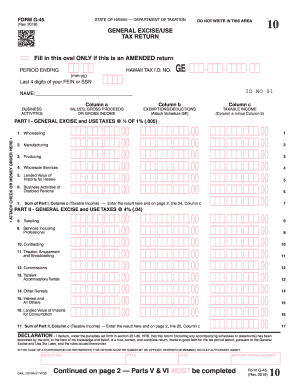
Its of your FEIN or SSN Column a BUSINESS VALUES, GROSS PROCEEDS ACTIVITIES OR GROSS INCOME ID NO 01 !!! !!! !!!! !! !!!! !!/!! (mm/yy) PERIOD ENDING Column b Column c EXEMPTIONS/DEDUCTIONS (Attach Schedule GE) PART III - INSURANCE COMMISSIONS .15% (.0015) TAXABLE INCOME (Column a minus Column b) Enter this amount on line 26, Column c !!!,!!!,!!!.00 !!!,!!!,!!!.00 !!!,!!!,!!!.00 18. Insurance Commissions 18 PART IV - COUNTY SURCHA.

How it works

  1. Open form

    Open form follow the instructions

  2. Easily sign form

    Easily sign the form with your finger

  3. Share form

    Send filled & signed form or save

How to fill out the HI DoT G-45 online

Filling out the HI DoT G-45 form is essential for reporting general excise and use taxes in Hawaii. This guide provides a clear and structured approach to completing the form online, ensuring that all users can navigate the process with confidence.

Follow the steps to fill out the HI DoT G-45 form efficiently.

  1. Click ‘Get Form’ button to access the HI DoT G-45 form and open it in the digital editor.
  2. Indicate if this is an amended return by filling in the oval next to ‘AMENDED RETURN’ if applicable.
  3. Enter the period ending date in the format mm-yy.
  4. Provide the last four digits of your Federal Employer Identification Number (FEIN) or Social Security Number (SSN) and your Hawaii Tax Identification Number in the specified fields.
  5. Fill in your name and select the relevant business activities from the provided columns, ensuring accuracy in values and gross income.
  6. In Column b, enter any applicable exemptions or deductions and in Column c calculate the taxable income (Column a minus Column b).
  7. Complete Part I by entering the appropriate values for wholesaling, manufacturing, and other specified activities, ensuring to calculate the taxable income correctly for each.
  8. Proceed to Part II, repeating the process for retailing, services, contracting, and other items listed with the correct taxable income.
  9. In Part III, address insurance commissions, entering the taxable income as specified.
  10. Complete Part IV by entering amounts attributable to each county based on the taxable income.
  11. Fill out Part V, marking the taxation district(s) where business activities occurred, ensuring compliance.
  12. In Part VI, summarize your periodic return by providing totals for all sections and calculating any amounts due or credits.
  13. Review your form for accuracy, save any changes, and choose to download or print the form for your records.

Complete your HI DoT G-45 form online today and ensure timely and accurate tax reporting.

Get form

Experience a faster way to fill out and sign forms on the web. Access the most extensive library of templates available.
Get form

Related content

Form G-45 Periodic General Excise/Use Tax Return...
Write the filing period and your Hawaii Tax. I.D. No. on your check or money order. Mail...
Learn more
A Rare Case Study of a Giant Molecular Filament...
by NK Bhadari · 2022 · Cited by 21 — The GMF G45.3+0.1 hosts G45E and G45W complexes...
Learn more
Exterior Dot-HP User Manual
The Exterior Dot-HP's cable tails exit the rear of the Dot at a 45° angle. This gives the...
Learn more

Related links form

Canada IMM 5744 2016 Canada IMM5562-F 2004 Canada PPTC 482 2014 Canada CI1 2009

Questions & Answers

Get answers to your most pressing questions about US Legal Forms API.

Contact support

Yes, you can file a Hawaii tax return electronically using the HI DoT G-45. This option makes it easier to submit your return, reduces errors, and speeds up processing. Electronic filing is a convenient choice for many taxpayers and enhances your ability to track your return.

You can access Hawaii tax forms online through the Hawaii Department of Taxation’s official website. The HI DoT G-45 form is also available there, along with other necessary documents for various tax filings. If you prefer a physical copy, local tax offices may have forms available as well.

To obtain a Hawaii tax ID number, you must register your business with the HI DoT G-45. This registration can typically be completed online through the Hawaii Department of Taxation's website. Having a tax ID number is essential for businesses to manage their tax obligations efficiently.

Certain tax forms, including specific amendments and some types of nonresident returns, may not be eligible for electronic filing. Always check the guidelines provided by the HI DoT G-45 to ensure your forms qualify. If in doubt, you may consult uslegalforms for assistance in understanding your filing requirements.

The G45 Hawaii tax form, part of the HI DoT G-45 process, is designed for taxpayers to report general excise taxes. This form helps businesses and individuals calculate their liability based on their sales and income. Understanding the G45 is crucial for proper tax compliance in Hawaii.

Mailing your state tax return is not necessary if you choose to file electronically with the HI DoT G-45. Electronic filing eliminates the need for papers, stamps, and trips to the post office. However, if you prefer to file by mail, you can still do so, but keep in mind it might take longer to process your return.

Yes, you can file your return electronically using the HI DoT G-45 form. This method simplifies the filing process and can expedite your tax return. Many taxpayers prefer electronic filing for its convenience and speed. Additionally, you may receive your refund faster when you file online.

If you live in Hawaii, you should mail your federal tax return to the address specified for Hawaii residents in the IRS guidelines. Be sure to check whether you need to include any payments with your return as the mailing addresses vary accordingly. Correct addressing ensures your federal obligations are met without hassle.

Paying excise tax is mandatory for certain goods and services which can include things like fuel and tobacco. In Hawaii, the excise tax contributes to state revenue, while funds often support local infrastructure and services. If you are unsure about your obligations or how to report these taxes, consulting platforms like uslegalforms can help clarify the processes related to the HI DoT G-45.

The address you put on your tax return, including the HI DoT G-45, should be your current residential address. If you have moved recently, ensure that you are using your new address for accurate communications. Remember, any discrepancies in your address could lead to delays in processing your tax return.

Get This Form Now!

Use professional pre-built templates to fill in and sign documents online faster. Get access to thousands of forms.
Get form
If you believe that this page should be taken down, please follow our DMCA take down processhere.
Get HI DoT G-45
Get form
  • Adoption
  • Bankruptcy
  • Contractors
  • Divorce
  • Home Sales
  • Employment
  • Identity Theft
  • Incorporation
  • Landlord Tenant
  • Living Trust
  • Name Change
  • Personal Planning
  • Small Business
  • Wills & Estates
  • Packages A-Z
  • Affidavits
  • Bankruptcy
  • Bill of Sale
  • Corporate - LLC
  • Divorce
  • Employment
  • Identity Theft
  • Internet Technology
  • Landlord Tenant
  • Living Wills
  • Name Change
  • Power of Attorney
  • Real Estate
  • Small Estates
  • Wills
  • All Forms
  • Forms A-Z
  • Other Templates
  • Legal Hub
  • About Us
  • Help Portal
  • Legal Resources
  • Blog
  • Affiliates
  • Contact Us
  • Delete My Account
  • Site Map
  • Industries
  • Forms in Spanish
  • Localized Forms
  • State-specific Forms
  • Forms Kit
  • Real Estate Handbook
  • All Guides
  • Notarize
  • Incorporation services
  • For Consumers
  • For Small Business
  • For Attorneys
  • USLegal
  • FormsPass
  • pdfFiller
  • signNow
  • altaFlow
  • DocHub
  • Instapage
Form Packages
  • Adoption
  • Bankruptcy
  • Contractors
  • Divorce
  • Home Sales
  • Employment
  • Identity Theft
  • Incorporation
  • Landlord Tenant
  • Living Trust
  • Name Change
  • Personal Planning
  • Small Business
  • Wills & Estates
  • Packages A-Z
Form Categories
  • Affidavits
  • Bankruptcy
  • Bill of Sale
  • Corporate - LLC
  • Divorce
  • Employment
  • Identity Theft
  • Internet Technology
  • Landlord Tenant
  • Living Wills
  • Name Change
  • Power of Attorney
  • Real Estate
  • Small Estates
  • Wills
  • All Forms
  • Forms A-Z
  • Other Templates
Customer Service
  • Legal Hub
  • About Us
  • Help Portal
  • Legal Resources
  • Blog
  • Affiliates
  • Contact Us
  • Delete My Account
  • Site Map
  • Industries
  • Forms in Spanish
  • Localized Forms
  • State-specific Forms
  • Forms Kit
Legal Guides
  • Real Estate Handbook
  • All Guides
Prepared for you
  • Notarize
  • Incorporation services
Our Customers
  • For Consumers
  • For Small Business
  • For Attorneys
Our Sites
  • USLegal
  • FormsPass
  • pdfFiller
  • signNow
  • altaFlow
  • DocHub
  • Instapage
Social Media
Call us now toll free:
+1 833 426 79 33
As seen in:
© Copyright 1999-2026 airSlate Legal Forms, Inc. 17 Station Street, Ste. 203, Brookline, MA 02445
  • Your Privacy Choices
  • Terms of Service
  • Privacy Notice
  • Content Takedown Policy
  • Bug Bounty Program