Loading
Form preview
  • US Legal Forms
  • Other Templates
  • Foreign Forms
  • Foreign Canada Tax Forms
  • Canada Nr73 E 2017

Get Canada Nr73 E 2017-2026

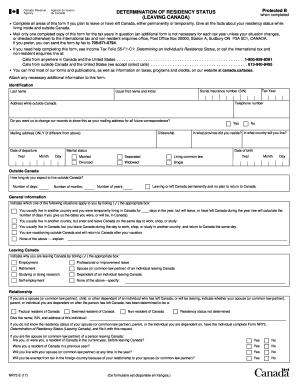
Ive all the facts about your residency status while living inside and outside Canada. • Mail only one completed copy of this form for the tax years in question (an additional form is not necessary for each tax year unless your situation changes, or directed otherwise) to the International tax and non-resident enquiries office, Post Office Box 20000, Station A, Sudbury ON P3A 5C1, CANADA. If you prefer, you can send the form by fax to 705-671-0794. • If you need help completing this form,.

How it works

  1. Open form

    Open form follow the instructions

  2. Easily sign form

    Easily sign the form with your finger

  3. Share form

    Send filled & signed form or save

How to fill out the Canada NR73 E online

The Canada NR73 E form is essential for individuals who are leaving Canada and need to declare their residency status. Completing this form accurately ensures that your tax obligations are clear while residing outside Canada.

Follow the steps to successfully fill out the Canada NR73 E online

  1. Press the 'Get Form' button to obtain the Canada NR73 E online and open it in your preferred editor.
  2. Begin by providing your identification details, including your last name, social insurance number (SIN), date of birth, and a telephone number.
  3. Fill in your address while outside Canada, and indicate if you want this to be your mailing address for all future correspondence.
  4. Specify your marital status, selecting from the options such as married, separated, or single.
  5. Indicate the province where you resided before leaving and the country where you will be living.
  6. Provide details on your departure date and the expected duration of your stay outside Canada, including the number of days, months, or years.
  7. Choose the situation that applies to you regarding your residency status and transient activities in Canada and abroad.
  8. Select the reason for leaving Canada from the options provided, such as employment or retirement.
  9. If applicable, provide information on ties you will maintain in Canada, including family relationships and property.
  10. Certify the information by signing and dating the form, ensuring that the information provided is complete and accurate.
  11. Finally, review the form thoroughly for any missing information, and then save, download, print, or share the completed document as needed.

Ensure your residency status is accurately represented by completing the Canada NR73 E form online today.

Get form

Experience a faster way to fill out and sign forms on the web. Access the most extensive library of templates available.
Get form

Related content

Physician-Targeted Interventions in Antibiotic...
by S Cox · 2022 · Cited by 9 — We performed a systematic review, including (cluster)...
Learn more
Drug Class Review on Pharmacologic Treatments for...
The purpose of this report is to make available information regarding the comparative...
Learn more
Equivalents-vacuum-tube-shop.pdf
Jan 17, 2010 — 6N2P-E is near equivalent, but with a different pin out. Only a few...
Learn more

Related links form

CA FTB 3536 2020 MO RD-110 2020 CA FTB 540-ES 2020 CA FTB 100-ES 2020

Questions & Answers

Get answers to your most pressing questions about US Legal Forms API.

Contact support

When returning to Canada, you'll need to fill out a declaration form that details your goods and any necessary health-related data. This form is typically completed on arrival and can include information relevant to your purchases and travel experiences. Utilizing the Canada NR73 E can complement your travels effectively by addressing any tax-related queries.

Yes, US citizens must complete the ArriveCAN form when entering Canada, especially for travel reasons. This form helps the Canadian government manage public health measures. Additionally, it can streamline your entry process, allowing you to focus on your visit rather than bureaucratic hurdles.

To enter Canada, you generally need to fill out a declaration card provided by Canadian customs. However, if you're a returning resident or a specific traveler type, additional forms or protocols may apply. Keep in mind that, depending on your situation, completing the Canada NR73 E might also be a smart move to address potential tax implications.

For your tax return in Canada, you'll typically need the T1 General form, along with supporting documents such as your NR73 E form if applicable. These documents provide proof of income, deductions, and credits applicable to your tax situation. Ensure you keep all records organized to facilitate your filing process.

You can submit the NR73 form online or by mail. If submitting online, visit the Canada Revenue Agency's website and follow the instructions for electronic submissions. For mail, print the completed form and send it directly to the appropriate office as listed in the form's instructions.

To fill out the declaration form at the airport, first, gather all necessary information about your purchases, gifts, and goods. You will need to list each item accurately along with its value. Once completed, present this form to the customs officer upon landing. If you're unsure, the NR73 E form can guide you through this process.

Filing the NR73 form is not mandatory for everyone, but it is highly recommended for those who want to clarify their residency status with the Canada Revenue Agency. This form helps determine your tax obligations and residency for tax purposes. Submitting the NR73 can simplify future tax returns, so it's wise to consider it.

When returning to Canada, you need to declare all goods and currency over a certain limit. This includes gifts and items you purchased while abroad. You should also declare any food, plants, or animals that you are bringing back. For a smooth process, consider completing the Canada NR73 E form as part of your declaration.

Avoiding exit tax altogether is typically not feasible, as it's based on the capital gains of your assets. However, effective strategies may minimize your overall tax liability. The Canada NR73 E form is an important tool in assessing your situation and understanding your obligations.

Your bank may ask for tax residency information to comply with Canadian and international tax laws. They need to determine whether you are a resident or non-resident for tax purposes, which affects your accounts and services. The Canada NR73 E can provide clarity on your tax residency status.

Get This Form Now!

Use professional pre-built templates to fill in and sign documents online faster. Get access to thousands of forms.
Get form
If you believe that this page should be taken down, please follow our DMCA take down processhere.
Get Canada NR73 E
Get form
  • Adoption
  • Bankruptcy
  • Contractors
  • Divorce
  • Home Sales
  • Employment
  • Identity Theft
  • Incorporation
  • Landlord Tenant
  • Living Trust
  • Name Change
  • Personal Planning
  • Small Business
  • Wills & Estates
  • Packages A-Z
  • Affidavits
  • Bankruptcy
  • Bill of Sale
  • Corporate - LLC
  • Divorce
  • Employment
  • Identity Theft
  • Internet Technology
  • Landlord Tenant
  • Living Wills
  • Name Change
  • Power of Attorney
  • Real Estate
  • Small Estates
  • Wills
  • All Forms
  • Forms A-Z
  • Other Templates
  • Legal Hub
  • About Us
  • Help Portal
  • Legal Resources
  • Blog
  • Affiliates
  • Contact Us
  • Delete My Account
  • Site Map
  • Industries
  • Forms in Spanish
  • Localized Forms
  • State-specific Forms
  • Forms Kit
  • Real Estate Handbook
  • All Guides
  • Notarize
  • Incorporation services
  • For Consumers
  • For Small Business
  • For Attorneys
  • USLegal
  • FormsPass
  • pdfFiller
  • signNow
  • altaFlow
  • DocHub
  • Instapage
Form Packages
  • Adoption
  • Bankruptcy
  • Contractors
  • Divorce
  • Home Sales
  • Employment
  • Identity Theft
  • Incorporation
  • Landlord Tenant
  • Living Trust
  • Name Change
  • Personal Planning
  • Small Business
  • Wills & Estates
  • Packages A-Z
Form Categories
  • Affidavits
  • Bankruptcy
  • Bill of Sale
  • Corporate - LLC
  • Divorce
  • Employment
  • Identity Theft
  • Internet Technology
  • Landlord Tenant
  • Living Wills
  • Name Change
  • Power of Attorney
  • Real Estate
  • Small Estates
  • Wills
  • All Forms
  • Forms A-Z
  • Other Templates
Customer Service
  • Legal Hub
  • About Us
  • Help Portal
  • Legal Resources
  • Blog
  • Affiliates
  • Contact Us
  • Delete My Account
  • Site Map
  • Industries
  • Forms in Spanish
  • Localized Forms
  • State-specific Forms
  • Forms Kit
Legal Guides
  • Real Estate Handbook
  • All Guides
Prepared for you
  • Notarize
  • Incorporation services
Our Customers
  • For Consumers
  • For Small Business
  • For Attorneys
Our Sites
  • USLegal
  • FormsPass
  • pdfFiller
  • signNow
  • altaFlow
  • DocHub
  • Instapage
Social Media
Call us now toll free:
+1 833 426 79 33
As seen in:
© Copyright 1999-2026 airSlate Legal Forms, Inc. 17 Station Street, Suite 303, Brookline, MA 02445
  • Your Privacy Choices
  • Terms of Service
  • Privacy Notice
  • Content Takedown Policy
  • Bug Bounty Program