Loading
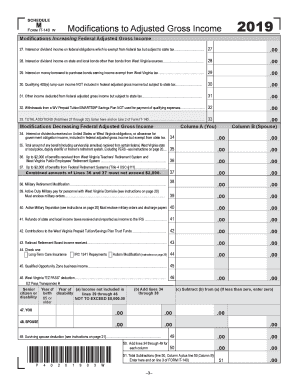
Get Wv Schedule M It-140 2019
How it works
-

Open form follow the instructions
-

Easily sign the form with your finger
-

Send filled & signed form or save
How to fill out the WV Schedule M IT-140 online
The WV Schedule M IT-140 is an essential form for individuals seeking to adjust their federal adjusted gross income for state tax purposes. This guide provides step-by-step instructions on how to accurately complete the form online, ensuring a smooth filing experience.
Follow the steps to accurately complete the WV Schedule M IT-140 online.
- Use the ‘Get Form’ button to access the WV Schedule M IT-140 form and open it in the editor.
- Begin with section 27, which addresses interest or dividend income on federal obligations. Enter the amount that is exempt from federal tax but subject to state tax.
- Move to section 28 and record any interest or dividend income from state and local bonds that are not from West Virginia sources.
- In section 29, input the amount for interest on money borrowed to purchase bonds earning income that is exempt from West Virginia tax.
- Continue to section 30, where you will report any qualifying 402(e) lump-sum income that is not included in your federal adjusted gross income but is subject to state tax.
- For section 31, include any other income deducted from federal adjusted gross income but subject to state tax.
- Next, in section 32, enter the withdrawal amounts from a WV Prepaid Tuition/SMART529© Savings Plan that were not used for qualifying expenses.
- After completing sections 27 through 32, total these amounts in section 33 and enter this figure on line 2 of Form IT-140.
- Now, proceed to fill out the sections concerning modifications that decrease federal adjusted gross income. Begin with section 34 and include any interest or dividends received on federal or West Virginia obligations.
- Follow up with section 35, reporting total benefits received from certain retirement systems, excluding PERS.
- Continue to sections 36 and 37 to report benefits from the West Virginia Teachers’ Retirement System and Federal Retirement Systems, respectively, ensuring combined amounts do not exceed $2,000.
- In section 38, provide details on military retirement modifications. Sections 39 and 40 require reporting of Active Duty Military pay and separation details, including necessary military orders.
- Complete sections 41 through 45 with any relevant refunds, contributions to the West Virginia Prepaid Tuition/Savings Plan, and qualified opportunity zone income.
- In section 46, report any West Virginia ‘EZ PASS’ deductions and specify any senior citizen or disability modifications.
- After completing all sections, sum lines 34 through 49 in section 50 for both you and your spouse.
- Finally, total the subtractions from columns A and B in section 51 and enter this amount on line 3 of Form IT-140. Once completed, save your changes and choose to download, print, or share the form.
Complete your WV Schedule M IT-140 online for a hassle-free filing experience.
Get form
Experience a faster way to fill out and sign forms on the web. Access the most extensive library of templates available.
Related links form
You need to file Schedule M if you have certain types of income adjustments to report on your West Virginia tax return. This is especially true if you are filing the WV Schedule M IT-140, which requires these adjustments for accurate tax reporting. To determine your specific needs, consult the instructions or online resources for assistance.
Get This Form Now!
Use professional pre-built templates to fill in and sign documents online faster. Get access to thousands of forms.