, Part IV, line 19, or reported more than $15,000 on Form 990-EZ, line 6a. (b) Pull tabs/instant bingo/progressive bingo (a) Bingo (d) Total gaming (add col. (a) through col. (c)) (c) Other gaming Gross revenue . . . . 2 Cash prizes . . . . 3 Noncash prizes . . . 4 Rent/facility costs . . . 5 Other direct expenses . 6 Volunteer labor . . 7 Direct expense summary. Add lines 2 through 5 in column (d) . . . . . . . . 8 Net gaming income summary. Subtract.
Loading

Open form follow the instructions

Easily sign the form with your finger

Send filled & signed form or save
How to fill out the IRS 990 - Schedule G online
Filling out the IRS 990 - Schedule G requires careful attention to detail and an understanding of the organization's fundraising or gaming activities. This guide will walk you through the process step-by-step, ensuring you complete the form accurately and efficiently.
Follow the steps to complete the IRS 990 - Schedule G online.
- Press the ‘Get Form’ button to access the IRS 990 - Schedule G and open it in your preferred digital format.
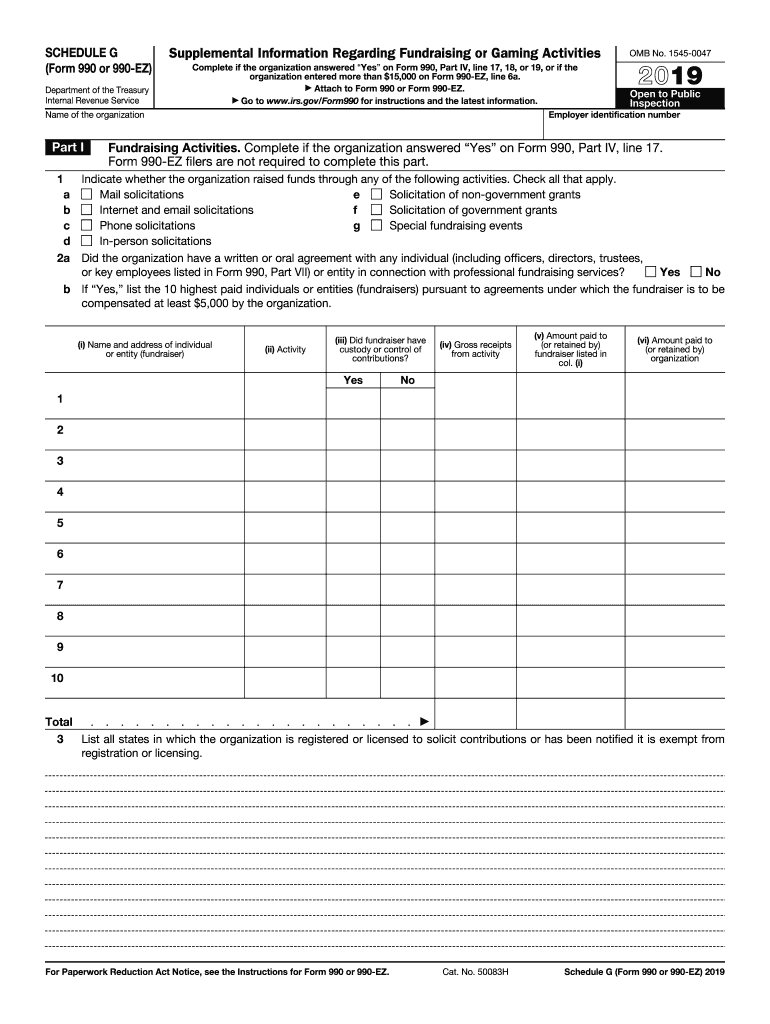
- Enter the employer identification number (EIN) and the name of your organization at the top of the form. Be sure these details match the information on your main IRS Form 990 or Form 990-EZ.
- In Part I, indicate whether your organization raised funds through any of the specified activities by checking all that apply. Ensure that you only check options relevant to your organization.
- Respond to the question about whether there was a written or oral agreement with any individual or entity in connection with professional fundraising services. If 'Yes,' provide the details for the ten highest paid individuals or entities involved.
- List all states where your organization is registered or licensed to solicit contributions, or where it has been notified it is exempt from registration.
- Move to Part II to detail your organization's direct expenses and revenues. Start by inputting the gross receipts and then subtract any contributions to arrive at the gross income.
- For fundraising events reported in Part III, list all events that had gross receipts greater than $5,000 and provide direct expense summaries related to those events.
- If applicable, complete the gaming section by reporting revenue and expenses related to gaming activities. Provide details on the organization’s gaming licenses and any collaborations with third parties.
- In Part IV, include any supplemental information required for clarifications or additional explanations, as specified in the instructions.
Complete your IRS 990 - Schedule G online to ensure accurate reporting.
Experience a faster way to fill out and sign forms on the web. Access the most extensive library of templates available.
Related content
3. List all states in which the organization is registered or licensed to solicit...
What is it? This form must be completed for any fundraising event with gross receipts of...
1. Contributions, gifts, grants, etc., received (attach schedule). 2. Check ▷ if the...
Get answers to your most pressing questions about US Legal Forms API.
Are IRS 990 forms public record?
IRS 990 forms are classified as public records, meaning they can be accessed by anyone interested in a nonprofit's financial information. This public access promotes accountability within the nonprofit sector. As a nonprofit organization, ensuring the accuracy and clarity of your Form 990 is essential for fostering trust within your community and among donors.
Are Form 990-N public?
Yes, Form 990-N, also known as the e-Postcard, is public. This form is used by small tax-exempt organizations to report their annual income. Although simpler than the full Form 990, it still plays a significant role in ensuring nonprofits maintain transparency with their finances.
Are nonprofit financial statements available to the public?
Nonprofit financial statements are indeed available to the public, mainly through the IRS Form 990. These financial statements reveal how funds are raised and spent, helping to maintain transparency. As a nonprofit, you should be diligent in managing these financial documents to uphold your reputation and meet reporting requirements.
Is the IRS 990 publicly available?
Yes, the IRS 990 forms are publicly available, providing insight into the operations of nonprofits. Anyone can access these forms online, facilitating transparency and accountability. If you’re involved with a nonprofit, ensure that your organization's Form 990 is properly completed and submitted, as it’s key for public inspection.
What is a fundraising event for 990?
A fundraising event for 990 refers to any organized activity intended to generate funds for a nonprofit organization. These events can include galas, auctions, or community festivals. Reporting the details of these events accurately on Schedule G of the IRS 990 - Schedule G helps demonstrate the nonprofit’s contributions to the community and its overall financial health.
Are nonprofit annual reports public records?
Yes, nonprofit annual reports, including Form 990, are public records. This means anyone can request and access these documents to learn more about the nonprofit's financial status and operations. Transparency is vital for building trust with donors and the community, so it's recommended to keep your reports up to date and accurate.
What is a Schedule G on a 990?
Schedule G on a 990 is an important component for nonprofits that engage in fundraising. It includes information on the types of fundraising events the organization hosts, along with the total revenue and expenses associated with those events. Nonprofits must accurately report this information to provide a clear picture of their financial activities to the IRS.
What is a Schedule G tax form?
A Schedule G tax form is a specific section of the IRS Form 990 used by nonprofits. This form primarily reports fundraising activities and details on professional fundraising services. Understanding how to complete Schedule G is crucial for compliance with IRS requirements, and it ensures transparency in your nonprofit’s fundraising efforts.
What is a Schedule G for 990?
A Schedule G for 990 pertains specifically to reporting professional fundraising services and any payments made for those services. This schedule ensures that all related compensation details are reported accurately to the IRS. By clarifying these aspects, the organization can foster trust with funders and stakeholders. Utilizing Schedule G plays a significant role in demonstrating a commitment to ethical fundraising practices.
What are the schedules for Form 990?
The schedules for Form 990 include various forms tailored to cover specific areas, such as Schedule A for public charities, Schedule B for contributions, and the aforementioned Schedule G for professional fundraising services. Each schedule provides detailed information necessary for compliance and transparency. Together, these schedules create a comprehensive profile of the organization's finances and operations. Properly completing these schedules enables organizations to uphold their integrity.
Use professional pre-built templates to fill in and sign documents online faster. Get access to thousands of forms.
If you believe that this page should be taken down, please follow our DMCA take down process here.
This form is available in several versions. Select the version you need from the drop-down list below.