Loading
Form preview
  • US Legal Forms
  • Other Templates
  • Tax Forms
  • Executive Department Treasury IRS Forms
  • Irs W-7(sp) 2019

Get Irs W-7(sp) 2019-2026

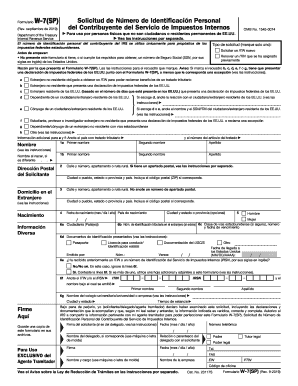
Nue Service OMB No. 1545-0074 Para uso por personas f sicas que no son ciudadanos o residentes permanentes de EE.UU. Vea las instrucciones por separado. El n mero de identificaci n personal del contribuyente del IRS se utiliza nicamente para prop sitos de los impuestos federales. Antes de empezar: No presente este formulario si tiene, o si cumple los requisitos para obtener, un n mero de Seguro Social (SSN, por sus siglas en ingl s) de los Estados Unidos. La obtenci n de.

This website is not affiliated with IRS

How it works

  1. Open form

    Open form follow the instructions

  2. Easily sign form

    Easily sign the form with your finger

  3. Share form

    Send filled & signed form or save

How to fill out the IRS W-7(SP) online

Filling out the IRS W-7(SP) form is a crucial step for individuals who are non-residents or non-permanent residents of the United States and require an Individual Taxpayer Identification Number (ITIN). This guide will provide you with clear and detailed instructions on how to complete the form online, ensuring accurate and efficient submission.

Follow the steps to fill out the IRS W-7(SP) form online effectively.

  1. Click 'Get Form' button to obtain the form and open it in the editor.
  2. Select the type of application you are submitting. Check only one box for your reason for submitting the form. Options include requesting a new ITIN or renewing an existing ITIN, based on your circumstances.
  3. Provide your personal information in the required fields. This includes your first name, last name, and any other names used if applicable. Ensure accuracy to avoid processing delays.
  4. Input your postal address along with your foreign address. Include all pertinent details such as street address, city or town, and postal codes as needed.
  5. Fill in your date of birth, country of birth, and citizenship information in the designated sections. These details are essential for identity verification.
  6. Complete the identification section, which may involve providing your taxpayer identification number from your home country, and information related to your U.S. visa, if applicable.
  7. In the final sections, depending on your situation, indicate if you have previously received an ITIN or IRSN, and provide any additional required documentation or signatures.
  8. Review all information for accuracy before saving your changes. Once confirmed, you can download, print, or share the completed form as needed.

Begin your document preparation now and successfully complete the IRS W-7(SP) form online.

Get form

Experience a faster way to fill out and sign forms on the web. Access the most extensive library of templates available.
Get form

Related content

Form W-7 (sp) (Rev. December 2024)
Antes de empezar: • No presente este formulario si tiene, o si cumple con los requisitos...
Learn more
Instructions for Form W-7 (Rev. December 2024)
Dec 31, 2024 — If you prefer to receive them in Spanish, submit Form W-7(SP). 2. Your...
Learn more
2017 General Instructions for Forms W-2 and W-3
May 2, 2017 — ... Form W-7 or visit IRS.gov/itin. You can identify an ITIN because it is...
Learn more

Related links form

Finishing Touches Wedding Hair and Makeup Service Agreement Fire Department Strategic & Tactical Worksheet Ford Duplicate W-2 Request Form 2013 Form 540.04 2006

Questions & Answers

Get answers to your most pressing questions about US Legal Forms API.

Contact support

The IRS W-7(SP) form is used to apply for an Individual Taxpayer Identification Number (ITIN) for individuals who are not eligible for a Social Security Number. This form is essential for individuals who need to fulfill tax obligations or claim certain tax benefits in the United States. Completing the IRS W-7(SP) accurately allows you to navigate the U.S. tax system confidently. Consider using uslegalforms as a reliable resource to find templates and guidance for your needs.

Yes, you can submit the IRS W-7(SP) without a tax return in certain situations. For example, if you need an ITIN for non-tax purposes, you can file your W-7(SP) separately. However, if you require the ITIN to file a tax return, you must include the return with your application. It’s essential to review your specific circumstances to ensure proper submission.

Unfortunately, the IRS W-7(SP) cannot be filed electronically at this time. The IRS requires this specific form to be submitted in paper format, along with your supporting documents. You must mail these items to the IRS or submit them in person at an IRS office for processing. This is a vital step to receive your Individual Taxpayer Identification Number (ITIN).

You should file your IRS W-7(SP) form with the IRS at the address listed on the form's instructions. Typically, you'll need to send your application along with the necessary documents by mail. If you are applying from outside the United States, be sure to use the address specified for international applicants. This ensures that your form is processed correctly and efficiently.

Receiving your ITIN immediately isn't typically an option since the IRS plans all processing. However, submitting your IRS W-7(SP) form at an IRS Taxpayer Assistance Center can sometimes accelerate the process. You may also explore using professional services which can help speed up the preparation and submission process. Platforms like UsLegalForms can assist in helping you navigate through these necessary steps efficiently.

The most straightforward way to obtain an ITIN is by completing the IRS W-7(SP) form correctly and submitting it with all necessary attachments. You can also use professional services that specialize in tax forms, which can guide you through the paperwork. This not only reduces stress but also helps avoid delays in the application process. Using platforms like UsLegalForms can make this process even easier.

The processing time for an ITIN application using the IRS W-7(SP) typically takes about six to eight weeks. Various factors can influence this duration, such as the volume of applications being processed. To expedite this process, ensure that your form is filled out correctly and submit any required documents. Engaging with platforms like UsLegalForms can also simplify your submission.

Unfortunately, you cannot find your ITIN number online. The IRS does not provide an online portal for ITIN retrieval. Instead, you may need to refer to past tax returns or other documents where your ITIN was listed. If you cannot locate it, consider reapplying with the IRS W-7(SP) form.

Typically, you cannot receive your ITIN on the same day you apply using the IRS W-7(SP). The process usually takes several weeks, as the IRS needs time to review each application thoroughly. However, if you submit your form at an IRS office, you may receive temporary assistance that expedites the process. For urgent situations, consider reaching out to a professional service like UsLegalForms for guidance.

A frequent mistake people make when completing the IRS W-7(SP) is providing incorrect or missing documentation. This can lead to processing delays or application rejections. It's vital to double-check your submission for completeness and accuracy. Using USLegalForms can help minimize these errors by providing you with a checklist to follow.

Get This Form Now!

Use professional pre-built templates to fill in and sign documents online faster. Get access to thousands of forms.
Get form
If you believe that this page should be taken down, please follow our DMCA take down processhere.
Get IRS W-7(SP)
Get form
  • Adoption
  • Bankruptcy
  • Contractors
  • Divorce
  • Home Sales
  • Employment
  • Identity Theft
  • Incorporation
  • Landlord Tenant
  • Living Trust
  • Name Change
  • Personal Planning
  • Small Business
  • Wills & Estates
  • Packages A-Z
  • Affidavits
  • Bankruptcy
  • Bill of Sale
  • Corporate - LLC
  • Divorce
  • Employment
  • Identity Theft
  • Internet Technology
  • Landlord Tenant
  • Living Wills
  • Name Change
  • Power of Attorney
  • Real Estate
  • Small Estates
  • Wills
  • All Forms
  • Forms A-Z
  • Other Templates
  • Legal Hub
  • About Us
  • Help Portal
  • Legal Resources
  • Blog
  • Affiliates
  • Contact Us
  • Delete My Account
  • Site Map
  • Industries
  • Forms in Spanish
  • Localized Forms
  • State-specific Forms
  • Forms Kit
  • Real Estate Handbook
  • All Guides
  • Notarize
  • Incorporation services
  • For Consumers
  • For Small Business
  • For Attorneys
  • USLegal
  • FormsPass
  • pdfFiller
  • signNow
  • altaFlow
  • DocHub
  • Instapage
Form Packages
  • Adoption
  • Bankruptcy
  • Contractors
  • Divorce
  • Home Sales
  • Employment
  • Identity Theft
  • Incorporation
  • Landlord Tenant
  • Living Trust
  • Name Change
  • Personal Planning
  • Small Business
  • Wills & Estates
  • Packages A-Z
Form Categories
  • Affidavits
  • Bankruptcy
  • Bill of Sale
  • Corporate - LLC
  • Divorce
  • Employment
  • Identity Theft
  • Internet Technology
  • Landlord Tenant
  • Living Wills
  • Name Change
  • Power of Attorney
  • Real Estate
  • Small Estates
  • Wills
  • All Forms
  • Forms A-Z
  • Other Templates
Customer Service
  • Legal Hub
  • About Us
  • Help Portal
  • Legal Resources
  • Blog
  • Affiliates
  • Contact Us
  • Delete My Account
  • Site Map
  • Industries
  • Forms in Spanish
  • Localized Forms
  • State-specific Forms
  • Forms Kit
Legal Guides
  • Real Estate Handbook
  • All Guides
Prepared for you
  • Notarize
  • Incorporation services
Our Customers
  • For Consumers
  • For Small Business
  • For Attorneys
Our Sites
  • USLegal
  • FormsPass
  • pdfFiller
  • signNow
  • altaFlow
  • DocHub
  • Instapage
Social Media
Call us now toll free:
+1 833 426 79 33
As seen in:
© Copyright 1999-2026 airSlate Legal Forms, Inc. 17 Station Street, Ste. 203, Brookline, MA 02445
  • Your Privacy Choices
  • Terms of Service
  • Privacy Notice
  • Content Takedown Policy
  • Bug Bounty Program