Ficaci n patronal (EIN) Clase de planilla (Marque todas las que le apliquen). a. Enmendada Nombre (el de usted, no el de su negocio) b. Patrono sucesor Nombre comercial (si alguno) c. Ning n pago hecho a los empleados en 2018 Direcci n N mero OMB No. 1545-0028 Calle d. Final: Se cerr el negocio o dej de pagar salarios N mero de oficina o de habitaci n Ciudad C digo postal (ZIP) Estado Nombre del pa s extranjero Visite www.irs.gov/Form940PR para obtener las instr.
Loading

Open form follow the instructions

Easily sign the form with your finger

Send filled & signed form or save
How to fill out the IRS 940-PR online
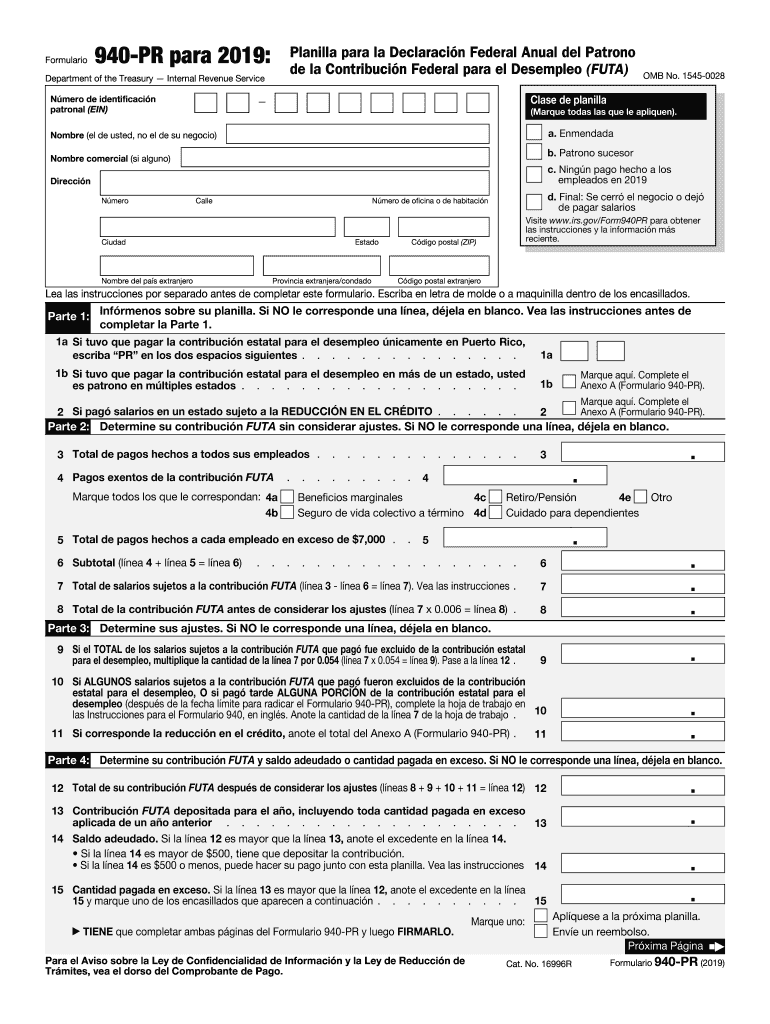
The IRS 940-PR is the annual federal unemployment tax return form for employers in Puerto Rico. This guide provides clear, step-by-step instructions to help you fill out the form online, ensuring compliance and accuracy.
Follow the steps to complete your IRS 940-PR form effectively.
- Use the 'Get Form' button to obtain the IRS 940-PR form and open it for editing.
- Enter your Employer Identification Number (EIN) accurately at the designated field. This number is vital for your tax return.
- Indicate the type of return by marking all applicable boxes such as 'Amended' if relevant, along with your name (your personal name, not your business name) and any trade name you may have.
- Fill in your address, including street, city, state, and ZIP code. Make sure to provide accurate contact information.
- In Part 1, answer questions about your employment taxes and mark whether you had to make unemployment contributions in multiple states.
- In Part 2, report your total payments made to employees and exempt payments accurately. Follow the provided instructions for calculations.
- In Part 3, calculate any adjustments required for your FUTA contribution based on the instructions given.
- In Part 4, determine your total FUTA contribution after considering all adjustments and any amount that has been paid or is owed.
- If applicable, provide information on your FUTA liability for each quarter in Part 5. Only complete this section if your liability exceeds $500.
- In Part 6, indicate whether you allow a third-party to speak with the IRS about your form. Provide their name and contact information if applicable.
- Finally, sign and date the form in Part 7. Ensure both pages of the form are completed before submitting.
- Once finished, you can save your changes, download, print, or securely share the form as needed.
Complete your IRS 940-PR form online today to ensure your compliance with employment tax regulations.
Experience a faster way to fill out and sign forms on the web. Access the most extensive library of templates available.
Related content
Jun 26, 2025 — Use Form 940 to report your annual Federal Unemployment Tax Act (FUTA)...
Tasa de la contribución FUTA. La tasa de la contribución federal para el desempleo...
Schedule A (Form 940) is for multi-state employers to report credit reduction information...
Get answers to your most pressing questions about US Legal Forms API.
What is a 940 PR?
The IRS 940-PR form is used to report annual Federal Unemployment Tax Act (FUTA) tax liability. Employers must file this form if they meet certain criteria regarding employee wages and unemployment taxes. Understanding the IRS 940-PR is vital for compliance, and using resources such as uSlegalforms can help you navigate filing requirements efficiently.
What address do I send my 940 form to?
The address you send your completed 940 form to is included in the form’s instructions. Depending on whether you are including any payment, the address may differ. To ensure timely processing of your IRS 940-PR, check the IRS website for the most current mailing addresses applicable to your situation.
Where do you mail an IRS form 940?
You should mail the IRS form 940 to the address provided in the instructions that accompany the form, which varies by your location. It is crucial to ensure you use the correct mailing address to avoid delays in processing. Utilizing uSlegalforms can provide you with the necessary resources and instructions to ensure your IRS 940-PR is sent to the right place.
Where do I file 940 PR without payment?
You can file the IRS 940-PR form without a payment directly with the IRS using the designated filing address. If you are not making a payment, ensure that you follow the instructions carefully for where to send the completed form. Utilizing uSlegalforms can simplify this process by providing the latest forms and guidance tailored to your needs.
What address do I send my federal tax payment to?
To send your federal tax payment, you must use the address specified on the IRS payment voucher or the IRS 940-PR instructions. Payment addresses may differ based on whether you file electronically or by mail. Always refer to the IRS website for the latest payment mailing options to avoid any errors in processing your payment.
What is the official mailing address for the IRS?
The official mailing address for the IRS varies depending on your location and the type of return you are submitting. Generally, the IRS recommends checking their official website for the most accurate and current information. For concerns related to the IRS 940-PR, mailing addresses can be found in the instructions specific to that form. Using the correct address ensures your documents are processed promptly.
What is the best way to file a 1099?
The best way to file a 1099 is electronically through an IRS-approved e-filing service. This method is faster, more secure, and generally more convenient than filing paper forms. Ensure you also keep copies for your records and confirm the recipient receives their copy. Services like uslegalforms provide user-friendly tools to help you file correctly and efficiently.
How do I file 1099s electronically with the IRS?
Filing 1099s electronically with the IRS involves using the IRS e-file system or third-party software that meets IRS requirements. You'll need to gather complete information about each recipient and ensure you're meeting all filing deadlines. Utilizing platforms like uslegalforms can help streamline this process, ensuring you file correctly and on time.
What is Form 940 PR?
Form 940 PR is a federal tax form used by employers in Puerto Rico to report their annual unemployment taxes to the IRS. This form is crucial for understanding your tax obligations as an employer in Puerto Rico. Knowing the requirements helps ensure compliance and avoid penalties. For assistance, you might consider using uslegalforms to navigate your filing needs effectively.
How do I submit a 1099-INT to the IRS?
To submit a 1099-INT to the IRS, use the appropriate IRS e-file system or send a paper copy if you are filing fewer than 250 forms. Ensure you fill out all required fields accurately, including the recipient's information and your identification number. For additional support, consider using uslegalforms, which offers guidance and templates to streamline your submission.
Use professional pre-built templates to fill in and sign documents online faster. Get access to thousands of forms.
If you believe that this page should be taken down, please follow our DMCA take down process here.
This form is available in several versions. Select the version you need from the drop-down list below.