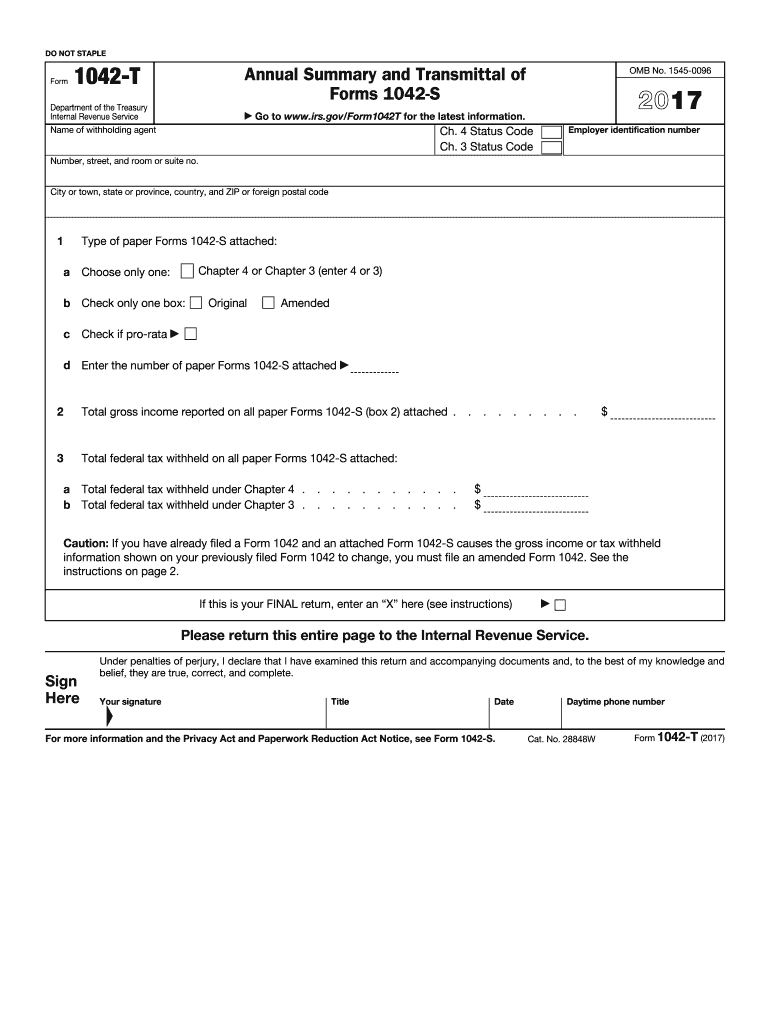
Te Daytime phone number Identifying information at top of form. The name, address, EIN, and chapter 4 and 3 status codes of the withholding agent named on this form must be the same as those you enter on Forms 1042 and 1042-S. See the instructions for Form 1042 for definitions of withholding agent. See the instructions for Form 1042-S for the withholding agent codes for the chapter 3 and 4 status codes. See instructions for Form 1042-S for the definition of withholdable payment to determine wh.
Loading

Open form follow the instructions

Easily sign the form with your finger

Send filled & signed form or save
How to fill out the IRS 1042-T online
The IRS 1042-T form is essential for transmitting Forms 1042-S to the Internal Revenue Service. This guide provides a step-by-step approach to help users accurately complete and file the form online, ensuring compliance with IRS regulations.
Follow the steps to complete the IRS 1042-T form online.
- Click ‘Get Form’ button to obtain the form and open it in the editor.
- Enter the name of the withholding agent in the designated field. It should match the details on Form 1042 and 1042-S.
- Provide the employer identification number (EIN) of the withholding agent. This number is critical for identification purposes.
- Complete the address section by entering the number, street, and room or suite number as well as the city, state or province, and ZIP or foreign postal code.
- For line 1a, check the appropriate box to indicate the type of Forms 1042-S attached. Remember to check the pro-rata box if applicable.
- In line 2, enter the total gross income reported on all Forms 1042-S attached. This amount is key for accurate reporting.
- On line 3, list the total federal tax withheld on all attached Forms 1042-S. Break it down into chapter 4 (line 3a) and chapter 3 (line 3b) amounts.
- If this is your final return, mark the box designated for the final return. Otherwise, leave it blank.
- Review all entries for accuracy. Sign the form where indicated, and include your title.
- Once completed, you can save changes, download, print, or share the form as needed.
Complete the IRS 1042-T form online today for seamless document management.
Experience a faster way to fill out and sign forms on the web. Access the most extensive library of templates available.
Related content
Jan 29, 2025 — Form 1042-T is used to transmit paper Forms 1042-S to the IRS. Use a...
Use Form 1042-S to report: Income and amounts withheld as described in the Instructions...
Feb 1, 2018 — If you are requesting an extension of time to file Form 1042, see the...
Get answers to your most pressing questions about US Legal Forms API.
Where to file 1042-T?
You should file IRS Form 1042-T with the appropriate IRS address designated for tax form submissions. This is typically centralized for efficient processing, depending on whether you're filing manually or electronically. For convenience, consider using platforms like USLegalForms to ensure your filings comply with the necessary regulations.
Who is eligible for 1042s?
Individuals who receive payments from U.S. sources may be eligible for 1042s if they qualify as foreign persons. This includes non-resident aliens and foreign entities who earn income subject to U.S. withholding taxes. Understanding your eligibility for IRS 1042s can help you navigate your tax responsibilities effectively.
What is Form 1042-T used for?
Form 1042-T is used to report certain tax information related to income subject to withholding under IRS rule 1042. It provides additional information to the IRS about payments made and taxes withheld on behalf of foreign persons. Utilizing Form 1042-T correctly helps maintain accuracy in reporting and compliance with IRS regulations.
Can you mail 1042 and 1042-T together?
Yes, you can mail IRS Form 1042 and Form 1042-T together when filing. This method simplifies your submission process and ensures that all related documents reach the IRS simultaneously. However, be sure to check the specific guidelines for submission to ensure compliance with IRS requirements.
Who needs to file the IRS Form 1042?
Individuals or entities that act as withholding agents for foreign payments must file the IRS Form 1042. This typically includes banks, corporations, partnerships, or any business that makes payments to non-resident aliens. By filing the IRS Form 1042, you ensure compliance with tax obligations related to foreign income.
Who must file the IRS Form 1042?
Any withholding agent who makes payments to foreign persons must file the IRS Form 1042. This includes institutions, businesses, and individuals who distribute income subject to U.S. tax withholding. It is important to be aware of your obligation under the IRS 1042 guidelines to avoid penalties.
What is the difference between a 1099 and a 1042?
The primary difference between a 1099 and a 1042 lies in their use; a 1099 is for reporting payments to U.S. persons, while a 1042 pertains to foreign entities. Thus, if you are dealing with non-resident aliens, you will need to use Form 1042. Understanding these distinctions is key for anyone handling international transactions under the IRS 1042-T framework.
Under what condition is a Form 1042-T filed?
T is typically filed when there are specific payments made to foreign individuals that require withholding. This form is used to detail the amounts withheld and reported to the IRS. Correctly identifying when to file the IRS 1042T ensures that you stay compliant with U.S. tax regulations.
Do I need to attach 1042s to a tax return?
You generally do not attach Form 1042 to your individual tax return. However, it is crucial for the withholding agent to keep accurate records of the 1042 filings. Compliance with the IRS 1042-T is necessary for transparency and to avoid future tax complications.
How does a 1042 work?
The IRS 1042 works by requiring withholding agents to deduct taxes from specific payments to foreign individuals. After withholding the necessary amount, the agent must report this on the Form 1042. Understanding how the IRS 1042-T operates will ensure you meet your tax obligations without difficulty.
Use professional pre-built templates to fill in and sign documents online faster. Get access to thousands of forms.
If you believe that this page should be taken down, please follow our DMCA take down process here.
This form is available in several versions. Select the version you need from the drop-down list below.