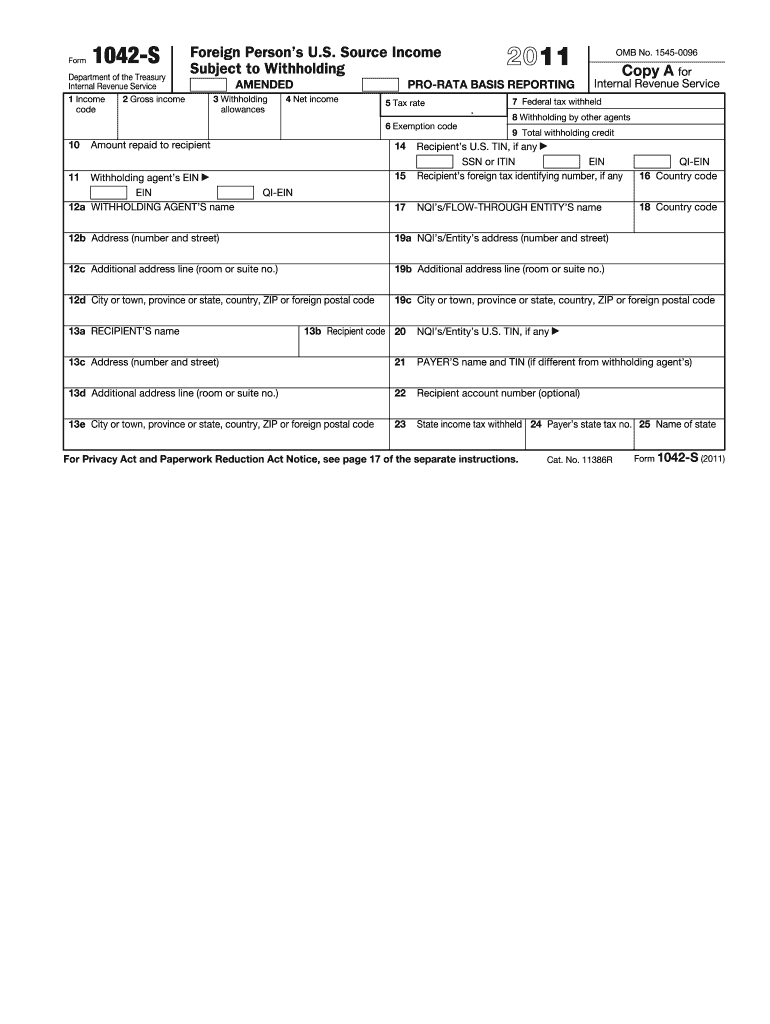
D Paperwork Reduction Act Notice, see page 17 of the separate instructions. Cat. No. 11386R Form 1042-S (2011) U.S. Income Tax Filing Requirements Generally, every nonresident alien individual, nonresident alien fiduciary, and foreign corporation with United States income, including income that is effectively connected with the conduct of a trade or business in the United States, must file a United States income tax return. However, no return is required to be filed by a nonresident alien in.

Open form follow the instructions

Easily sign the form with your finger

Send filled & signed form or save
How to fill out the IRS 1042-S online
Filling out the IRS 1042-S form online is a crucial step for reporting income subject to withholding for foreign persons. This guide provides clear and detailed instructions to help you through each section of the form, ensuring that your submission is accurate and complete.
Follow the steps to complete the IRS 1042-S form online.
- Click ‘Get Form’ button to obtain the form and open it for editing.
- Fill in box 1 with the appropriate income code for the type of income received. Use the instruction guide provided on the form for assistance in choosing the correct code.
- Enter the gross income amount in box 2. Ensure that this reflects the total income subject to withholding.
- In box 3, specify the number of withholding allowances that apply. This is important for calculating the correct withholding amount.
- Input the net income amount in box 4. This should account for any deductions that apply.
- Provide the applicable tax rate in box 5 based on the income type and withholding requirements.
- If applicable, indicate the exemption code in box 6, using the appropriate code from the instruction manual.
- Complete the details regarding the withholding agent, including their EIN and name in boxes 11 and 12a.
- Fill in the total federal tax withheld in box 7. This should reflect the total amount deducted from the payment.
- If there are any withholdings by other agents, record that amount in box 8.
- Combine all withholding amounts and enter the total in box 9 for total withholding credit.
- Provide the recipient's U.S. TIN (if available) in box 15, followed by their foreign tax identifying number if applicable.
- Complete the recipient’s name and address information in boxes 13a through 13e.
- Enter any optional recipient account number in box 22, if relevant.
- Review the completed form for accuracy and completeness, then save your changes. You may also download, print, or share the filled form as needed.
Start filling out your IRS 1042-S form online today to ensure your income reporting is accurate and compliant.
Experience a faster way to fill out and sign forms on the web. Access the most extensive library of templates available.
Related content
Use Form 1042-S to report: Income and amounts withheld as described in the Instructions...
Use Form 1042-S to report: Income and amounts withheld as described in the Instructions...
Apr 15, 2015 — Form(s) 1042-S, you generally must include the amount shown in box 2 of...
Get answers to your most pressing questions about US Legal Forms API.
How do I file a 1042-S tax return?
To file an IRS 1042-S tax return, ensure you complete the appropriate forms, which usually involves filing Form 1040-NR if you are a non-resident alien. You will gather information from your 1042-S and other relevant documents. For assistance, consider using platforms like uslegalforms, which can guide you through the filing process and ensure all details are accurately reported.
Where to report 1042-S on TurboTax?
You should report IRS 1042-S on the TurboTax section dedicated to foreign income. Here, you will find fields to enter the income amounts and any tax withheld. TurboTax simplifies this process, ensuring you correctly categorize your 1042-S income and meet IRS requirements effectively.
How do I report 1042-S income on TurboTax?
To report IRS 1042-S income on TurboTax, navigate to the section for foreign income or miscellaneous income. Input the amounts shown on your 1042-S form as instructed. TurboTax will guide you through the process and help ensure you comply with tax regulations while accurately reporting your income.
Can Form 1042-S be filed electronically?
Yes, Form 1042-S can be filed electronically through the IRS e-file system. Electronic filing simplifies the submission process, making it faster and more efficient. By using approved software, you can ensure that your IRS 1042-S is submitted accurately and timely, reducing the risk of errors.
Where do I report 1042-S?
You report IRS 1042-S income on your federal tax return, specifically on Form 1040-NR if you are a non-resident alien. The information from the 1042-S will help you accurately complete the required sections regarding foreign income. Make sure to review your form carefully to ensure all details are correctly reported for IRS compliance.
Do I need to attach 1042-S to a tax return?
No, you do not need to attach the IRS 1042-S to your federal tax return. However, you should keep it with your tax records for reference. It provides important information about the income you received and the taxes withheld. It's essential for accurate reporting, even if it isn't submitted with your return.
What documents do I need to attach with my tax return?
The documents you need to attach with your tax return can vary, but typically include W-2s, 1099s, and if applicable, IRS 1042-S forms. Make sure personal identification information, such as your Social Security number, is accurate and attached if required. These documents support your income claims and deductions listed on your return. For guidance, consider accessing resources from US Legal Forms.
Are S Corps required to file a tax return?
Yes, S Corporations must file a tax return, specifically Form 1120-S, to report income, deductions, and credits. Although S Corps pass income to their shareholders, they still have an obligation to file annually. If your S Corp has received any IRS 1042-S forms, those figures should also be considered during your filing process. For further assistance with your S Corp tax filings, US Legal Forms can provide useful resources.
Do I need to report 1042-S in my tax return?
Yes, you must report the information from IRS 1042-S on your tax return if you received income listed on the form. Reporting it ensures you comply with tax regulations and helps determine your overall tax liability. Failure to report can lead to penalties, so it is crucial to include this information accurately. For assistance with your tax preparation, turn to US Legal Forms for detailed help.
Why am I receiving 1042-S?
You receive IRS 1042-S if you earned income as a non-resident alien or if you had certain investment incomes that required reporting. This form is meant to inform you about U.S. income sourced to you and any taxes withheld. Understanding why you receive this form helps you comply with IRS requirements and accurately report your income. If you need additional support, US Legal Forms can offer guidance.
Use professional pre-built templates to fill in and sign documents online faster. Get access to thousands of forms.
If you believe that this page should be taken down, please follow our DMCA take down process here.
This form is available in several versions. Select the version you need from the drop-down list below.