Loading
Form preview
  • US Legal Forms
  • Form Library
  • Tax Forms
  • Executive Department Treasury IRS Forms
  • 2011 Form 1042 2011

Get 2011 Form 1042 2011

3. You must use the 2013 version of Form 1042 to report for 2013. The final 2014 version of the Form 1042 has been provided at this time solely for informational purposes in order to provide as much time as possible for withholding agents and intermediaries to implement the new requirements of the Foreign Account Tax Compliance Act (FATCA). The 2014 version of the Form 1042 reflects the new FATCA requirements and will be filed by taxpayers in 2015 to report with respect to 2014. 1042 Annual W.

This website is not affiliated with IRS

How it works

  1. Open form

    Open form follow the instructions

  2. Easily sign form

    Easily sign the form with your finger

  3. Share form

    Send filled & signed form or save

How to fill out the 2011 Form 1042 online

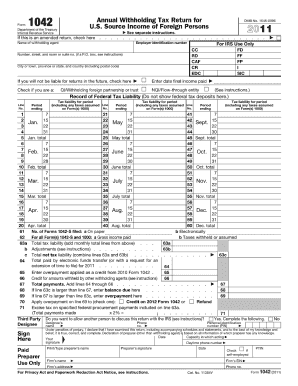
Filling out the 2011 Form 1042 online can be straightforward when you have the right guidance. This step-by-step guide offers clear instructions to help users accurately complete the form required for reporting U.S. source income of foreign persons.

Follow the steps to complete the 2011 Form 1042 online.

  1. Press the ‘Get Form’ button to obtain the form and open it for editing.
  2. Begin by entering the name of the withholding agent in the designated field at the top of the form. Ensure that this information is accurate, as it identifies the entity responsible for tax withholding.
  3. Fill in the employer identification number (EIN) just below the name of the withholding agent. This number is essential for the IRS to track your filing.
  4. Next, indicate the period ending date in the specified space. This date pertains to the tax year for which you are reporting income.
  5. If this is an amended return, check the corresponding box. This is important for the IRS to know that the original filing has been modified.
  6. Complete Section 1 by entering the date the final income was paid. This provides essential context for your reported income figures.
  7. In the lines provided, document the record of federal tax liability, ensuring to include any taxes assumed on Forms 1000 as required.
  8. Proceed to outline total gross amounts reported on all Forms 1042-S and 1000 in the specified lines. Ensure accuracy when reporting U.S. source income, both FDAP and substitute payments.
  9. Specify whether you authorize another person to discuss this return with the IRS by checking 'Yes' and filling in the designee's details.
  10. Finally, once all required information has been inputted, you can save any changes made, download the completed form, print, or share it as necessary.

Complete your 2011 Form 1042 online today to ensure timely reporting and compliance.

Get form

Experience a faster way to fill out and sign forms on the web. Access the most extensive library of templates available.

Related content

Annual Withholding Tax Return for U.S. Source...
For Privacy Act and Paperwork Reduction Act Notice, see instructions. Cat. No. 11384V...
Learn more
Foreign Person's U.S. Source Income Subject to ...
Form 1042-S (2011). Page 2. Form 1042-S. Department of the Treasury. Internal Revenue...
Learn more
2014 Instructions for Form 1040NR
Apr 15, 2015 — If your Form 1042-S or Form 1099-R shows a larger amount, use the amount...
Learn more

Related links form

IRS 8453-EO 2011 IRS 8453-F 2013 IRS 8453-F 2012 IRS 8453-S 2018

Questions & Answers

Get answers to your most pressing questions about US Legal Forms API.

Contact support

To enter the 2011 Form 1042-S in TurboTax, start by opening your tax return and locating the income section. Input the information you see on the 1042-S form, such as income amounts, withholding taxes, and other relevant details. TurboTax will provide prompts to guide you through this process. If you encounter any issues, USLegalForms offers resources that can assist you in accurately completing your tax return.

Yes, the 2011 Form 1042 can be filed electronically through software that supports this capability. This method is advantageous as it allows for quicker confirmation of receipt and immediate processing. Make sure to check all entries thoroughly for compliance with IRS guidelines. Utilizing platforms like USLegalForms can guide you through the electronic filing process effectively.

You can file your return electronically if you are using the 2011 Form 1042. Electronic filing expedites the process, offering a convenient way to submit information to the IRS. Be sure to verify that all details on your return are accurate before submission. USLegalForms provides helpful resources to make your filing experience smooth and efficient.

Absolutely, you can file the 2011 Form 1042 electronically using IRS-approved software. This method not only saves time but also reduces the chances of errors compared to paper filing. Ensure your software is updated and check that all information is complete. By choosing electronic filing, you streamline your tax responsibilities significantly.

Filing the 2011 Form 1042 late can result in penalties that vary based on how late the form is submitted. Generally, the IRS applies a fine for each month the form is overdue, increasing until the form is filed. Additionally, you may face interest on any taxes owed, which can add financial burden. To avoid these penalties, be proactive in filing your form on time.

Yes, non-resident aliens can file the 2011 Form 1042 electronically. This option simplifies the filing process and provides a quicker way to submit your tax information. Ensure that you have the necessary documentation ready, as electronic filing requires accurate details. Consider using platforms like USLegalForms for guided assistance.

Filing the 2011 Form 1042 incorrectly or late can lead to penalties imposed by the IRS. The penalties may include fines based on the unpaid tax amounts or additional charges for late submission. To avoid these penalties, it's crucial to file the form accurately and on time, possibly utilizing platforms like US Legal Forms for assistance.

Form 1042 is typically filled out by withholding agents, which can include businesses or individuals making payments to foreign persons. These agents are responsible for withholding taxes on certain types of income, ensuring that the IRS receives due payments. If you are a foreign entity or individual receiving U.S. income, this form is crucial for you.

Yes, the 2011 Form 1042 is indeed a tax return used by foreign individuals and entities receiving income from U.S. sources. It serves to report and withhold tax for payments subject to U.S. income tax withholding. Understanding its function can help ensure compliance and accurate reporting of income.

Absolutely, you can claim a refund on the 2011 Form 1042 if you have overpaid withholding taxes. To do this, you must fill out the form accurately and submit the appropriate claim for refund. You can also utilize platforms like uslegalforms to ensure you meet all IRS requirements and expedite your refund claim.

Get This Form Now!

Use professional pre-built templates to fill in and sign documents online faster. Get access to thousands of forms.
If you believe that this page should be taken down, please follow our DMCA take down processhere.
Get 2011 Form 1042
  • Adoption
  • Bankruptcy
  • Contractors
  • Divorce
  • Home Sales
  • Employment
  • Identity Theft
  • Incorporation
  • Landlord Tenant
  • Living Trust
  • Name Change
  • Personal Planning
  • Small Business
  • Wills & Estates
  • Packages A-Z
  • Affidavits
  • Bankruptcy
  • Bill of Sale
  • Corporate - LLC
  • Divorce
  • Employment
  • Identity Theft
  • Internet Technology
  • Landlord Tenant
  • Living Wills
  • Name Change
  • Power of Attorney
  • Real Estate
  • Small Estates
  • Wills
  • All Forms
  • Forms A-Z
  • Form Library
  • Legal Hub
  • About Us
  • Help Portal
  • Legal Resources
  • Blog
  • Affiliates
  • Contact Us
  • Delete My Account
  • Site Map
  • Industries
  • Forms in Spanish
  • Localized Forms
  • State-specific Forms
  • Forms Kit
  • Real Estate Handbook
  • All Guides
  • Notarize
  • Incorporation services
  • For Consumers
  • For Small Business
  • For Attorneys
  • USLegal
  • FormsPass
  • pdfFiller
  • signNow
  • altaFlow
  • DocHub
  • Instapage
Form Packages
  • Adoption
  • Bankruptcy
  • Contractors
  • Divorce
  • Home Sales
  • Employment
  • Identity Theft
  • Incorporation
  • Landlord Tenant
  • Living Trust
  • Name Change
  • Personal Planning
  • Small Business
  • Wills & Estates
  • Packages A-Z
Form Categories
  • Affidavits
  • Bankruptcy
  • Bill of Sale
  • Corporate - LLC
  • Divorce
  • Employment
  • Identity Theft
  • Internet Technology
  • Landlord Tenant
  • Living Wills
  • Name Change
  • Power of Attorney
  • Real Estate
  • Small Estates
  • Wills
  • All Forms
  • Forms A-Z
  • Form Library
Customer Service
  • Legal Hub
  • About Us
  • Help Portal
  • Legal Resources
  • Blog
  • Affiliates
  • Contact Us
  • Delete My Account
  • Site Map
  • Industries
  • Forms in Spanish
  • Localized Forms
  • State-specific Forms
  • Forms Kit
Legal Guides
  • Real Estate Handbook
  • All Guides
Prepared for you
  • Notarize
  • Incorporation services
Our Customers
  • For Consumers
  • For Small Business
  • For Attorneys
Our Sites
  • USLegal
  • FormsPass
  • pdfFiller
  • signNow
  • altaFlow
  • DocHub
  • Instapage
Social Media
Call us now toll free:
+1 833 426 79 33
As seen in:
© Copyright 1999-2026 airSlate Legal Forms, Inc. 3720 Flowood Dr, Flowood, Mississippi 39232
  • Your Privacy Choices
  • Terms of Service
  • Privacy Notice
  • Content Takedown Policy
  • Bug Bounty Program
2011 Form 1042
This form is available in several versions.
Select the version you need from the drop-down list below.
2021 IRS 1042
Select form
  • 2021 IRS 1042
  • 2020 IRS 1042
  • 2019 IRS 1042
  • 2018 IRS 1042
  • 2017 IRS 1042
  • 2016 IRS 1042
  • 2015 IRS 1042
  • 2014 IRS 1042
  • 2011 2011 Form 1042
  • 2010 IRS 1042
Select form