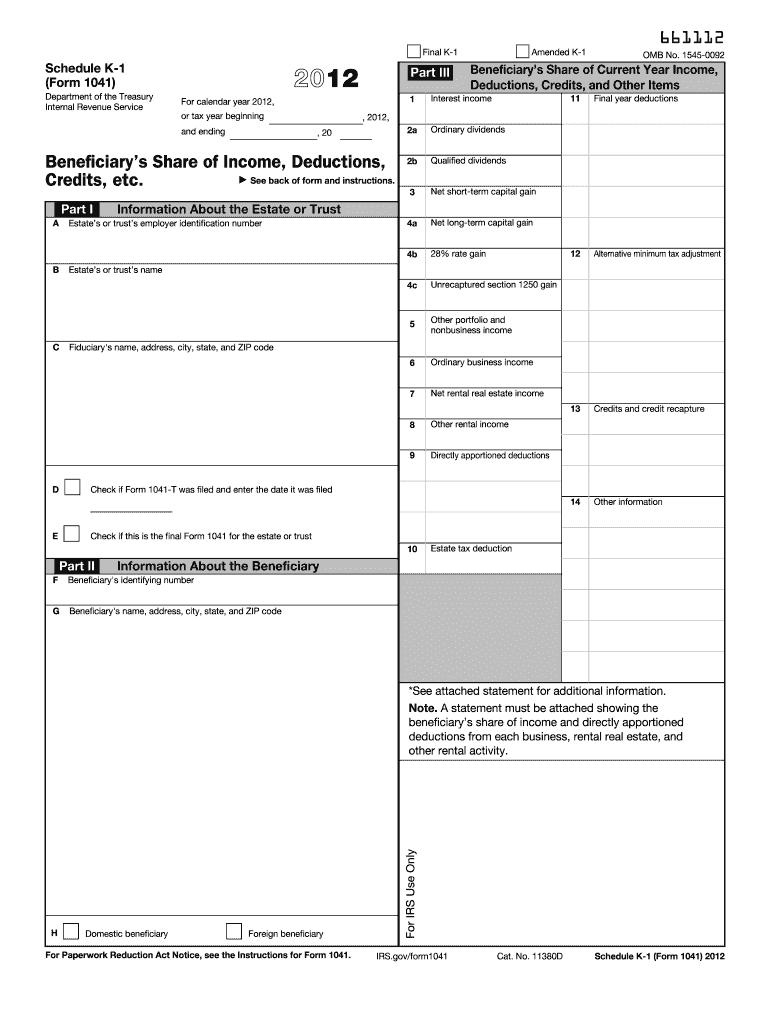
Urrent Year Income, Deductions, Credits, and Other Items 12 2a Other information Qualified dividends , 2012, , 20 Beneficiary s Share of Income, Deductions, See back of form and instructions. Credits, etc. 3 Net short-term capital gain 4a Net long-term capital gain 4b 28% rate gain 4c Unrecaptured section 1250 gain 5 Other portfolio and nonbusiness income 6 Ordinary business income 7 Net rental real estate income 8 Other rental income 9 Part I Credits and credit re.

Open form follow the instructions

Easily sign the form with your finger

Send filled & signed form or save
How to fill out the IRS 1041 - Schedule K-1 online
The IRS 1041 - Schedule K-1 is a key document used to report a beneficiary's share of income, deductions, credits, and other items from an estate or trust. This guide provides a clear and user-friendly process for completing this form online, ensuring that users can accurately report their information.
Follow the steps to complete your IRS 1041 - Schedule K-1 online.
- Click the ‘Get Form’ button to access the Schedule K-1 form and open it in your browser.
- Enter the estate's or trust's employer identification number in Part I, Box A. This information identifies the entity from which you are receiving distributions.
- Provide the estate's or trust's name in Box B, followed by the fiduciary's details, including their name, address, city, state, and ZIP code in Box D.
- Indicate whether the final Form 1041 for the estate or trust has been filed by checking the appropriate box in Box E and entering the date it was filed.
- In Part II, fill out information about the beneficiary in Box F, which requires the beneficiary's identifying number, and continue with their name and address in Box G.
- In Part III, report the beneficiary’s share of current year income, deductions, credits, and other items. Fill out each applicable field, including ordinary dividends, interest income, and capital gains.
- Ensure that any additional statements, as indicated in the form, are attached to the Schedule K-1 to provide extra details about the beneficiary's share of income and deductions.
- Once all fields are completed, review the form for accuracy. You can then save your changes, download, print, or share the completed Schedule K-1 as needed.
Start completing your IRS 1041 - Schedule K-1 online today for accurate reporting.
Experience a faster way to fill out and sign forms on the web. Access the most extensive library of templates available.
Related content
Note: A statement must be attached showing the beneficiary's share of income and directly...
The fiduciary of a trust or decedent's estate uses Schedule. K-1 to report your share of...
Jan 31, 2012 — Schedule K-1 (Form 1041), or other and geothermal property. Examples...
Get answers to your most pressing questions about US Legal Forms API.
Can I file form 1041 electronically?
Yes, you can file IRS 1041 electronically using approved e-file software or through a tax professional. E-filing simplifies the submission process, reduces paperwork, and speeds up refunds. Ensure that you use IRS-approved software for accurate filing. For more information on e-filing and to access suitable forms, uslegalforms provides helpful resources.
Do you have to file a K-1 with a 1041?
You do not need to file a K-1 with the 1041 return, but you must provide it to each beneficiary for their individual filings. Each beneficiary uses the K-1 to report income, deductions, and credits on their tax returns. This process is crucial for ensuring compliance with tax laws. For easy access to necessary forms and guidance, consider checking out uslegalforms.
Who generates Schedule K-1?
The fiduciary of the estate or trust is responsible for generating Schedule K-1. This can be an executor, administrator, or trustee who prepares the document based on the entity's financial activities. Beneficiaries rely on this form to understand their taxable income from the estate or trust. Uslegalforms can offer resources and templates to help fiduciaries in accurately preparing Schedule K-1.
How do I know if I need to file a 1041?
You need to file IRS 1041 if the estate or trust earns gross income of $600 or more during the tax year or has a non-resident alien as a beneficiary. If you are unsure, reviewing the financial activities of the estate or trust can provide clarity. Consulting with tax professionals or uslegalforms can also guide you in determining your filing obligations effectively.
Does Schedule K-1 need to be filed with 1041?
Schedule K-1 does not need to be filed with the IRS 1041 return itself, but it must be provided to each beneficiary. Each beneficiary then uses the information on their K-1 to report income on their own tax returns. It’s important to maintain proper records for filing purposes. To navigate these requirements smoothly, consider accessing templates from uslegalforms.
What is required to be reported on Schedule K-1?
Schedule K-1 requires reporting the beneficiary's share of income, deductions, and credits. This may include various types of income such as interest, dividends, and capital gains. Ensuring complete and accurate reporting on this form is essential for the beneficiary’s tax obligations. For detailed reporting requirements, uslegalforms can provide useful frameworks and examples.
How do I get a Schedule K-1 form?
You can obtain a Schedule K-1 form through the estate or trust that generates it. Typically, the fiduciary of the estate or trust will prepare this form and distribute it to the beneficiaries. If you are the beneficiary, ensure you request this form if you have not received it. Additionally, uslegalforms offers templates and guidance on obtaining this important document.
What is Schedule K-1 form 1041 line 14?
Line 14 of the IRS 1041 - Schedule K-1 is crucial for reporting beneficiary information. It typically details the beneficiary's share of credits, deductions, or other items that must be reported in their tax returns. Understanding this line helps ensure accurate reporting and compliance with IRS regulations. Consult resources from uslegalforms for further clarification and assistance.
Should I report Schedule K-1?
Yes, you should report Schedule K-1 to accurately reflect your income. Failing to report the income from the K-1 can lead to issues with the IRS, including penalties and interest on unpaid taxes. It's crucial to include this form with your tax return for compliance. If you need assistance, consider using our resources on the uslegalforms platform to simplify the reporting process.
What is the difference between a K-1 and a 1041?
The main difference between a K-1 and a 1041 lies in their purpose. Form 1041 is the tax return for the estate or trust, while Schedule K-1 is the document that reports an individual beneficiary's share of that income. This means K-1 provides detailed information for beneficiaries on how much income to report on their taxes. Understanding this distinction is essential when dealing with IRS 1041 - Schedule K-1.
Use professional pre-built templates to fill in and sign documents online faster. Get access to thousands of forms.
If you believe that this page should be taken down, please follow our DMCA take down process here.
This form is available in several versions. Select the version you need from the drop-down list below.