Lumn (c) or (e) B Depletion Form 8582 or Schedule E, line 33, column (c) or (e) Q Credit to holders of tax credit bonds Form 8582 or Schedule E, line 33, column (c) or (e) S Energy efficient appliance credit C Amortization 10. Estate tax deduction Schedule A, line 28 P Nonconventional source fuel credit R Agricultural chemicals security credit T Credit for employer differential wage payments U Recapture of credits 11. Final year deductions 14. Other information Report on Form 1040, li.
Open form follow the instructions
Easily sign the form with your finger
Send filled & signed form or save
How to fill out the IRS 1041 - Schedule K-1 online
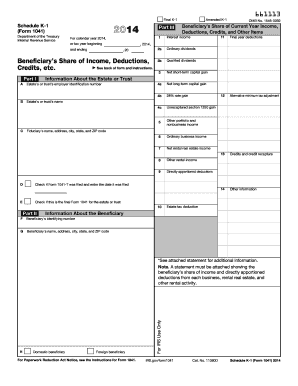
The IRS 1041 - Schedule K-1 is an essential form used to report a beneficiary's share of income, deductions, and credits from an estate or trust. This guide will help you navigate the process of completing this form online, ensuring that you provide all necessary information accurately.
Follow the steps to complete your IRS 1041 - Schedule K-1 online.
- Press the ‘Get Form’ button to access the form and open it for editing.
- In Part I, provide the estate's or trust's identification number, name, and fiduciary's contact information as specified in the form.
- Indicate whether Form 1041-T was filed and enter the corresponding date.
- Complete Part II by filling in the beneficiary's identifying number, name, and address, while indicating their status as a domestic or foreign beneficiary.
- In Part III, accurately fill out the beneficiary’s share of current year income, deductions, credits, and other relevant items. Be sure to refer to the back of the form for detailed instructions if needed.
- Review all entries to ensure accuracy and completeness.
- Once finished, you can either save your changes, download, print, or share the completed form as required.
Complete your documents online for a smoother filing experience.
Experience a faster way to fill out and sign forms on the web. Access the most extensive library of templates available.
Related content
Note: A statement must be attached showing the beneficiary's share of income and directly...
The fiduciary of a trust or decedent's estate uses Schedule. K-1 to report your share of...
Jan 31, 2012 — Schedule K-1 (Form 1041), or other and geothermal property. Examples...
Get answers to your most pressing questions about US Legal Forms API.
Who generates Schedule K-1?
The Schedule K-1 is generated by the individual or entity managing the estate or trust, commonly the executor or trustee. This process involves compiling financial information that reflects the distributions made to beneficiaries, leading to the completion of the IRS 1041 - Schedule K-1. It is essential to handle this accurately, as it provides the beneficiaries necessary information for their tax returns. If you're unsure about the process, consider professional assistance.
Who issues a Schedule K-1?
A Schedule K-1 is issued by the estate's executor or the trust's trustee. They must provide this form to each beneficiary to report their share of income, deductions, and credits reflected in the IRS 1041 - Schedule K-1. Proper issuance of this form is vital for compliance with tax laws. Remember to verify that you receive your copy in a timely manner to avoid any filing delays.
Who prepares the K-1 form?
The K-1 form is generally prepared by the trustee or executor handling the estate or trust's finances. These individuals are tasked with collecting the necessary financial data to complete the IRS 1041 - Schedule K-1 accurately. It is crucial for the preparation to be diligent, as any mistakes can impact the beneficiaries' tax obligations. If you need help, consider utilizing services like uslegalforms for guidance in this process.
Who is responsible for K-1?
The executor of the estate or the trustee of the trust is primarily responsible for preparing and issuing the Schedule K-1. They complete the IRS 1041 - Schedule K-1 to report the income distributions to beneficiaries. It is essential that they ensure accuracy, as the beneficiaries will use this information for their tax filings. Communication between the executor and beneficiaries is important to clarify any questions.
Can I file Form 1041 electronically?
Yes, you can file Form 1041 electronically using authorized e-file providers. Many tax software platforms allow users to easily file the IRS 1041 - Schedule K-1 online. Electronic filing not only speeds up the process but also reduces the chance of errors associated with paper forms. Ensure you follow the necessary requirements to successfully e-file.
How do I get a Schedule K-1 form?
You can obtain a Schedule K-1 form from the executor of an estate or the trustee of a trust. They are responsible for providing the Schedule K-1 to all beneficiaries once the IRS 1041 - Schedule K-1 is prepared. If you are the beneficiary, ensure you receive this form in time to meet your tax filing deadlines. Alternatively, many online tax services also offer downloadable versions of this form.
Does Schedule K-1 need to be filed with 1041?
Yes, Schedule K-1 must accompany Form 1041 if the estate or trust has to report income, deductions, or credits to its beneficiaries. When you file the IRS 1041 - Schedule K-1, you ensure that each beneficiary receives proper documentation for their tax obligations. These forms play a crucial role in accurately reporting income to the IRS. Failing to include it can lead to issues down the line.
What forms cannot be electronically filed?
Certain forms, including some specialized tax forms, cannot be filed electronically. It is important to check the IRS website or consult with tax software guidelines to understand which forms may require paper filing. For simplicity, using a comprehensive platform like uslegalforms can help you determine the proper filing method for all your tax requirements.
Can an IL 1041 be filed electronically?
Yes, an IL 1041 can be filed electronically through specific tax software that supports state and federal tax filings. This includes submitting your IRS 1041 - Schedule K-1 if you are holding a related estate or trust. Using reliable platforms such as uslegalforms can help ensure that your filing is accurate and timely.
What is the difference between a k1 and a 1041?
The key difference between a K-1 and a 1041 lies in their functions. The K-1 is used to report income distributions from partnerships or S corporations, while Form 1041 is the tax return filed by estates and trusts. Understanding these differences is crucial when filing your taxes and navigating the IRS 1041 - Schedule K-1.
Use professional pre-built templates to fill in and sign documents online faster. Get access to thousands of forms.
If you believe that this page should be taken down, please follow our DMCA take down process here.
This form is available in several versions. Select the version you need from the drop-down list below.