Loading
Get Irs 668 (y) (c) 1999-2026
How it works
-

Open form follow the instructions
-

Easily sign the form with your finger
-

Send filled & signed form or save
How to fill out the IRS 668 (Y) (c) online
Filling out the IRS 668 (Y) (c), also known as the Notice of Federal Tax Lien, is an important task when dealing with federal tax liabilities. This guide offers clear, step-by-step instructions to help you complete the form accurately and efficiently online.
Follow the steps to complete the IRS 668 (Y) (c) form online.
- Use the 'Get Form' button to access the IRS 668 (Y) (c) form and open it in your online editor.
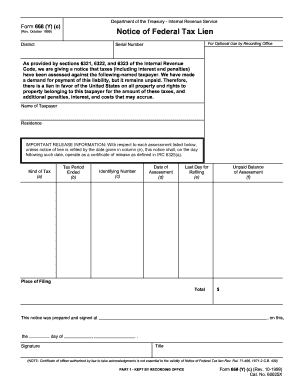
- In the first section, fill in the 'Name of Taxpayer' with the complete name of the individual or entity responsible for the tax liability.
- Next, input the 'Residence' address of the taxpayer. Ensure that the address is current and accurately reflects the taxpayer's location.
- For each tax period, fill out the following fields: 'Tax Period Ended', which indicates the specific tax period for the assessment; 'Kind of Tax', which specifies the type of tax owed; 'Date of Assessment', providing the date when the tax was assessed; 'Identifying Number' to uniquely identify the assessment; and 'Unpaid Balance of Assessment', indicating the total amount still owed.
- In the 'Last Day for Refiling' section, enter the deadline for refiled notice of lien to ensure proper management of this document.
- After completing all necessary fields, check for accuracy and completeness. This is crucial to avoid delays or complications.
Take the next step and complete your IRS forms online for a smoother filing experience.
The IRS can freeze your bank account for up to 21 days, allowing you the opportunity to resolve the situation. During this period, you must act swiftly to address any tax obligations. Understanding the implications of IRS 668 (Y) (c) can help you navigate the freeze effectively.