Get Irs 1040-x 2010
How it works
-

Open form follow the instructions
-

Easily sign the form with your finger
-

Send filled & signed form or save
How to fill out the IRS 1040-X online
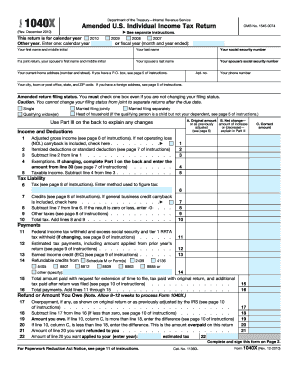
Filing an amended U.S. individual income tax return using the IRS 1040-X can seem daunting, but with the right guidance, you can complete it with confidence. This guide provides clear and detailed instructions to help users navigate each section of the form effectively.
Follow the steps to successfully complete your IRS 1040-X online.
- Click ‘Get Form’ button to obtain the IRS 1040-X and open it in your editing tool.
- Enter your personal information in the designated fields. This includes your first name, last name, and social security number. If you are filing jointly, include your partner’s information as well.
- Provide your current home address, including your city, state, and ZIP code. If applicable, refer to the instructions for foreign addresses.
- Check the appropriate box to indicate your amended return filing status. You must select one option, as changing your filing status is restricted after the due date.
- In the 'Income and Deductions' section, enter your adjusted gross income and any changes to your itemized or standard deductions. Complete any relevant calculations as guided by the instructions.
- With the 'Tax Liability' section, calculate your total tax and any applicable credits. Ensure to indicate the method used for calculating your tax.
- For the 'Payments' section, list any federal income tax withheld, estimated tax payments, and refundable credits relevant to your amended return.
- In the 'Refund or Amount You Owe' section, determine if you are owed a refund or if you have a balance due based on your revised calculations.
- Complete Part I and II with any changes to exemptions you are claiming. Make sure to specify dependents accurately.
- In Part III, explain why you are filing the 1040-X, and attach any necessary supporting documents.
- Sign and date the form to finalize your submission. Remember to keep a copy for your records.
- Review all details carefully before saving your changes, and choose to download, print, or share the completed form as necessary.
Amend your tax return with confidence by completing the IRS 1040-X online.
Get form
Related links form
To change your filing status using the IRS 1040-X, start by entering your new filing status on the form. Next, provide the reason for the change in the designated space. Ensure that you include any necessary supporting documents and calculate the new amounts for your income and deductions accordingly. Using resources like the uslegalforms platform can make this process easier and guide you in filing correctly.