Loading
Get Irs 1040-x 2013
This website is not affiliated with IRS
How it works
-

Open form follow the instructions
-

Easily sign the form with your finger
-

Send filled & signed form or save
How to fill out the IRS 1040-X online
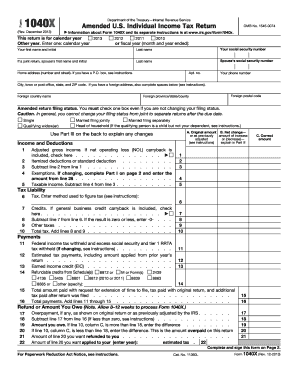
The IRS 1040-X is an amended U.S. Individual Income Tax Return, allowing users to correct errors from their original returns. This guide provides clear, step-by-step instructions for completing the form online to ensure accuracy and compliance.
Follow the steps to complete your IRS 1040-X accurately.
- Click ‘Get Form’ button to obtain the IRS 1040-X and open it in your preferred editor.
- Enter the year for which you are amending your tax return in the section labeled 'This return is for calendar year'. You may select from past years like 2013, or enter a specific fiscal year.
- Fill in your name, social security number, and, if applicable, your spouse's details. Ensure all information matches the original return to reduce processing issues.
- Provide your complete home address, including ZIP code and any relevant foreign address details if applicable.
- Select your amended return filing status by checking the appropriate box. Make sure to review the instructions on changing your status if necessary.
- Enter the original amounts from your return and any changes in Part I, ensuring that you explain any discrepancies in Part III.
- Complete the Income and Deductions section, including adjusted gross income and any changes to deductions. Calculate taxable income accurately.
- In the Tax Liability section, determine your tax amount and take note of any tax credits. Subtract credits from your calculated tax.
- Document all payments made, including tax withheld and estimated tax payments, ensuring you account for all relevant credits.
- In the Refund or Amount You Owe section, calculate any overpayment or amount owed. Enter your desired refund amount or indicate the amount to apply toward estimated tax.
- Specify exemptions in Part I if applicable, and list dependents in Part II, following instructions carefully.
- Use Part III to clearly explain your reason for filing the amended return, attaching any supporting documents as necessary.
- Complete the signing process by providing your signature and date, and if applicable, your spouse's signature. Remember to keep a copy for your records.
- Finalize by saving changes, downloading, printing, or sharing your completed form as needed.
Start your online journey to amend your tax return today!
Get form
Experience a faster way to fill out and sign forms on the web. Access the most extensive library of templates available.
Related links form
To file an amended tax return yourself, complete IRS 1040-X by entering the correct information and explaining your changes. You can download the form from the IRS website, or use online services like USLegalForms for a guided experience. After filling it out, mail it to the provided address, making sure to keep copies for your records.
Get This Form Now!
Use professional pre-built templates to fill in and sign documents online faster. Get access to thousands of forms.