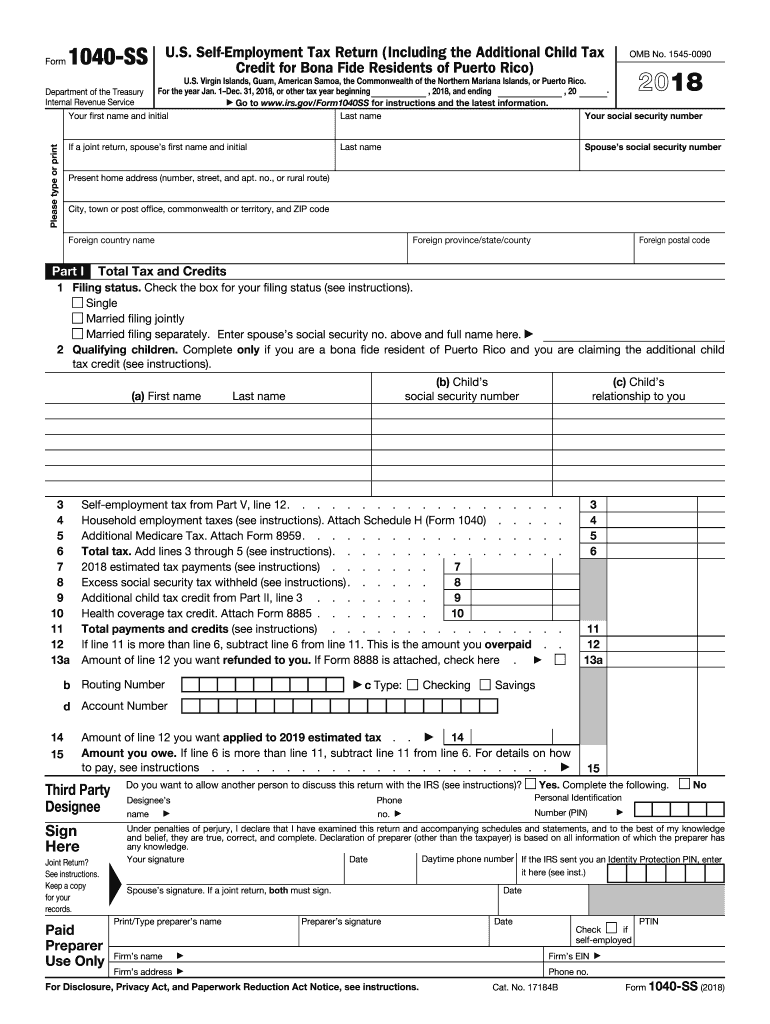
Oint Return? See instructions. Keep a copy for your records. Paid Preparer Use Only Third Party Designee Do you want to allow another person to discuss this return with the IRS (see instructions)? Designee s Phone Personal Identification name no. Number (PIN) Spouse s signature. If a joint return, both must sign. Print/Type preparer s name Preparer s signature Date Date Check if self-employed Firm s name Firm s EIN Firm s address Phone no.
Loading

Open form follow the instructions

Easily sign the form with your finger

Send filled & signed form or save
How to fill out the IRS 1040-SS online
Filling out the IRS 1040-SS form online can seem overwhelming, but this guide will help simplify the process. The IRS 1040-SS is specifically designed for self-employed individuals who need to report their income and calculate their self-employment tax. Follow the steps below to complete the form with confidence.
Follow the steps to successfully fill out the IRS 1040-SS online.
- Click ‘Get Form’ button to obtain the 1040-SS form and access it in your preferred online document editor.
- Begin by entering your personal information, including your first name, last name, and social security number. If filing jointly, include your partner’s details as well.
- Provide your present home address, including the city, state, and ZIP code. If applicable, include your foreign country name and postal code.
- In Part I, select your filing status by checking the appropriate box: single, married filing jointly, or married filing separately while entering your spouse’s information as required.
- If you are claiming the additional child tax credit and are a bona fide resident of Puerto Rico, list your qualifying children by filling in their names, social security numbers, and their relationship to you.
- Input details for total tax and credits. Ensure you calculate self-employment tax from Part V, line 12, along with any household employment taxes or additional Medicare tax as applicable.
- Fill in the amounts for estimated tax payments, excess social security tax withheld, and any additional child tax credit. Total all payments and credits in the designated field.
- If you have overpaid, specify the amount to be refunded and include your mailing preferences for the refund.
- Proceed to sign the form, declaring that the information provided is true to the best of your knowledge. If filing jointly, ensure both signatures are present.
- After completing the form, review all entries for accuracy. You can save changes, download, print, or share the completed form.
Complete your IRS 1040-SS form online today for a smooth filing experience.
Experience a faster way to fill out and sign forms on the web. Access the most extensive library of templates available.
Related content
Jun 5, 2025 — One purpose of the form is to report net earnings from self-employment...
Instructions for Form 1040-SS, U.S. self-employment tax return (including the additional...
Apr 15, 2015 — Form SS-4 and its instructions. Form. SS-4 is available at IRS.gov...
Get answers to your most pressing questions about US Legal Forms API.
What's the difference between a 1040 and a 1040 NR?
The primary difference between Form 1040 and Form 1040-NR lies in the taxpayer's residency status. Form 1040 is for U.S. citizens and residents, while Form 1040-NR is designated for non-resident aliens. Each form has specific filing requirements and applicable credits or deductions. If you are navigating these differences, platforms like USLegalForms can help guide you in completing the appropriate form, including nuances related to the IRS 1040-SS.
What is the tax form 1040pr?
Form 1040-PR is a tax return specifically for residents of Puerto Rico to report income and claim tax credits. This form is essential for individuals who earn income within Puerto Rico and helps them fulfill their tax obligations. Understanding how it interacts with IRS forms like the 1040-SS can provide clarity on your tax responsibilities, especially for self-employed individuals.
What is a 1040?
The 1040 form is a comprehensive tax return form used by individuals to report personal income to the IRS. This form allows taxpayers to calculate their total income, claim deductions, and determine their tax liability. The 1040 is essential for individuals filing federal taxes, including aspects covered in the IRS 1040-SS for residents of Puerto Rico.
What is 1040 SS?
Form 1040-SS is designed specifically for U.S. citizens and resident aliens who work in Puerto Rico. It is used to report income and calculate taxes owed under the Self-Employment Contributions Act. If you are self-employed or have income from Puerto Rico sources, you will likely need this form. Resources like USLegalForms can assist you in easily completing the IRS 1040-SS.
Should I use 1040 or 1040 SR?
Choosing between Form 1040 and 1040-SR depends on your age and financial situation. Taxpayers 65 and older may benefit from the 1040-SR, which features larger text and a more straightforward layout. If you feel comfortable with standard tax forms and your situation involves traditional deductions, the standard 1040 is also appropriate. Both forms can accommodate the IRS 1040-SS, depending on your needs.
Who qualifies for Puerto Rico tax exemption?
Residents of Puerto Rico may qualify for tax exemption if they meet specific criteria related to their income and tax residency status. Generally, individuals who earn income solely from Puerto Rico sources are eligible. It's crucial to consult the IRS guidelines, particularly when using forms like the IRS 1040-SS, to ensure compliance with the applicable tax laws.
What does 1040 stand for?
The term '1040' refers to the IRS form used by individuals to report their annual income. The form allows taxpayers to calculate their tax liability and claim any applicable deductions or credits. It serves as a fundamental component of U.S. tax filing. Understanding the 1040 is essential, especially when considering forms like the IRS 1040-SS for specific situations.
What is the best way to mail your tax return to the IRS?
To mail your tax return to the IRS, use the address specified for your state in the IRS instructions. Ensure you use a secure envelope and consider sending it via a certified or tracked mail service. This way, you can confirm that your return has reached the IRS. Remember to keep copies of all documents for your records, especially if you are using IRS 1040-SS.
What does 1040 mean in slang?
'1040' in slang often relates to tax season or financial discussions about income tax. People sometimes use the term casually when referring to tax filing experiences or concerns. However, discussing the IRS 1040-SS is essential when addressing the tax obligations of those living outside the United States.
What does 1040 mean?
The term '1040' represents a specific form used by individuals to file federal income tax returns in the United States. This form collects personal and financial information needed to determine tax liability. Understanding the IRS 1040-SS and its implications can help individuals accurately report their income while complying with IRS regulations.
Use professional pre-built templates to fill in and sign documents online faster. Get access to thousands of forms.
If you believe that this page should be taken down, please follow our DMCA take down process here.
This form is available in several versions. Select the version you need from the drop-down list below.