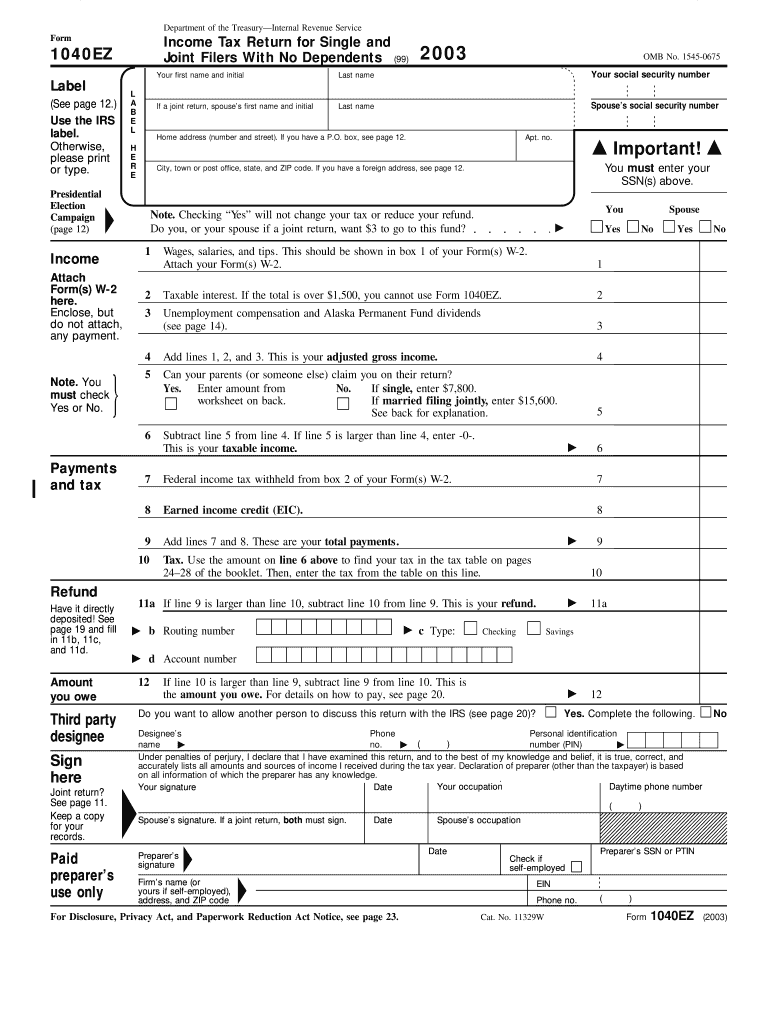
Your first name and initial Label (See page 12.) Use the IRS label. Otherwise, please print or type. Presidential Election Campaign (page 12) Last name If a joint return, spouse s first name and initial L A B E L Your social security number Last name Spouse s social security number Home address (number and street). If you have a P.O. box, see page 12. H E R E Apt. no. Important! You must enter your SSN(s) above. City, town or post office, state, and ZIP code. If you hav.
Loading

Open form follow the instructions

Easily sign the form with your finger

Send filled & signed form or save
How to fill out the IRS 1040-EZ online
Filing your taxes can be a straightforward process, especially when using the IRS 1040-EZ form, designed for simple tax situations. This guide will help you navigate each section of the form online with clear, step-by-step instructions, ensuring you complete it accurately and efficiently.
Follow the steps to fill out your IRS 1040-EZ online.
- Press the ‘Get Form’ button to obtain the IRS 1040-EZ form and open it in your document editor.
- Enter your first name and initial in the appropriate fields. Include your last name, and if applicable, provide your spouse's first name and initial.
- Input your social security number in the designated field, followed by your spouse's social security number if filing jointly.
- Complete your home address, ensuring you include your street address, city or town, state, and ZIP code. If you have a P.O. box, follow the instructions provided.
- Indicate whether you want to contribute $3 to the presidential election campaign fund by checking 'Yes' or 'No'.
- Report your income from wages, salaries, and tips as shown on your Form W-2 in the income section.
- If applicable, include taxable interest and unemployment compensation identified in the income section.
- Add your income amounts together to determine your adjusted gross income as indicated in the guidelines.
- Check the checkbox regarding whether someone else can claim you as a dependent, and enter the appropriate income thresholds.
- Calculate your taxable income by subtracting your adjustments from your adjusted gross income.
- Calculate your total payments, which include federal income tax withheld and any eligible credits.
- Determine your tax due by referencing the IRS tax table as instructed and enter the amount.
- If your payments exceed your tax due, calculate the refund amount; if not, indicate the amount owed.
- Choose whether to have your refund directly deposited by filling in the routing and account numbers.
- Sign the form where indicated, including both your and your spouse's signatures if filing jointly.
- Lastly, review all entries for accuracy and completeness, then save changes, download, print, or share the form according to your needs.
Complete your IRS 1040-EZ form online today for a smooth filing experience.
Experience a faster way to fill out and sign forms on the web. Access the most extensive library of templates available.
Related content
Jul 7, 2025 — Form 1040 is used by US taxpayers to file an annual income tax return...
Mail your return by April 15, 2014. Mail it to the address shown on the last page of the...
Schedule 8812 is for the Child Tax Credit and is attached to Form 1040, 1040A, or 1040NR.
Get answers to your most pressing questions about US Legal Forms API.
Where can I get a 1099 EZ form?
The IRS does not have a form explicitly named 1099-EZ, but you can find various 1099 forms on the IRS website for different reporting needs. These forms include 1099-MISC, 1099-NEC, and others. For easier access to all tax forms, including any related 1099 forms, consider exploring uslegalforms for convenience.
Who can file an EZ tax return?
Simply put, anyone who meets the criteria for IRS 1040-EZ can file an EZ tax return. This includes individuals without dependents, limited income, and a straightforward financial situation. If you fit this description, the IRS 1040-EZ significantly simplifies your tax return experience.
Does the IRS have a form 1040EZ anymore?
No, the IRS no longer provides a form specifically called IRS 1040-EZ. Instead, the updated Form 1040 encompasses the features of the former 1040-EZ. This consolidation allows taxpayers to experience a more unified filing process.
Does 1040 EZ exist anymore?
As of 2018, the IRS 1040-EZ form has been discontinued. However, taxpayers can still file using the redesigned IRS Form 1040, which accommodates a wider range of situations, including those previously suitable for 1040-EZ. The change aims to streamline the overall tax process.
Who is eligible for 1040EZ?
Eligibility for the IRS 1040-EZ is accessible to individuals with straightforward financial situations. You should be single or married filing jointly, have no dependents, and report taxable income under $100,000. If these conditions apply, the IRS 1040-EZ can be a fast and simple tax solution for you.
Do I qualify for 1040 EZ?
To qualify for the IRS 1040-EZ, you need to meet specific criteria, such as having a taxable income of less than $100,000 and not claiming dependents. Your filing status must be single or married filing jointly. If you meet these requirements, filing the IRS 1040-EZ can simplify your tax process.
Where can I get the IRS form 1040EZ?
You can easily obtain the IRS 1040-EZ form from the IRS website. Simply visit their forms section, and you will find downloadable PDFs ready for use. Additionally, tax preparation platforms, such as uslegalforms, often provide access to IRS forms, helping you get the necessary paperwork with convenience.
Should I file 1040 or 1040EZ?
Deciding between IRS 1040 and 1040-EZ depends on your tax situation. The IRS 1040-EZ is ideal for simple tax returns, typically for individuals with no dependents and limited income. If you have deductions, credits, or additional income sources, you might prefer the IRS 1040. Consider your financial details before making a choice.
What information is required on a 1040EZ form?
To fill out the IRS 1040-EZ form, you will need basic information such as your name, address, Social Security number, and income details. Additionally, you must provide information about any taxable interest, wages, tips, or salaries received. It's essential to gather all necessary documents beforehand to facilitate a smooth filing process. Platforms like US Legal Forms can help you gather the required information efficiently.
What is the difference between 1040EZ and 1040SR?
The primary difference between the IRS 1040-EZ and 1040-SR lies in the target audience and some additional features. The 1040-SR is designed for senior taxpayers aged 65 and older, offering larger print and an easier layout for improved readability. Both forms are relatively simple, but the 1040-SR includes provisions for certain deductions that older taxpayers may benefit from. Always consider your specific needs when choosing a form.
Use professional pre-built templates to fill in and sign documents online faster. Get access to thousands of forms.
If you believe that this page should be taken down, please follow our DMCA take down process here.
This form is available in several versions. Select the version you need from the drop-down list below.