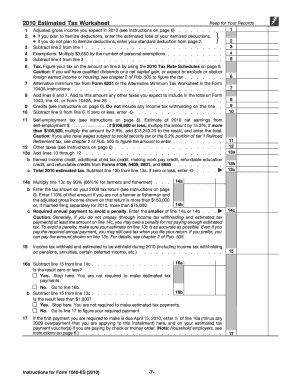
Ackage to figure and pay your estimated tax. If you are not required to make estimated tax payments for 2010, you can discard this package. Estimated tax is the method used to pay tax on income that is not subject to withholding (for example, earnings from self-employment, interest, dividends, rents, alimony, etc.). In addition, if you do not elect voluntary withholding, you should make estimated tax payments on other taxable income, such as unemployment compensation and the taxable part of your.
Open form follow the instructions
Easily sign the form with your finger
Send filled & signed form or save
How to fill out the IRS 1040-ES online
The IRS 1040-ES is a form used for estimating and paying your federal income tax. This guide will provide you with clear steps to fill out the form online effectively, ensuring you meet your tax obligations in a straightforward manner.
Follow the steps to complete your IRS 1040-ES online.
- Click ‘Get Form’ button to obtain the form and open it in the editor.
- Fill out your personal information including your name, address, and Social Security number in the designated fields. Make sure the information is accurate to avoid any issues.
- Indicate your expected adjusted gross income for the year based on your previous tax return. Use this as a guide to estimate your income accurately.
- Complete the Estimated Tax Worksheet provided with the form. This worksheet will help you calculate your expected tax liability by entering your estimated deductions and exemptions.
- Calculate your total estimated tax liability. This will include federal income tax owed, self-employment tax, and any other taxes applicable to your situation.
- Determine your required annual payment to avoid penalties. Compare your estimates against the thresholds provided to decide if you need to make estimated tax payments.
- Complete the payment voucher for each estimated payment due and include any relevant payments if applicable. Make sure to enter the amount correctly.
- Finally, review all entered information for accuracy, save your changes, download, print, or share the completed form as needed.
Complete your IRS 1040-ES online today to stay compliant with your tax obligations.
Experience a faster way to fill out and sign forms on the web. Access the most extensive library of templates available.
Related content
May 15, 2025 — Use Form 1040-ES to figure and pay your estimated tax. Estimated tax is...
Use Form 1040-ES to figure and pay your estimated tax for 2025. Estimated tax is the...
Mar 1, 2017 — Form 1040 or Form 1040A instructions. If you did not pay estimated tax...
Get answers to your most pressing questions about US Legal Forms API.
Who fills out 1040-ES?
Taxpayers who expect to owe taxes or who receive income without withholding typically fill out the IRS 1040-ES. This includes independent contractors, small business owners, and investors. Individuals can benefit from platforms like uslegalforms to easily manage and submit their estimated tax payments, simplifying their filing process.
Are IRS estimated tax payments mandatory?
IRS estimated tax payments are mandatory for certain taxpayers, particularly those with income not subject to withholding. If your tax liability meets the criteria, using the IRS 1040-ES ensures that you remain compliant with IRS requirements. Paying these estimated taxes on time helps you avoid unexpected tax bills during tax season.
How do I know if I need to make estimated tax payments?
You may need to make estimated tax payments if you expect to owe taxes of $1,000 or more when filing your IRS return. Additionally, if your withholding is insufficient to cover your tax liability, then IRS 1040-ES payments become necessary. It’s best to review your financial situation and consult resources like uslegalforms for guidance.
Can I file 1040-ES electronically?
Yes, you can file Form 1040-ES electronically. The IRS allows electronic submission of this form, making the process quicker and more efficient. Filing electronically helps ensure accuracy and speeds up processing times, allowing you to keep track of your estimated tax payments with ease.
What triggers IRS estimated tax payments?
Certain financial situations can require you to make IRS estimated tax payments. Generally, if you expect to owe more than a specific amount in taxes when filing your return, the IRS 1040-ES becomes necessary. Events like self-employment income, interest, and dividends can trigger these payments, ensuring compliance with tax obligations.
Does TurboTax have Form 1040-ES?
Yes, TurboTax offers Form 1040-ES as part of its tax preparation services. You can easily access and fill out the IRS 1040-ES within the TurboTax platform. This feature simplifies the process of calculating and submitting your estimated tax payments, making it convenient for users.
Can you get a tax refund if you're self-employed?
Yes, self-employed individuals can receive a tax refund, particularly if they've overpaid during the year. If your total tax payments, including quarterly estimated payments via IRS 1040-ES, exceed your total tax liability, you may qualify for a refund. Tracking your income and expenses accurately can help maximize this potential refund and keep your finances on track.
Does 1040 ES include self-employment tax?
The IRS 1040-ES is primarily for estimating your income tax payments, particularly for self-employed individuals. However, it does not directly include self-employment tax calculations. You will need to file Schedule SE with your Form 1040 to determine your self-employment tax based on your net earnings.
How do I file taxes if I am self-employed?
When filing taxes as a self-employed individual, you should report your income and expenses on Schedule C attached to your IRS Form 1040. Estimate your tax payments throughout the year using the IRS 1040-ES to avoid potential penalties. Additionally, remember to track any business-related deductions that can lower your total taxable income, making sure to keep records for verification.
How to file self-employment taxes step by step?
Filing self-employment taxes involves a few key steps. Begin by gathering your income documents and expenses, then calculate your net income. Use the IRS 1040-ES to estimate your taxes and ensure you are making your quarterly payments on time. Finally, complete your tax return using Form 1040 and include the necessary schedules to report your self-employment income.
Use professional pre-built templates to fill in and sign documents online faster. Get access to thousands of forms.
If you believe that this page should be taken down, please follow our DMCA take down process here.
This form is available in several versions. Select the version you need from the drop-down list below.