Get Irs 14242 2011
How it works
-

Open form follow the instructions
-

Easily sign the form with your finger
-

Send filled & signed form or save
How to fill out the IRS 14242 online
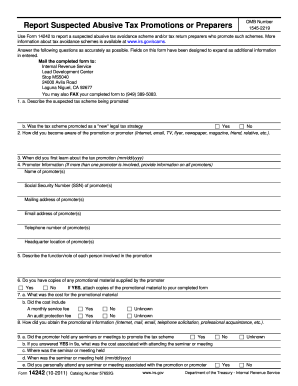
The IRS 14242 form is used to report suspected abusive tax avoidance schemes and tax return preparers promoting such schemes. This guide provides a clear, step-by-step approach to filling out this form online, ensuring accurate and complete information is submitted.
Follow the steps to complete the IRS 14242 form online.
- Click ‘Get Form’ button to obtain the form and open it in the editor.
- Begin filling out Section 1 by describing the suspected tax scheme being promoted. Indicate whether the scheme was presented as a 'new' legal tax strategy by selecting 'Yes' or 'No'.
- In Section 2, note how you became aware of the promotion or promoter, choosing from options like Internet, email, TV, or other sources.
- Enter the date you first learned about the tax promotion in the provided format (mm/dd/yyyy) in Section 3.
- Provide promoter information in Section 4. Enter the name, Social Security number, mailing address, email address, telephone number, and headquarters location for each promoter involved.
- In Section 5, describe the function or role of each person involved in promoting the tax scheme.
- Section 6 asks if you have copies of any promotional materials supplied by the promoter. Indicate 'Yes' or 'No', and if 'Yes,' be prepared to attach those copies.
- For Section 7, provide the cost of the promotional material and whether it included a monthly service fee or an audit protection fee by selecting the appropriate options.
- Continue to Section 8, describing how you obtained the promotional information, such as through Internet sources or personal acquaintances.
- In Section 9, answer whether the promoter held any seminars or meetings. If applicable, include costs, locations, and dates for those events.
- Describe the promoter's involvement and the target group of the promotion under Sections 10 and 11 respectively.
- Section 12 requires you to state if you are aware of similar promotions in your area and to describe any similarities.
- In Section 13, indicate if the promotion is still being advertised.
- Detail the tax benefits of the promotion in Section 14, providing any claims made by the promoter.
- Describe the geographic scope of the promotion in Section 15, indicating if it is local, national, or international.
- If applicable, provide information about any tax preparers involved with the promotion in Section 16.
- Section 17 is for documenting any private conversations you had with the promoter or their associates.
- Complete Section 18 by stating your current relationship with the promoter(s) and if you had any contact with them.
- Indicate in Section 19 whether you know of any individuals or businesses that purchased or used the promotion and provide names if available.
- Finally, in Section 20, state if you purchased and used the promotion package and, if applicable, whether you amended your tax returns.
- Once all sections are filled appropriately, you can save your changes, download your completed form, print it, or share it as needed.
Ensure you complete and submit your IRS 14242 form online to report any suspected abusive tax promotions accurately.
Get form
Related links form
The IRS Fresh Start Program is designed to assist individuals who are struggling to meet their tax obligations. Typically, it targets those with lower incomes or significant financial challenges. Eligibility also often depends on factors like filing status or the amount owed. Consulting with a tax service provider can clarify your eligibility and open up better options for relief.