(AGI) for 2017 was more than $150,000 ($75,000 if your filing status for 2018 is married filing separately), substitute 110% for 100% in (2b) under General Rule, earlier. This rule doesn t apply to farmers or fishermen. Generally, if you receive a pension or annuity you can use Form W-4P, Withholding Certificate for Pension or Annuity Payments, to start or change your withholding from these payments. You also can choose to have federal income tax withheld from certain government payments. Fo.
Loading

Open form follow the instructions

Easily sign the form with your finger

Send filled & signed form or save
How to fill out the IRS 1040-ES online
The IRS 1040-ES is an essential form for individuals who need to pay estimated taxes throughout the year. This guide will provide step-by-step instructions on how to complete the form correctly online, ensuring you meet your tax obligations in a timely manner.
Follow the steps to accurately complete the IRS 1040-ES online.
- Use the ‘Get Form’ button to access the IRS 1040-ES form and open it in your chosen editor.
- Enter your personal information at the top of the form, including your name, address, and Social Security number. Make sure the information is accurate to avoid delays in processing.
- Review the 'Who Must Make Estimated Tax Payments' section carefully. Check if you expect to owe at least $1,000 in tax and that your withholding is less than required.
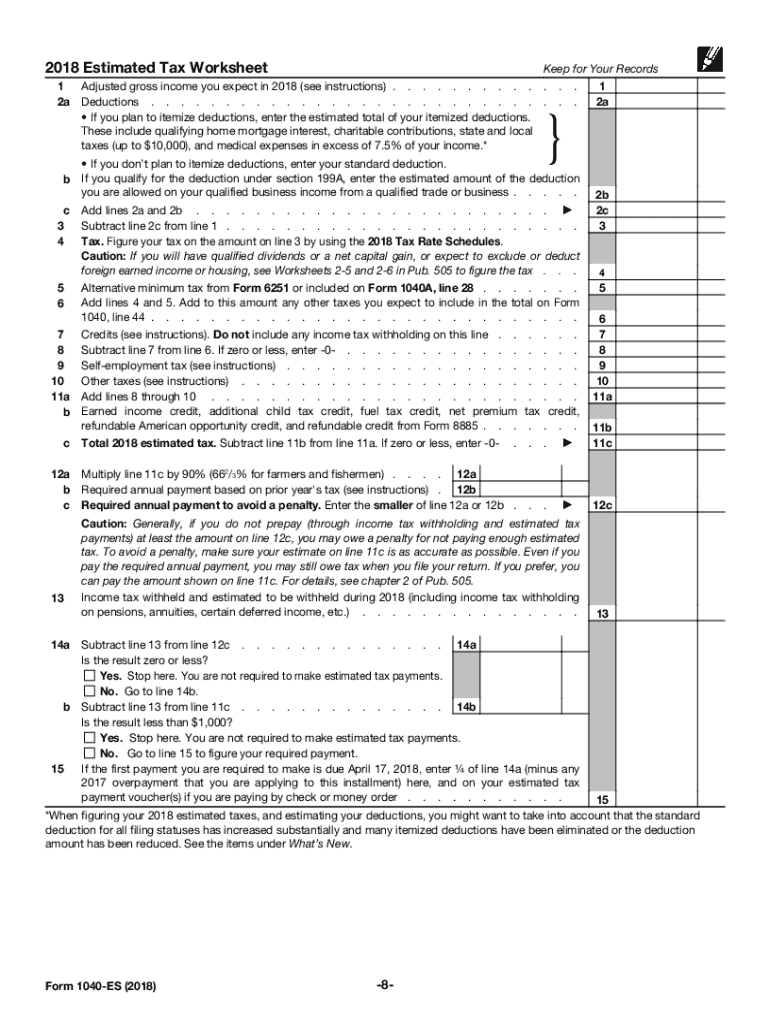
- Use the '2018 Estimated Tax Worksheet' included in the form to estimate your adjusted gross income and deductions. Ensure that you account for both income and expenses accurately.
- Calculate your estimated tax by using the tax rate schedules provided in the form. This should include any other taxes you expect to incur such as self-employment tax.
- Once you have calculated your total estimated tax, proceed to fill in the required fields, including expected payments and credits.
- Review your entries for accuracy. Once confirmed, you can save the document or proceed with submitting if applicable.
- You can then choose to save changes, download, print, or share the completed form as needed.
Ensure you complete your IRS 1040-ES form online today to fulfill your estimated tax obligations.
Experience a faster way to fill out and sign forms on the web. Access the most extensive library of templates available.
Related content
May 15, 2025 — Use Form 1040-ES to figure and pay your estimated tax. Estimated tax is...
Use Form 1040-ES to figure and pay your estimated tax for 2025. Estimated tax is the...
Mar 1, 2017 — Form 1040 or Form 1040A instructions. If you did not pay estimated tax...
Get answers to your most pressing questions about US Legal Forms API.
Why did the IRS send me a 1040-ES?
If you received an IRS 1040-ES, it likely means the IRS expects you to make estimated tax payments for the current tax year. This notice is common for self-employed individuals or those with significant non-wage income. You can benefit from using the IRS 1040-ES to calculate your tax obligations accurately, avoiding underpayment penalties. Our platform can help you manage your estimated payments easily.
How do I get my underpayment penalty waived?
To get your underpayment penalty waived, you can request a waiver by submitting Form 843 to the IRS. This form allows you to explain why you underpaid your taxes, especially if you had reasonable cause. Keeping track of your payments and ensuring they align with IRS guidelines on the IRS 1040-ES can also help avoid future penalties. Consider using tools provided by uslegalforms to simplify your tax processes.
Does TurboTax have Form 1040-ES?
TurboTax does provide access to Form 1040-ES. This feature allows users to calculate and report their estimated tax payments conveniently. By utilizing TurboTax, you can ensure your IRS 1040-ES form is completed correctly, with all necessary calculations made on your behalf. It’s a great option for simplicity and accuracy in managing your tax responsibilities.
Can I file 1040-ES with TurboTax?
You can indeed file IRS 1040-ES using TurboTax. The software simplifies the process, guiding you through the necessary steps to create your estimated tax payments. By using TurboTax, you can access valuable tools to help you accurately compute your taxes. This makes managing your estimated payments easier and more efficient.
Does TurboTax include self-employment tax?
Yes, TurboTax includes features to help users compute and file self-employment tax. When you prepare your taxes with TurboTax, it automatically calculates any self-employment taxes due, including those related to IRS 1040-ES. This ensures you’re complying with your tax obligations as a self-employed individual. It streamlines the process, allowing you to focus on your business.
Which IRS forms are not included in TurboTax?
While TurboTax covers many IRS forms, it does not include certain forms like Form 2210 for underpayment of estimated tax, and some specific state forms. If you need to file these types of forms, you might need to seek additional assistance or use different resources. However, for IRS 1040-ES, TurboTax provides a straightforward way to calculate and submit your estimated payments effectively.
Who fills out 1040-ES?
Typically, individuals who earn income that is not subject to withholding fill out IRS 1040-ES. This includes freelancers, self-employed individuals, and those with investment income. If you fall into any of these categories, completing Form 1040-ES helps you report your estimated tax liability. It's advisable to consult with a tax professional if you have questions about your filing obligations.
Are IRS estimated tax payments mandatory?
IRS estimated tax payments are necessary for certain individuals who expect to owe tax. If you anticipate owing $1,000 or more when you file your return, you must make estimated payments. This requirement exists to help you avoid penalties for underpayment at tax time. Therefore, understanding your tax situation is crucial in determining your need for these payments.
Can I file 1040-ES electronically?
Yes, you can file IRS 1040-ES electronically. Many tax preparation software programs, including TurboTax, provide options for electronic filing. This method allows for a more convenient and quicker way to submit your estimated tax payments. Plus, filing electronically can help ensure your payment is processed promptly.
Why am I getting an underpayment penalty if I'm getting a refund?
Receiving a tax refund does not automatically negate the possibility of an IRS underpayment penalty. If you have underpaid your estimated taxes throughout the year, you could still incur penalties even if your overall tax return shows a refund. To navigate this situation, keep an eye on your estimated payments and ensure you apply them towards your overall tax liability correctly. Using a platform like Uslegalforms can assist in clarifying these issues.
Use professional pre-built templates to fill in and sign documents online faster. Get access to thousands of forms.
If you believe that this page should be taken down, please follow our DMCA take down process here.
This form is available in several versions. Select the version you need from the drop-down list below.